Custom Domain Mailboxes: How to Set Them Up for Agents and Teams

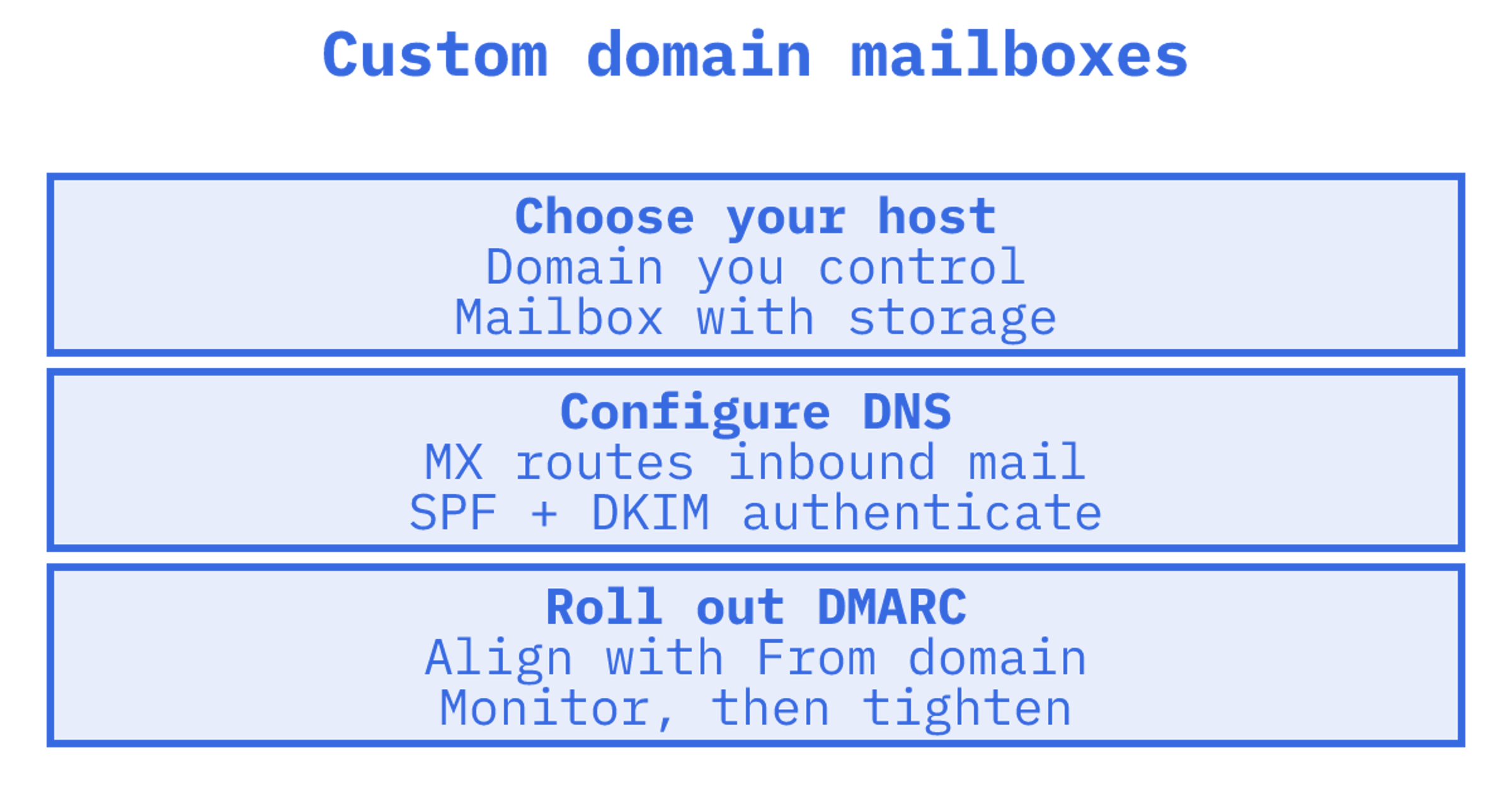
A custom domain mailbox is a real inbox on your own domain, such as support@yourcompany.com.au, with its own storage, its own sending identity and its own mail, rather than a forwarding rule or a nickname bolted onto someone else's account. To run one properly you need a registered domain, a host that provides the mailbox, and four DNS controls (MX, SPF, DKIM and DMARC) that tell the world the mail is genuine. For developers the question has a second half: how do you create dozens or thousands of these, one per agent, customer or tenant, without paying per seat or hand-editing DNS each time?
This guide covers both halves. It starts with the fundamentals, walks through the DNS records, then moves to the API, routing and monitoring decisions that matter once mailboxes are provisioned by code.
TL;DR
- A custom domain mailbox has its own storage and sending identity. An alias or a custom From address does not, so choose based on whether you need to receive, store and thread mail.
- Publish MX for receiving, then SPF and DKIM for sending, then DMARC with alignment to the visible From domain. SPF or DKIM alone does not protect the From address.
- Authentication does not guarantee inbox placement. Start DMARC at monitoring, read the aggregate reports, then tighten.
- For agents and multi-tenant products, per-seat hosted mailboxes get expensive and awkward. A mailbox API lets you create, route and log inboxes programmatically.
- Sendmux gives agents and tenants real mailboxes on @myagent.mx or a verified sending and receiving custom domain. Free teams include two active mailboxes.
Table of Contents
1. What a custom domain mailbox actually is
The plainest definition: an email address that uses your own domain, such as name@company.com, instead of a consumer domain like gmail.com. That definition covers several different things, and mixing them up is the most common cause of a messy setup.
Domain name. The thing you register, for example yourcompany.com.au. It is only a name. It does nothing with email until you publish DNS records for it.
Mailbox. A place where mail is delivered, stored and read. It has quota, folders, threads and credentials or API access.
Alias. An extra address that points at an existing mailbox. Mail sent from an alias uses the underlying mailbox infrastructure, so an alias does not by itself give you independent storage or an independent sending identity. If one alias sends heavily, it shares the fate of the mailbox behind it.
Custom sender address. A From address you configure inside a marketing or product tool. It changes what recipients see, but it usually is not somewhere replies are stored, threaded or processed.
A practical rule: if the address needs to receive replies, keep history and be acted on by a person or an agent, you want a mailbox. If it only needs to look right on outbound mail, a verified sender address may be enough. If it simply needs to catch mail for an existing inbox, use an alias.
2. Why developers are asking about this now
For years, a custom domain mailbox meant buying seats from a hosted suite. One seat per human, a monthly fee each, and an admin console. That model fits an office of twenty people. It fits badly when:
- Every AI agent needs its own address, so the headcount is software, not staff.
- A SaaS product gives each tenant an inbox, and tenants arrive and leave daily.
- An outbound team sends across many sender domains and several providers.
- A self-hosted assistant relies on a Gmail app password or an OAuth token that keeps expiring in production.
The common thread is that mailboxes become infrastructure that code creates, rather than accounts an administrator clicks into existence. That changes what you should evaluate: provisioning speed, isolation between tenants, logs, quotas and the price curve when the count of mailboxes grows.
3. What you need before you create the first mailbox
Whether you build it yourself or use a platform, the checklist is short.
- A domain you control. You need access to its DNS, or a way to delegate the records you need. Many teams use a dedicated subdomain for agents so that experiments never touch the main corporate domain's reputation.
- A mailbox host. This is the service that accepts inbound mail on your behalf and stores it. It might be a hosted suite, your own mail server, or a mailbox API.
- Records for receiving and sending. MX for inbound, plus SPF, DKIM and DMARC for outbound trust.
- A decision on identity per unit. One mailbox per agent, per customer, per workspace or per environment. Decide the naming pattern (for example, one local part per tenant ID) before you create hundreds.
- A way to read and send. REST API, SMTP and IMAP, OAuth to a third-party mailbox, or webhooks for inbound events. More on choosing below.
If you want to skip DNS entirely while prototyping, Sendmux includes the @myagent.mx domain, so a new agent can have a working address immediately. You then move to a custom domain verified for receiving when the product needs your own branding.
4. The four DNS controls: MX, SPF, DKIM and DMARC
This is where most setups fail quietly. Each record does a different job.
MX: where inbound mail goes
MX records name the servers that accept mail for your domain. Without them, nobody can reply to your mailbox. If you change MX to point at a new host, mail for the whole domain moves, which is why agent setups often use a subdomain so the main domain's mail is untouched.
SPF and DKIM: proving the sender is authorised
According to the IETF, SPF publishes authorised sending hosts, DKIM uses cryptographic signatures whose keys are published in DNS, and DMARC publishes policy for the visible From domain. In practice:
- SPF is a DNS record listing which servers may send mail for your domain. Add every provider that sends on your behalf, and keep one SPF record per domain.
- DKIM signs each message. Your provider gives you a key, and you publish the public half as a DNS record. Receivers use it to check the message was not altered and came from a holder of the key.
Our SPF, DKIM and DMARC setup guide walks through the record formats, and the domain verification walkthrough covers what verification checks and why it sometimes stalls on propagation.
DMARC: tying it all to the visible From address
This is the control people skip, and it is the one that protects the address the recipient actually sees. DMARC passes when SPF or DKIM passes and the authenticated domain aligns with the From domain, and that alignment can be relaxed or strict. The consequence is worth stating plainly: SPF and DKIM can both pass for a provider's own domain and still fail DMARC for yours, because the passing domain is not the one in the From header.
The policy then says what receivers should do with failures. The three settings are none (no special action), quarantine (treat as suspicious, typically spam) and reject (refuse during the SMTP session). For a deeper look at relaxed versus strict alignment, see our DMARC alignment explainer.
A sensible rollout order
- Publish MX, SPF and DKIM and confirm they pass on a test message.
- Publish DMARC at p=none with a reporting address.
- Read the reports for a few weeks and find every legitimate sender you forgot.
- Move to quarantine, then reject, once the reports are clean.
The reports matter. DMARC aggregate reports give visibility into sending IP addresses, the policy applied and SPF and DKIM outcomes, which is exactly the evidence you need before tightening. If you run a multi-tenant product, our DMARC for SaaS guide covers rollout across many customer domains.
Branding domain versus mail-server domain
Some platforms ask for two different domains and the difference trips people up. ActiveCampaign's documentation distinguishes a branding custom domain, which changes links and tracking URLs, from a mail-server domain that identifies the server sending mail and supports SPF and DMARC alignment. Check which of the two a provider is asking you to configure. Only the second affects authentication.
5. Choosing how agents send and receive
The mailbox is only useful if your software can reach it. Here are the options and when each fits.
| Approach | Good for | Watch out for |
|---|---|---|
| REST API | Agents and apps that read, search, send and thread mail in code | You depend on the provider's API design and limits |
| SMTP and IMAP | Legacy tools, existing mail clients, drop-in replacement of scripts | Polling loops, connection handling, raw MIME parsing |
| OAuth to Gmail or Outlook | Sending from an account a customer already owns | Tokens expire, consent screens, provider rate limits and suspensions |
| Inbound webhooks | Reacting to a reply the moment it arrives | You must handle retries, ordering and idempotency |
| MCP server | Letting an AI client read and send mail as a tool | Scope the tool so an agent cannot reach mailboxes it should not |
The pattern we see work best for agents is a mailbox that holds state, with a webhook or sync token to say something changed. Polling a full inbox on every run wastes tokens and time. A mailbox API that returns cleaned message text with quoted history stripped lets an agent act on the new reply rather than parse a whole raw thread. Our mailbox API guide goes into the endpoints and the retrieval patterns that keep payloads small.
6. Isolating, routing and monitoring mailboxes at scale
Once there are more than a handful of mailboxes, the work shifts from setup to operations. Four things deserve design time.
Isolation. Each agent or tenant should see only its own mail. Scoped keys per mailbox or per tenant, and separate logs, stop one misbehaving workflow from reading or damaging another's. For product teams this is also the basis of a clean audit trail.
Routing. Inbound mail needs to reach the right agent or queue. Decide the rule up front: by address, by tenant, by header, by sender. Keep thread headers (in-reply-to and references) intact on replies so conversations stay together.
Quotas. Cap sending and storage per mailbox and per provider. A runaway loop in one agent should hit its own ceiling, not exhaust the account or get a shared provider mailbox suspended.
Monitoring. You want delivery logs, bounce and suppression visibility, and webhook events for what happened to each message. Without them, you learn about problems from customers.
Deliverability sits across all four. Authentication helps, but domain authentication can give independence from shared sending reputation without guaranteeing inbox placement or fixing wider deliverability problems. Content, volume ramp-up and list quality still decide whether mail lands in the inbox. Our piece on AI agent deliverability controls covers the sending limits that matter when software, not a person, is composing the mail.
Troubleshooting checklist
- Verification will not complete: check for a typo in the record host, a duplicate SPF record, or DNS that has not propagated. Re-check after the TTL has passed.
- Bounces on inbound: confirm MX points where you think it does and that the domain is verified for receiving.
- Landing in spam: check DMARC alignment first, then your sending volume pattern, then the content. Read your aggregate reports for unexpected senders.
- Replies not threading: make sure the in-reply-to and references headers carry the original message ID.
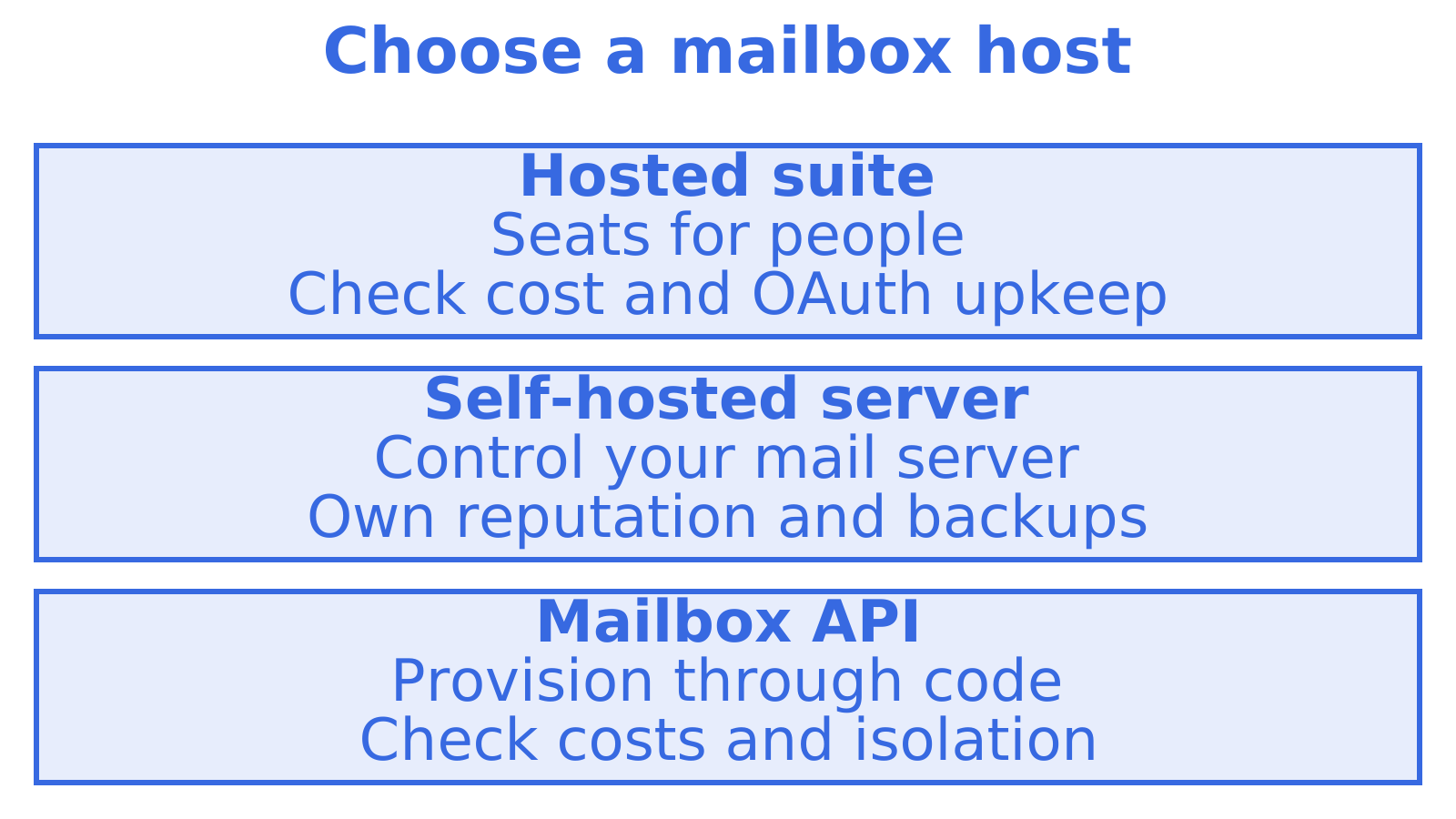
7. Hosted suite, self-hosted server or mailbox API?
Three routes cover almost every case.
Hosted suite seats. The easiest for people. Each human gets a seat. It is poor value for agents, where the number of mailboxes can far exceed the number of staff, and OAuth to those accounts adds token upkeep and exposure to provider rate limits.
Self-hosted mail server. Maximum control and no per-seat fee, but you own IP reputation, patching, spam filtering, backups and abuse handling. For most product teams, build versus buy ends in favour of buy once the cost of an on-call mail server is counted.
Mailbox API. Mailboxes are created by code, priced by usage, and tied to logs and webhooks. This suits agents, multi-tenant products and teams that want transactional sending and replies from the same place. Check three things before committing: whether pricing is per mailbox or per message, whether it supports your own provider accounts for outbound, and whether each tenant can have an isolated identity.
One caution from the alias research: if you plan to send at volume, use a dedicated mailbox rather than an alias, and confirm that SPF and DKIM cover the domain the alias uses.
8. Our perspective: mailboxes hold persistent state
We built Sendmux on one belief: an agent's mailbox should hold persistent state. The common stack today is a sending provider, plus a Gmail OAuth workaround, plus a parser, plus a webhook relay, plus separate billing. Each piece works. Together they fail in the gaps: tokens expire, a provider rate-limits or suspends the mailbox, threads break between the parser and the sender, and nobody can say which tenant sent what.
Sendmux provides mailbox-scoped API access for receiving, threading and sending, plus delivery logs. Teams can connect Gmail, Outlook or custom SMTP accounts.
Our advice for a team starting now: begin on the included @myagent.mx domain to prove the agent workflow, then verify a custom domain once the product needs your brand on it. Roll DMARC out in monitoring first. Give every tenant its own mailbox from day one, because retrofitting isolation later is far harder than starting with it.
9. What it costs with Sendmux
Check the pricing page when budgeting for your mailbox setup. Our inbound mailboxes page describes how addresses are provisioned on @myagent.mx or a custom domain, and the sending API page describes outbound sending. If you are weighing options, our AgentMail alternatives comparison lays out inboxes, routing and costs side by side, and Sendmux itself is the place to start on the free plan.
Sources
Recommended
Frequently Asked Questions
MX: where inbound mail goes
MX records name the servers that accept mail for your domain. Without them, nobody can reply to your mailbox. If you change MX to point at a new host, mail for the whole domain moves, which is why agent setups often use a subdomain so the main domain's mail is untouched.
SPF and DKIM: proving the sender is authorised
According to the IETF, [SPF publishes authorised sending hosts, DKIM uses cryptographic signatures whose keys are published in DNS, and DMARC publishes policy for the visible From domain](https://datatracker.ietf.org/doc/html/rfc8616). In practice: - **SPF** is a DNS record listing which servers may send mail for your domain. Add every provider that sends on your behalf, and keep one SPF record per domain. - **DKIM** signs each message. Your provider gives you a key, and you publish the public half as a DNS record. Receivers use it to check the message was not altered and came from a holder of the key. Our [SPF, DKIM and DMARC setup guide](https://sendmux.ai/blog/email-deliverability/spf-dkim-dmarc) walks through the record formats, and the [domain verification walkthrough](https://sendmux.ai/blog/email-deliverability/domain-verification-email) covers what verification checks and why it sometimes stalls on propagation.
DMARC: tying it all to the visible From address
This is the control people skip, and it is the one that protects the address the recipient actually sees. [DMARC passes when SPF or DKIM passes and the authenticated domain aligns with the From domain](https://datatracker.ietf.org/doc/html/draft-ietf-dmarc-dmarcbis-27), and that alignment can be relaxed or strict. The consequence is worth stating plainly: SPF and DKIM can both pass for a provider's own domain and still fail DMARC for yours, because the passing domain is not the one in the From header. The policy then says what receivers should do with failures. The three settings are [none (no special action), quarantine (treat as suspicious, typically spam) and reject (refuse during the SMTP session)](https://datatracker.ietf.org/doc/html/draft-levine-dmarc-listugh-01). For a deeper look at relaxed versus strict alignment, see our [DMARC alignment explainer](https://sendmux.ai/blog/email-deliverability/dmarc-alignment).
A sensible rollout order
1. Publish MX, SPF and DKIM and confirm they pass on a test message. 2. Publish DMARC at p=none with a reporting address. 3. Read the reports for a few weeks and find every legitimate sender you forgot. 4. Move to quarantine, then reject, once the reports are clean. The reports matter. [DMARC aggregate reports give visibility into sending IP addresses, the policy applied and SPF and DKIM outcomes](https://datatracker.ietf.org/doc/html/draft-ietf-dmarc-aggregate-reporting-28), which is exactly the evidence you need before tightening. If you run a multi-tenant product, our [DMARC for SaaS guide](https://sendmux.ai/blog/email-deliverability/dmarc-for-saas) covers rollout across many customer domains.
Branding domain versus mail-server domain
Some platforms ask for two different domains and the difference trips people up. ActiveCampaign's documentation distinguishes [a branding custom domain, which changes links and tracking URLs, from a mail-server domain that identifies the server sending mail and supports SPF and DMARC alignment](https://help.activecampaign.com/hc/en-us/articles/115000999524-Custom-domain-name-versus-Mailserver-Domain). Check which of the two a provider is asking you to configure. Only the second affects authentication. ## 5. **Choosing how agents send and receive** The mailbox is only useful if your software can reach it. Here are the options and when each fits.
Troubleshooting checklist
- **Verification will not complete:** check for a typo in the record host, a duplicate SPF record, or DNS that has not propagated. Re-check after the TTL has passed. - **Bounces on inbound:** confirm MX points where you think it does and that the domain is verified for receiving. - **Landing in spam:** check DMARC alignment first, then your sending volume pattern, then the content. Read your aggregate reports for unexpected senders. - **Replies not threading:** make sure the in-reply-to and references headers carry the original message ID. ## 7. **Hosted suite, self-hosted server or mailbox API?** Three routes cover almost every case. **Hosted suite seats.** The easiest for people. Each human gets a seat. It is poor value for agents, where the number of mailboxes can far exceed the number of staff, and OAuth to those accounts adds token upkeep and exposure to provider rate limits.
What is the difference between a custom domain mailbox and an alias?
A mailbox has its own storage and sending identity. An alias is another address pointing at an existing mailbox, so it [shares that mailbox's infrastructure](https://reviewmyemails.com/emailalmanac/email-fundamentals/what-is-email/email-alias-vs-mailbox). Use a mailbox when the address must receive, store and thread mail on its own.
Do I need SPF, DKIM and DMARC for every custom domain mailbox?
Yes, if you send from it. SPF and DKIM prove the sender is authorised, and DMARC checks that the authenticated domain aligns with the visible From domain. Start DMARC at p=none, read the reports, then tighten the policy.
Can one domain host mailboxes for many agents or tenants?
Yes. Give each agent or tenant its own local part, or use a subdomain per customer, and keep keys, quotas and logs separate. With a mailbox API you create these in code rather than buying a seat for each.
Will a custom domain stop my email going to spam?
Not on its own. Authentication gives you your own sending reputation, but it [does not guarantee inbox placement](https://help.activecampaign.com/hc/en-us/articles/115000999524-Custom-domain-name-versus-Mailserver-Domain). Volume ramp-up, content and list quality still matter, so monitor bounces and complaints from the start.
