Inbound Email API Setup: 5 Steps to Agent-Ready Mailboxes

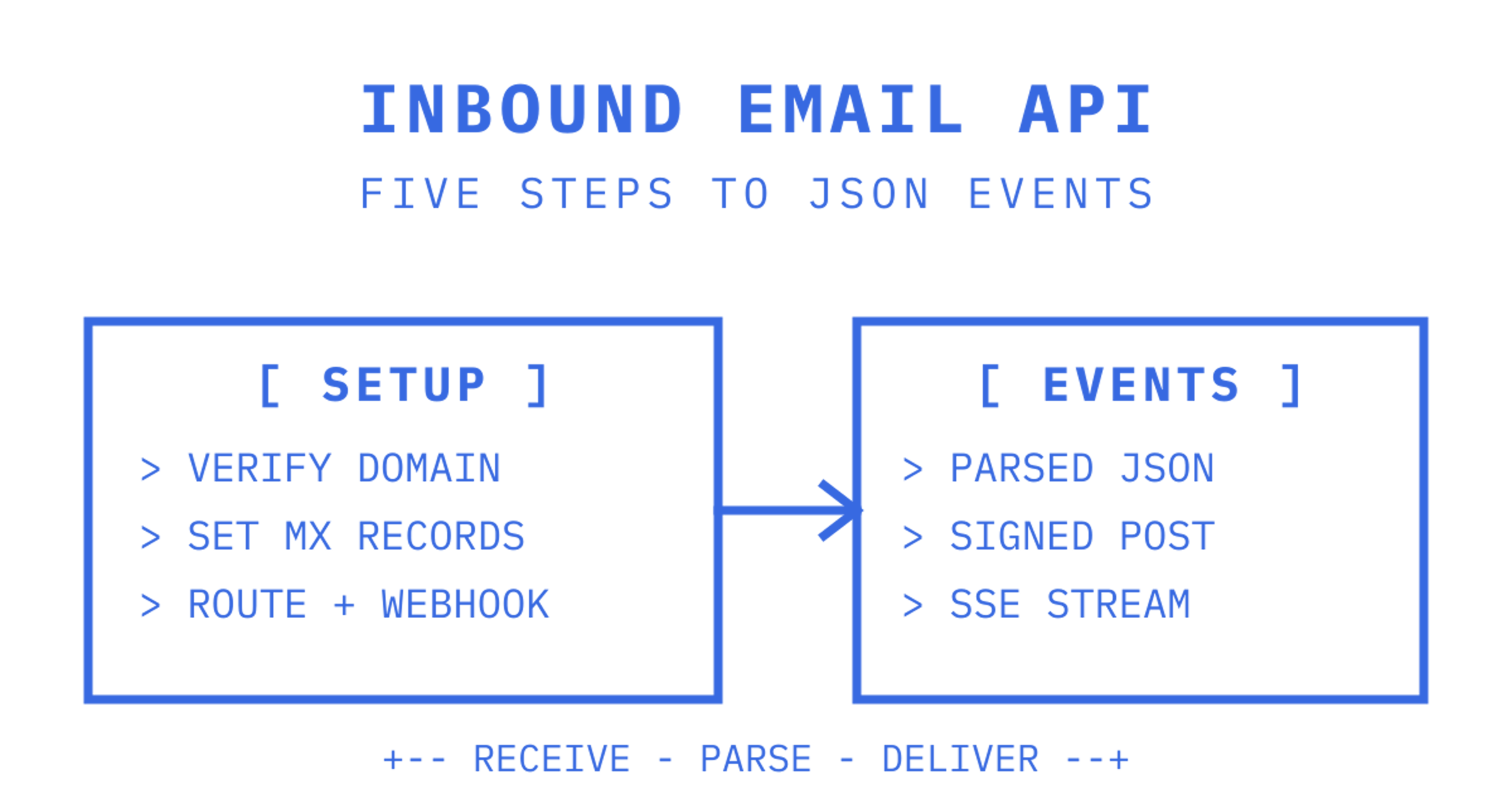
An inbound email API takes mail addressed to your domain, parses it into structured JSON, and pushes it to your application as a webhook event, instead of forcing you to poll an IMAP inbox. You get sender, subject, cleaned body text and HTML, attachments and threading headers in one payload. Setup usually runs to five steps: verify a domain or use a provider subdomain, point MX records at the provider, create routing rules, register a webhook URL to catch delivery events, then send a test message.
How inbound email APIs work: SMTP → parse → event delivery
Mail reaches an inbound API the same way it reaches any mailbox: over SMTP. The provider's mail server accepts the connection, and instead of writing to a mailbox on disk, it queues the raw MIME message for a parsing worker. That worker decodes headers, splits multipart bodies into plain text and HTML, pulls out attachments, and assembles a structured payload. Google App Engine's Mail API works this way at the platform level too, posting incoming mail to a route like /_ah/mail/[ADDRESS] and exposing an InboundEmailMessage object with bodies(), subject, sender and attachments already separated out.
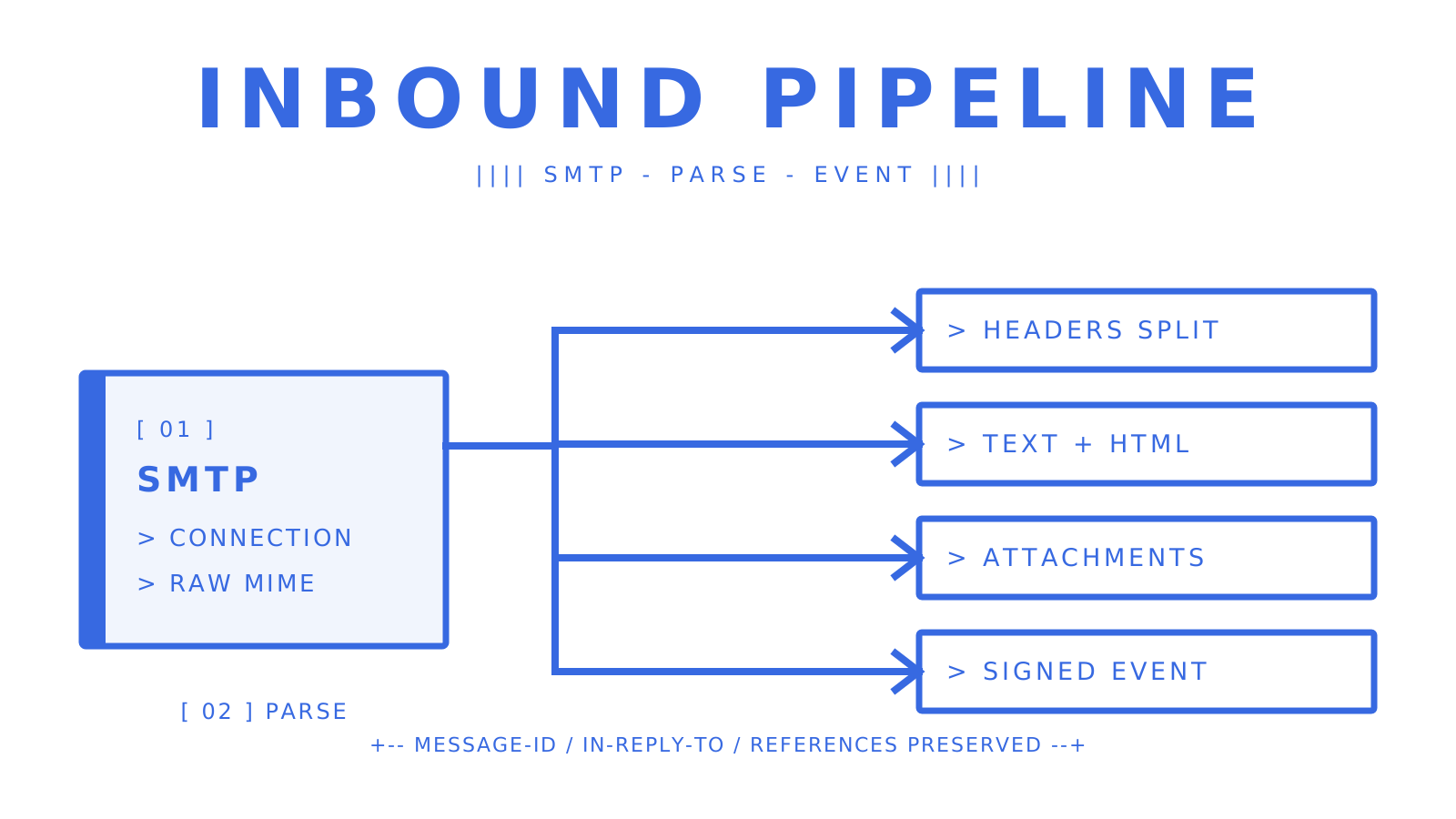
Once parsing finishes, the platform fires a webhook event. Typical event types include:
receivedfor a successfully parsed message
bouncedfor delivery failures back to the sender
complaintfor spam reports
delayedfor temporary deferrals awaiting retry
Threading survives this whole pipeline through standard headers. Message-ID identifies each message uniquely, In-Reply-To points to the parent, and References lists the full chain, letting your app group a reply with its original thread instead of treating it as a new conversation. A well-built inbound processing pipeline preserves these headers verbatim in the parsed payload so you never have to reconstruct threading yourself.
Quick start: verify domain, set MX, create routes, test a webhook
Getting your first message parsed doesn't take long if you follow the sequence in order.
- Choose your receiving domain. Use a provider subdomain (fast, zero DNS work) or verify your own domain for receiving, which needs an MX record change.
- Update MX records to point at the provider's mail servers, then wait for propagation. TTL matters here. A short TTL (300 seconds) lets you test changes fast; a long one delays every fix.
- Create routing rules that map addresses to your webhook. Exact-match addresses (
support@yourdomain.com) work for single-purpose inboxes. Prefix patterns (ticket-*@yourdomain.com) suit per-customer or per-case addressing. Catch-all routes forward everything else, evaluated last by priority.
- Register your webhook endpoint. It must be HTTPS, accept POST only, and return a
200quickly, ideally under a second or two, before doing any heavy processing.
- Send a test message to your new address and confirm the payload lands with the fields you expect.
Before going live, test your webhook with an intentionally oversized attachment and a malformed multipart message. Providers handle edge cases differently, and you want to find that out in staging, not when a real customer's PDF breaks your parser.
Core API primitives and developer tooling to expect
A mature inbound email API gives you more than a single "message received" webhook. Look for a proper Mailbox API with endpoints for listing, fetching and searching messages, plus batch operations so you're not making one call per row when reprocessing a backlog. Sync or state tokens matter more than they sound like they should: instead of re-listing an entire mailbox to check for new mail, your client polls with a token and gets back only what changed, which cuts bandwidth and rate-limit pressure substantially on high-volume mailboxes.
Real-time delivery usually comes two ways: signed webhooks for backend services, and Server-Sent Events for clients that can't host a public endpoint, common with local scripts, desktop agents or serverless functions behind a firewall.
Attachments deserve their own design thought. Rather than embedding base64 blobs in every webhook payload, a well-designed API stores the binary in object storage and hands you a short-lived download URL, keeping payloads small and your webhook processing fast.
On tooling, expect:
- An OpenAPI 3.1 specification for generating typed clients
- SDKs across common languages (TypeScript, Python, Go)
- A CLI for debugging and key management
- Scoped API keys, so a compromised credential can't touch billing or other mailboxes
Documented SDKs and CLIs measurably shorten integration time compared with hand-rolled HTTP clients, mostly by removing the guesswork around payload shapes and auth headers.
Security and reliability best practices for inbound webhooks
Every webhook endpoint you expose is a target, and the fixes are well understood. OWASP's webhook guidance lays out the core defence-in-depth checklist:
- Verify the HMAC-SHA256 signature on every request using a constant-time comparison, never a simple string equality check
- Validate the signed timestamp against a server-side tolerance window to reject replayed requests
- Persist event IDs with atomic deduplication logic at the database layer to catch duplicates and avoid repeated side effects
- Enforce TLS 1.2 or higher, accept only POST methods, and validate content-type before processing the raw body
- Re-resolve DNS on the subscriber URL just before delivery and block private or loopback IP ranges, closing off SSRF and DNS rebinding paths
The pattern that pays off most, according to detailed defence-in-depth write-ups, is acknowledging fast and processing asynchronously. Return 200 immediately after verifying the signature and queuing the payload, then perform further parsing, storage, and downstream calls asynchronously in a background worker. This practice helps prevent retry storms, because a slow endpoint under load looks like a failure to the sender, which triggers more retries, which makes the endpoint slower still.
Log the raw signature, timestamp, and event ID for every rejected webhook. When a provider's retry behaviour changes without notice, that log is the only way you'll spot it quickly.
Integration patterns and architectures for inbound mail
The right architecture depends on where your bottleneck actually sits, not on which pattern sounds most complete on paper.
- Webhook-first with a background worker. Acknowledge the webhook in milliseconds, queue the payload, process it asynchronously. This is the default choice for most transactional workflows, ticketing systems and reply handlers. Make every handler idempotent against the event ID, because retries will happen.
- Mailbox API polling with sync tokens. When your application needs to search threads, browse folders, or reconstruct conversation history rather than just react to new mail, a stateful Mailbox API beats a stream of disconnected webhook events. This suits support tools and any agent that needs to reason about a full conversation, not just the latest message.
- Server-Sent Events for constrained clients. If your integration runs somewhere that can't accept inbound connections, a local script, a notebook, a serverless job with no public URL, an SSE stream gives you near-real-time updates without standing up an endpoint.
- Attachment-heavy hybrid. For invoice processing, document intake or anything attachment-dense, offload binaries to object storage immediately and pass short-lived URLs through your webhook or Mailbox API response, keeping the hot path lightweight.
Most production systems end up combining webhook-first ingestion with mailbox-style reads for anything that needs history.
Pricing shapes, limits and operational considerations
Inbound email APIs bill in a handful of common shapes, and the shape you pick affects your architecture more than most teams expect.
- Per-inbound-event pricing, charged per distinct mailbox delivery
- Storage billed per GB per month, which pushes teams toward retention and pruning policies rather than keeping everything forever
- A pricing gap between connected outbound (your own provider) and managed outbound (the platform's own sending infrastructure), since managed sending carries more overhead
- Rate limits on API calls, typically per minute, which shape how aggressively you can batch-fetch or backfill
Watch attachment size caps and the webhook retry window closely. If your background worker takes longer than the retry window to acknowledge under load, you'll see duplicate deliveries, which is exactly why idempotent processing isn't optional.
Why mailbox-first APIs matter for agents and multi-tenant apps
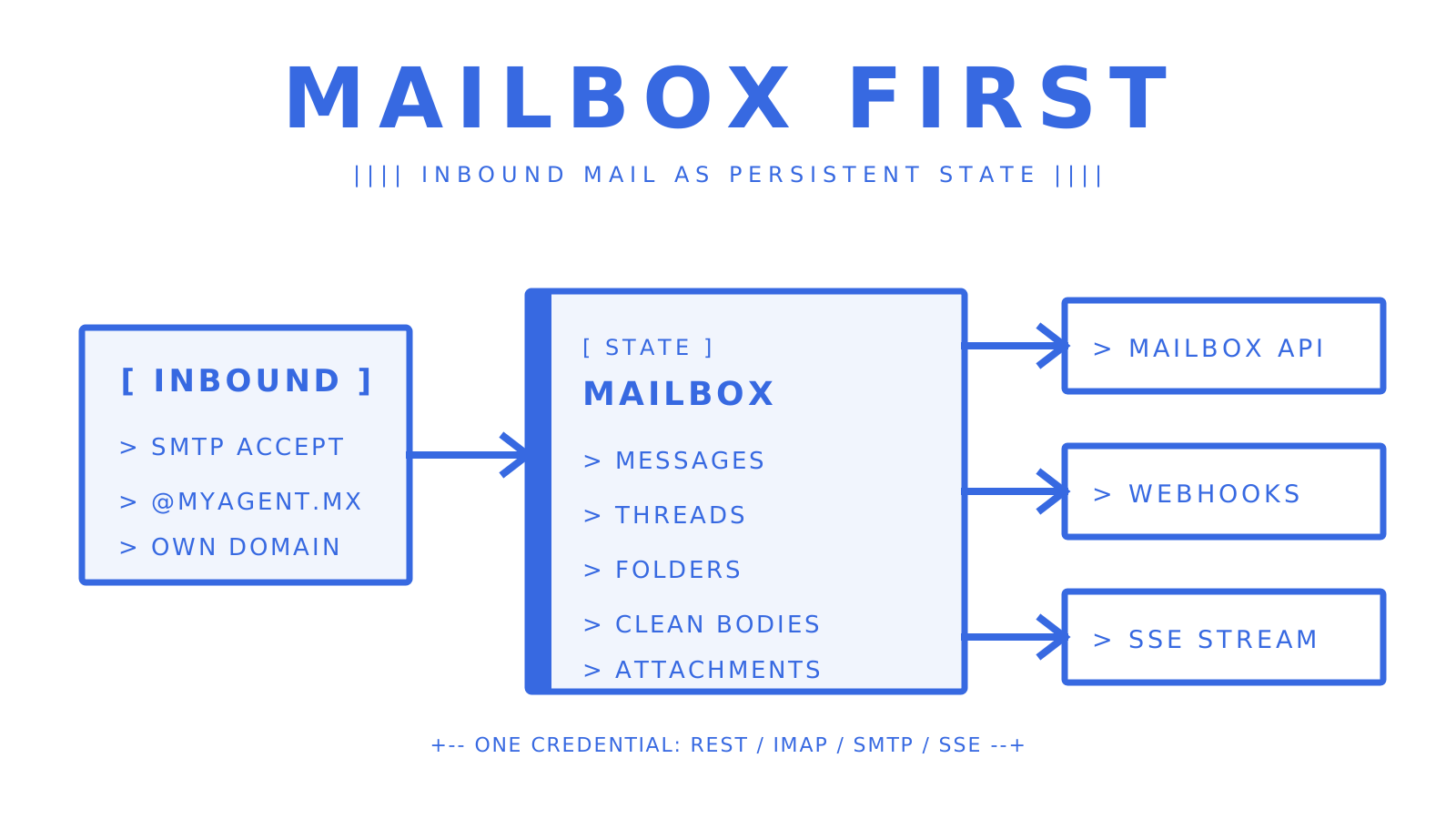
Persistent mailboxes partition context by address rather than by query, which matters enormously once you're running dozens or hundreds of agents instead of one. Each entity, a customer, a case, an applicant, gets its own inbox, and retrieval becomes a lookup instead of a filter. Mailbox APIs that return cleaned body text with quoted history stripped also cut token costs for anything passing mail into a language model. The trade-off teams underestimate: mailbox count scales faster than message volume in these systems, so budget for that growth curve early.
Sendmux: a mailbox-first inbound API built for developers
Sendmux gives every agent, customer or workspace a real inbox on the included @myagent.mx domain or your own verified domain, with the Mailbox API handling messages, threads, folders and attachments as persistent state rather than one-off webhook drops. You get signed webhooks and a Server-Sent Events stream side by side, scoped mailbox keys that double as SMTP and IMAP passwords, and cleaned message bodies with quoted history already stripped, so you're not reparsing raw MIME on every reply.
Developer tooling ships as OpenAPI 3.1 specs, SDKs across TypeScript, Python, Go, PHP, Ruby and Rust, and a CLI covering the Management, Mailbox, and Sending APIs. Pricing runs on usage: Free, Pro at $7 per team per month, or Enterprise on contract, with no per-mailbox fee on Free or Pro. If you're weighing whether to build agent mailboxes or bolt inbound parsing onto an existing sender, the inbound mailboxes product page is the place to check what a mailbox-first setup looks like for your use case.
Sources
For deeper implementation detail beyond this article, OWASP's webhook security guidelines cover signature verification and replay defence in full, Google Cloud's Mail API docs show a concrete MIME parsing implementation, and EuroMail's inbound processing guide walks through a full pipeline from SMTP to webhook delivery.
Frequently Asked Questions
What Is an Inbound API?
An inbound API receives data pushed to it by an external system, rather than your application requesting data on demand. For email specifically, an inbound email API receives incoming mail and converts it into structured data, usually JSON, that your application can act on programmatically.
Is There a Free API for Sending Emails?
Several providers offer free tiers for email sending and receiving. Sendmux's Free plan costs $0 per team per month and includes two mailboxes, one connected sending account and $1 of starting credit, with sending subject to provider limits per day.
What Is an Inbound Email?
An inbound email is any message received at an address you control, as opposed to outbound email that you send. In API terms, inbound email refers specifically to mail your system receives and processes programmatically, typically through MX record routing and webhook delivery.
What Are Inbound and Outbound Emails?
Inbound emails are messages arriving at your domain that your systems need to receive, parse and act on. Outbound emails are messages your application sends out, whether transactional receipts, notifications or agent replies. Most production systems need both, which is why platforms increasingly combine inbound processing and outbound sending in one API rather than stitching together separate tools for each direction.
How Do I Test My Webhook Before Going Live?
Send a test message to your verified address and confirm your endpoint receives the expected payload shape within your provider's retry window. Test with edge cases too, oversized attachments, malformed MIME and duplicate deliveries, since idempotency bugs rarely show up with clean test data.
