Postmark Alternatives for Developers: The Mailbox-First Shortlist


Mailgun, Amazon SES, Resend and SendGrid cover most transactional email needs, but no single Postmark alternative wins on every axis. For teams building agent or multi-tenant products where mailboxes matter as much as sends, Sendmux is the strongest fit because it pairs a persistent mailbox API with bring-your-own provider routing. For pure high-volume transactional sending at the lowest cost, Amazon SES still leads. The right pick depends on whether you're sending mail or actually managing mailboxes.
Postmark alternatives compared: a ranked shortlist for developer teams
Every provider on this list can send a transactional email reliably. What separates them is what happens around that send: how deliverability is protected, whether inbound mail is a first-class feature or an afterthought, and how pricing behaves once you're past the free tier.
Sendmux leads this list for one structural reason: it's the only option here built around persistent mailboxes rather than a webhook payload that disappears once your app has read it. If your product gives every customer, workspace or AI agent its own inbox, that architecture difference compounds fast. For straightforward outbound-only sending, Mailgun, SendGrid, Amazon SES and Resend all remain solid, well-tested choices with mature docs and large user bases.
A few pros and cons worth flagging before you trial anything. Mailgun's validation tooling is genuinely useful for cleaning lists before a send, but its dashboard can feel dense for a first-time integration. Amazon SES is unbeatable on raw cost, yet you'll be building your own bounce handling, reputation monitoring and retry logic from scratch. Resend's developer experience is arguably the smoothest of the bunch for React stacks, but it's a newer platform with less deliverability history than Mailgun or SendGrid. Sendmux trades some of that sending-only simplicity for mailbox persistence, threading and inbound parsing, which only pays off if your workload actually needs a real inbox rather than a fire-and-forget send.
How do you actually evaluate email providers?
Picking a provider off a feature comparison chart is how teams end up migrating twice. A repeatable checklist catches the gaps that marketing pages don't mention.
- Deliverability infrastructure: dedicated IP options, DKIM/SPF/DMARC tooling, and whether transactional and bulk streams share a reputation pool or stay isolated.
- API and SDK maturity: language coverage, whether the API supports idempotency keys, and how complete the webhook event set is.
- Inbound and mailbox capability: does the provider offer a real inbox with threading and search, or only a one-way inbound parse webhook?
- Pricing shape: flat tiers versus usage-based billing, and whether the free tier actually reflects your production volume.
- Scale behaviour: rate limits, burst tolerance, and documented failover patterns for provider outages.
- Support and compliance: SLA tiers, data residency options, and whether the vendor publishes a status page with real incident history.
None of this is theoretical. The verified reviews on Capterra's Mailgun-versus-Postmark comparison surface exactly these gaps, from accounts disabled without warning to dashboards reviewers call heavy or confusing, and review sites do not test event behaviour for you. Validating deliverability and events with a representative test workload, rather than trusting any marketing page, is the right instinct for every provider on this list, not just those two.
For the practical test itself: send a representative batch to a seed list of accounts across Gmail, Outlook and Yahoo, and watch where messages land, not just whether they're accepted. Run it from your actual sending domain rather than a throwaway, because reputation is domain-specific and a clean test on a fresh domain tells you nothing about how your production domain will land. Then fire test webhooks and confirm retry behaviour under a simulated failure, since documented retry semantics and actual retry behaviour aren't always the same thing.
What do Postmark alternatives actually cost at scale?
Headline pricing on most of these platforms hides the real cost driver: what happens once you're sending past your free allotment. Usage-based providers scale linearly and predictably. Tiered providers can jump sharply the moment you cross a plan boundary, even if your actual volume increase was marginal.
Sendmux prices per event rather than per thousand; current detailed prices and plan features are available on Sendmux's pricing page.
| Cost driver | What to check |
|---|---|
| Per-recipient billing | Does every To, Cc and Bcc count separately, or only the primary recipient? |
| Free tier ceiling | Is the cap daily, monthly, or per-hour, and does it match your real test traffic? |
| Overage pricing | Is the rate flat past the free tier, or does it step up in tiers? |
| Storage/inbox fees | Are mailboxes billed per seat, per mailbox, or purely on usage? |
| Validation/list-cleaning fees | Are email verification checks billed separately from sends? |
Before signing anything, run this checklist against the vendor's actual docs, not their pricing page summary:
- Ask what happens to unsent, bounced, or rejected recipients: are they billed or excluded?
- Confirm whether marketing/broadcast sends share the same rate as transactional sends.
- Check if list validation or email verification is a separate paid add-on.
- Model your cost at 10x your current volume, not just your current volume, because tiered plans often punish growth spikes.
Free-tier granularity and per-thousand pricing vary enough between these providers to matter at small and mid scale, so model against your own send profile rather than a generic "per 1,000 emails" number quoted in a blog post.
What deliverability signals actually matter?
Deliverability is where Postmark built its reputation, and it's the axis most alternatives get compared on hardest. The core principle: keeping transactional and marketing sends on separate streams protects your login emails and password resets from getting caught in the fallout of a bulk campaign's spam complaints.
- Check for stream separation. Does the provider let you isolate transactional traffic from broadcast traffic at the infrastructure level, or only via a tag in the dashboard?
- Verify DKIM, SPF and DMARC tooling. Look for automated record generation and verification status reporting, not just documentation links. Sendmux's domain verification flow, for comparison, surfaces the required DNS records and verification state through its Management API and rechecks domains every six hours.
- Ask about seed-list testing support. Some providers offer built-in inbox-placement testing; others expect you to run your own.
- Review bounce and complaint reporting granularity. You want per-message status, not just aggregate daily counts.
- Confirm suppression list behaviour. A hard bounce should suppress future sends automatically, and you should be able to export and inspect that list.
A widely used rule of thumb treats a bounce rate above 5% as a red flag, and inbox providers set complaint tolerances in the tenths of a percent: Google's sender guidelines tell bulk senders to keep Postmaster Tools spam rates below 0.3%. Cross those lines and account review or throttling usually follows. Amazon SES places accounts under review or pauses sending outright when bounce or complaint rates climb too high, and providers layered on top of SES generally inherit similar tolerances.
Courier's comparison guidance on Postmark alternatives specifically flags that deliverability and account-suspension policies vary by vendor, which matches what most migrating teams find the hard way. Read Sendmux's own notes on email deliverability and bounce handling if you want a working model for what to track before you flip production traffic over.
How good is the API and developer experience?
Time-to-first-email is a real metric, and it varies enormously between these providers. Resend and Sendmux both prioritise a fast path from signup to a working send; Amazon SES, by contrast, expects you to configure IAM policies, verify domains manually, and handle bounce and complaint notifications yourself before you're production-ready.
A few things worth checking before you commit engineering time to an integration:
- SDK coverage across your actual stack: Sendmux ships multiple SDKs covering many common programming languages, which supports integration without a custom HTTP client.
- Whether the API supports an idempotency key on send, so retries after a timeout don't double-send.
- Webhook event completeness: delivered, bounced, complained, rejected, delayed and received should all fire as distinct events, not be collapsed into a generic "status changed" payload.
- Template versioning and rollback, particularly if your team uses component-based email templates like React Email.
- A sandbox or test mode that doesn't require a verified production domain to start integrating.
Sendmux's webhook documentation covers signed HMAC-SHA256 payloads and retries timeouts and non-successful responses across a bounded window with up to eight delivery attempts, which is worth benchmarking against whatever your shortlisted provider documents for retry semantics. Test webhook delivery against a deliberately slow endpoint too, because some providers stop retrying sooner than their docs suggest. If the docs don't specify a retry count and backoff curve, that's a gap worth flagging to sales before you build around it.
How do these providers handle scale and failover?
Scale problems rarely show up in a demo. They show up during a product launch, a Black Friday spike, or the afternoon your biggest customer imports 50,000 new contacts. The providers that survive these moments share a few traits.
- Documented, enforced rate limits with clear burst allowances rather than vague "fair use" language.
- Multi-provider failover as a built-in primitive, not a manual runbook you write yourself. Sendmux's sending API supports weighted routing across connected provider accounts, and accounts showing repeated failures are pulled from rotation automatically.
- Delivery log retention long enough to debug an incident days after it happened, ideally with CSV export for offline analysis. Sendmux's delivery logs guide covers how to filter by status, provider and recipient when something goes wrong.
- Alerting hooks tied to bounce and complaint thresholds, not just a weekly digest email.
- Batch sending limits that match your actual workload shape, rather than forcing single-message loops.
The stress test worth running before a launch: send a burst equivalent to your projected peak hour, sustained for the full hour, and watch queue depth, error rates and webhook latency the whole time. If a provider's dashboard doesn't surface queue depth or in-flight message counts, you're flying blind during exactly the moment you need visibility most.
When do you need a real mailbox API instead of inbound webhooks?
Most transactional providers treat inbound mail as an afterthought: a webhook fires with a parsed payload, your app reads it, and the message is gone. That's fine for a contact form or a reply-to-unsubscribe flow. It falls apart the moment your product needs to search, thread, or persist mail over time.
- Inbound parsing with regex-based routing works for simple cases: replies to a specific address triggering a specific action.
- A real mailbox API gives you message search, folder structure, and thread reconstruction without you building that layer yourself.
- Agent and multi-tenant workloads specifically benefit from mailbox-first design, because each entity (a customer, a case, an AI agent) needs its own persistent inbox rather than a shared webhook stream. Sendmux's mailbox API guide covers this distinction directly, and its post on why Gmail and SendGrid fall short for AI agents is worth reading if you're weighing this trade-off.
- Attachment handling deserves scrutiny too: check per-message attachment count limits, size caps for inline versus reference uploads, and total storage quota per mailbox before you assume a provider can handle document-heavy inbound flows.
- Test inbound with genuinely messy sample payloads: multipart MIME with nested attachments, unusual character encodings, and long quoted-reply chains, since these are where inbound parsers most often break.
If your product's core loop is "send a transactional email and move on," you don't need any of this. If it's "every customer needs an inbox that persists and threads correctly," inbound webhooks alone won't get you there.
Should you choose transactional-only or an all-in-one platform?
Postmark's original pitch was strict separation: transactional email kept isolated from marketing sends so a bulk campaign's spam complaints never touch your password reset emails. That isolation is still the safer default for products where transactional deliverability is business-critical.
- Transactional-first providers (Sendmux, Resend, Amazon SES) protect deliverability through stream isolation but expect you to run marketing sends elsewhere.
- Integrated platforms (Brevo, SendGrid, Mailchimp Transactional Email) bundle broadcast, automation and CRM features but blur that isolation unless you configure separate sending domains or subdomains yourself.
- Teams building a single product with modest marketing needs often do fine on an integrated platform. Teams running high-stakes transactional flows (financial notifications, security alerts) should keep that traffic on a dedicated stream regardless of platform.
- If you migrate, keep your existing verified sending domain's DKIM and SPF records intact during the cutover, warm up the new provider's IP or shared pool gradually, and monitor bounce rates daily for the first two weeks post-migration.
What integrations actually save engineering time?
Native integrations and automation tooling are where a lot of hidden engineering hours get spent, or saved. Judge these on depth, not on the length of the integrations list.
- Zapier, Make and n8n connectors handle simple trigger-based automation without custom code, useful for lower-volume operational alerts.
- Template builders with live render previews cut down the back-and-forth of "send yourself a test email to check formatting."
- AI-assisted workflow generation, which Dreamlit specifically builds around, can shortcut initial sequence drafting, though you should still review generated copy against your actual compliance obligations under rules like the FTC's CAN-SPAM guide.
- Framework-level SDK extensions matter more than generic no-code connectors for teams already writing custom send logic. If you're building marketing automation on top of any of these providers, a structured automation checklist helps avoid missing consent and opt-out handling steps.
- Watch for lock-in: provider-specific automation builders (visual journey editors, proprietary templating languages) can make a future migration painful. Favour providers that let you export templates and automation logic in a portable format.
Which Postmark alternative should you actually choose?
Three buyer profiles map cleanly onto this shortlist. A startup shipping an MVP with modest volume does fine on Resend or Mailgun's free tier, prioritising fast integration over enterprise features. A multi-tenant SaaS platform giving every customer or workspace its own mailbox and sending identity should weight Sendmux heavily, since that's the specific architecture it's built for. A high-volume operation sending millions of transactional messages monthly, where unit economics dominate every other consideration, should put Amazon SES at the top of the test list.
Before committing to any provider, run this sequence:
- Set up a 48 to 72 hour test workload matching your real send patterns, not a synthetic burst.
- Seed a test list across Gmail, Outlook and Yahoo accounts and check actual inbox placement, not just acceptance.
- Fire test webhooks under simulated failure conditions and confirm retry counts match documentation.
- Model your cost at both current volume and a 10x growth scenario before signing anything.
For mailbox-first and agent-driven products specifically, Sendmux is the strongest fit on this list: it's the only provider here combining a persistent mailbox API with bring-your-own multi-provider outbound routing, priced per event rather than per seat or per mailbox.
Why mailbox-first thinking changes the calculus
Most Postmark alternative roundups compare sending features and stop there: rate limits, template engines, deliverability tooling. That's the right comparison for a product that sends transactional email and never needs to hear back. It's the wrong comparison for anything building around AI agents, multi-tenant workspaces, or any product where "reply to this email" needs to actually go somewhere persistent.
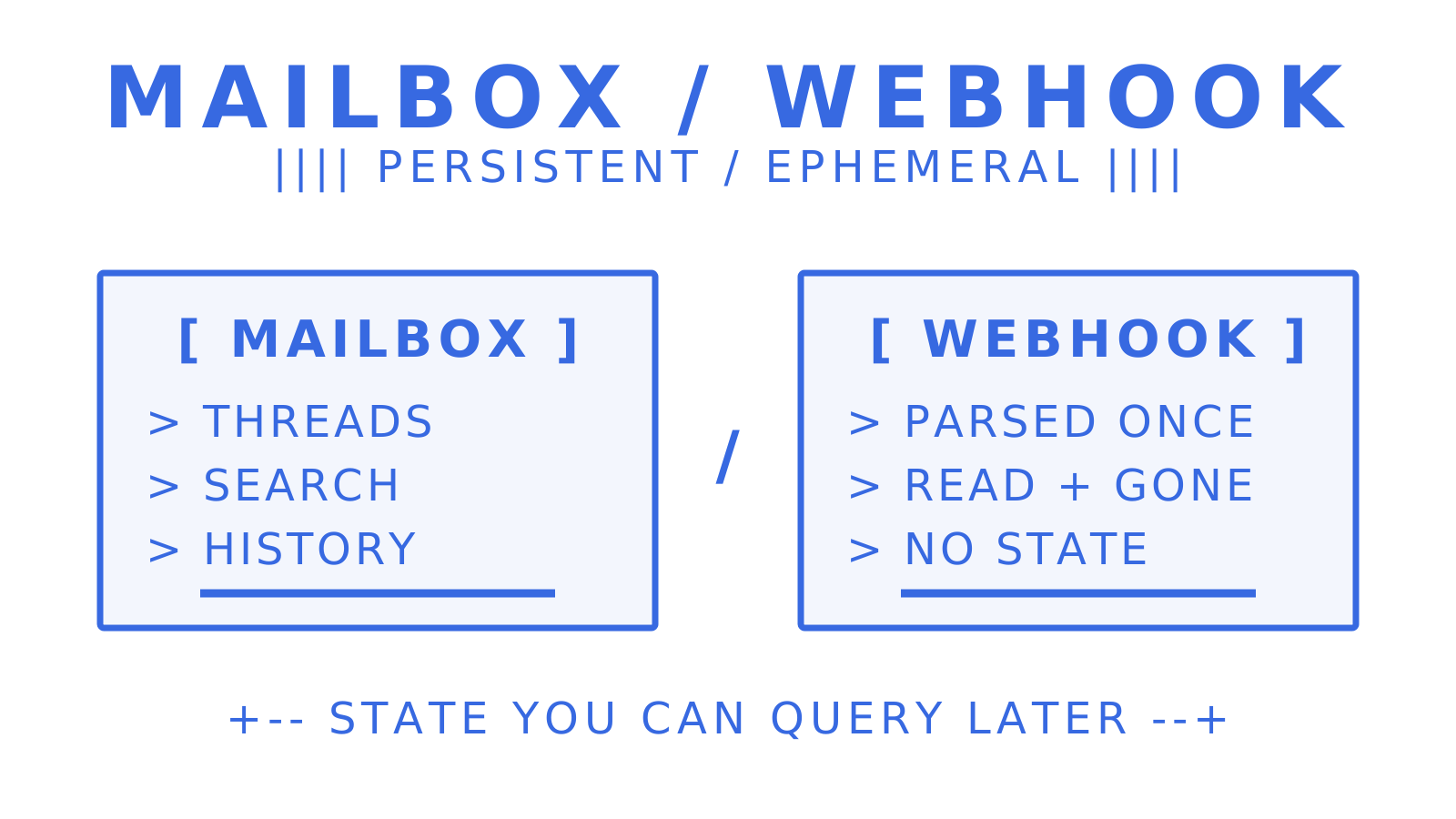
The overlooked nuance is this: a webhook that hands you a parsed inbound message and then forgets it exists is just a one-way pipe. Teams discover this the hard way when a support or agent product needs to thread a conversation, search past messages, or maintain per-tenant isolation, and realise their "inbound email" feature was never built to do any of that. Stitching together a sending API, a Gmail OAuth workaround, an inbound parser and a separate webhook relay is exactly how that gap gets papered over, and exactly why it becomes expensive to unwind later.
None of this makes Amazon SES, Mailgun or Resend the wrong choice. For pure outbound transactional sending, they remain excellent, well-proven infrastructure. The mistake is assuming every provider on a Postmark alternatives list is solving the same problem. Some are solving "send this email reliably." A smaller number are solving "give every entity in my product a real, persistent inbox." Knowing which problem you actually have will save more engineering time than any feature comparison chart.
Try Sendmux for your mailbox-first workload
Sendmux is the alternative worth testing when your product needs more than a sending API: real inbox provisioning, inbound parsing and multi-provider outbound routing in one platform, priced per event rather than per seat. Every mailbox comes with a real address on a provided domain or a verified custom domain, and outbound sends route across your connected provider accounts with automatic failover, simplifying architecture for multi-tenant or agent-driven products.
Sendmux doesn't compete on marketing automation or broadcast campaign tooling, and it won't replace a dedicated marketing platform if that's your primary need. What it does well is mailbox infrastructure at usage-based pricing: the Free plan costs $0 per month with a starting test allotment, and Pro runs $7 per team per month plus usage once you're past testing. Check the sending API and inbound mailboxes product pages, then spin up a Free team and run a real inbound test today.
Sources
For readers who want to check the comparison guidance behind this shortlist, these are the primary references. Courier's Postmark alternatives page carries the vendor-by-vendor deliverability and account-suspension notes quoted above, and the FTC's CAN-SPAM guide is the compliance baseline for any marketing automation you build on top of a sending API.
- Capterra comparison: Mailgun vs Postmark
Frequently Asked Questions
Is Postmark free to use?
Postmark's free Developer plan includes 100 emails a month and never expires, which suits testing and side projects rather than production traffic. Sendmux, Mailgun and Resend also offer free allowances, and their ceilings and billing shapes differ enough to compare before you need to pay.
How reliable is Postmark for transactional email?
Postmark has a strong deliverability reputation built on strict transactional/broadcast stream separation, and many teams report solid inbox placement. Reliability still depends on your own domain reputation and sending practices, which is why running your own seed-list and bounce-rate tests matters regardless of provider, as Courier's comparison guidance notes.
What's the best cheap transactional email service?
Amazon SES generally offers the lowest per-email cost at scale, though it requires more engineering effort for bounce handling and reputation monitoring. For a balance of low cost and less setup overhead, usage-based providers like Sendmux (from $0.000500 per accepted recipient through your own connected provider) or Mailgun's entry tiers are worth testing.
What's the best free mailing list or email sending service?
For pure transactional sending, Sendmux, Mailgun and Resend all offer usable free tiers for testing before you commit to a paid plan. Sendmux's Free plan costs $0 per team per month and includes two mailboxes and one connected sending account, which suits early-stage testing of mailbox-based workflows specifically.
When should you choose a mailbox API over a standard sending API?
Choose a mailbox API when your product needs persistent, searchable, threaded inbound mail per customer, agent or tenant, rather than a one-off inbound webhook. Standard sending APIs like Amazon SES or Resend suit products that only need to send and never need to manage a real, ongoing inbox.
