Nine Mailtrap Alternatives: Pick by Job, Sandbox to Agent Mailboxes


The right Mailtrap alternative depends on the job you're actually replacing. If you need a self-hosted local SMTP sandbox, pick Mailpit. If you need CI-first automated QA with SDK bindings, pick Mailosaur. If you need deliverability-hardened transactional sending, Postmark or Mailgun cover that ground. If your team is building agent-driven or multi-tenant products that need persistent mailboxes and multi-provider outbound routing, Sendmux is built for exactly that job. Run a quick proof-of-concept before committing.
What is Mailtrap actually replacing for you?
Before you shop for a Mailtrap alternative, work out which job you're actually trying to replace. Mailtrap bundles three separate problems into one product: a local SMTP sandbox for catching dev emails before they hit real inboxes, a testing layer for CI/QA pipelines that need programmatic assertions, and (in its newer form) a transactional sending API competing with Postmark and SendGrid. Roundups covering this space consistently split tools by the problem they replace rather than treating them as interchangeable, and that's the right mental model.
Comparison guides in this category also draw a further line most people miss: SMTP capture (catching mail in a dev sandbox), rendering preview (checking how an email looks across clients), and deliverability monitoring (seedlist testing to confirm inbox placement) are three distinct problem classes, not one feature set. A tool that's brilliant at capture is often mediocre at deliverability monitoring, and vice versa. If you're trying to replace Mailtrap with a single tool that does all three well, you'll end up disappointed no matter which one you pick.
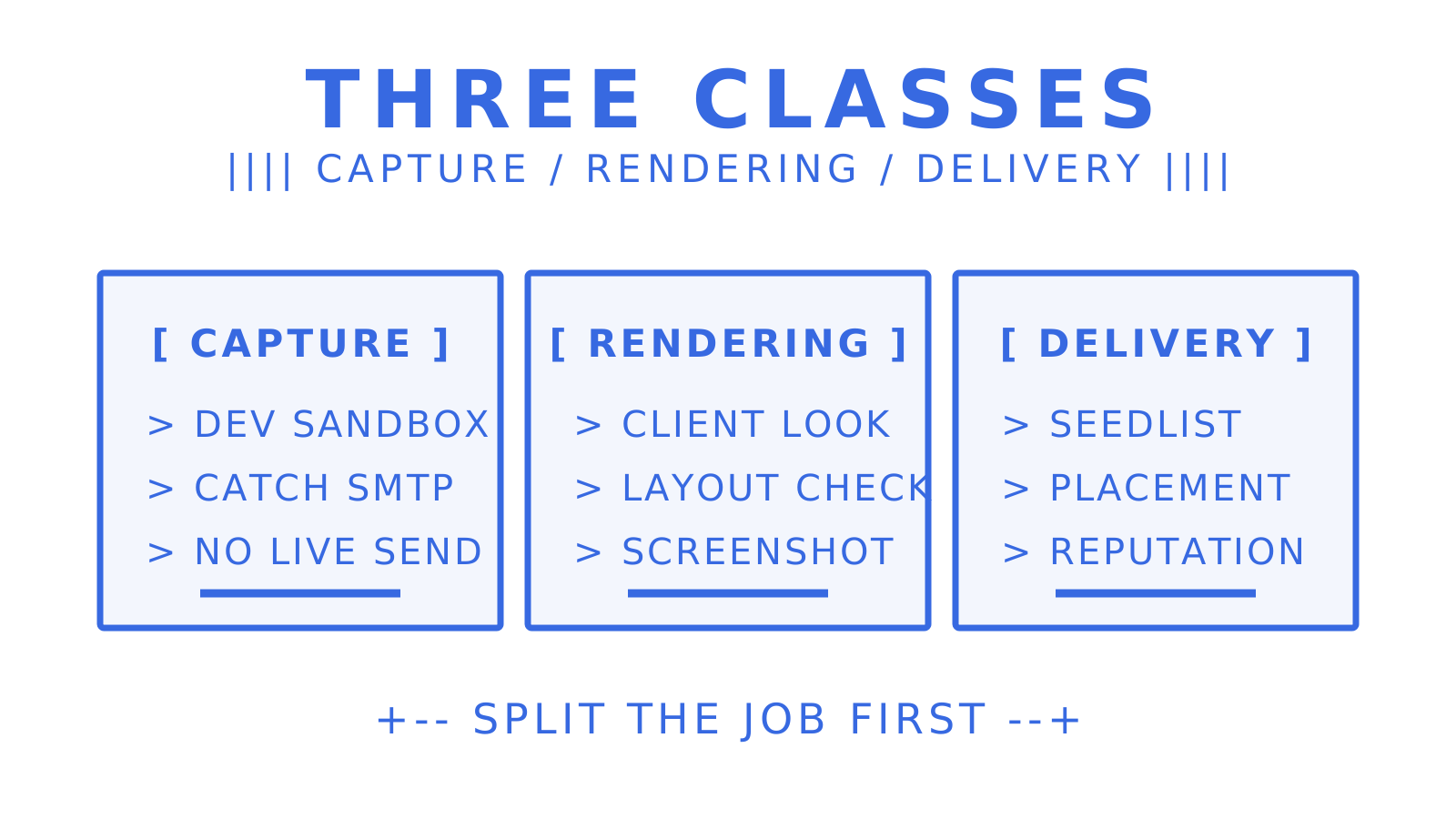
The practical question, then, isn't "what's the best Mailtrap alternative" in the abstract. It's: are you catching test emails locally, asserting on email content in CI, or actually sending production transactional mail (possibly to agent-managed mailboxes rather than human inboxes)? Each answer points somewhere different.
Quick comparison: how the top Mailtrap alternatives stack up
| Tool | Best for | Hosted vs self-hosted | CI/SDK support | Free tier/trial | Pricing shape (entry) |
|---|---|---|---|---|---|
| Sendmux | Agent-native mailboxes + multi-provider outbound routing | Hosted (self-registration for agents) | SDKs (TypeScript, Python, Go, PHP, Ruby, Rust), CLI, MCP | Free plan, $1 starting credit | Free $0/month; Pro $7/month + usage |
| Mailpit | Local dev sandbox, self-hosted | Self-hosted (single Go binary) | MailHog-compatible API | Free, open source (MIT) | No cost |
| MailHog | Legacy local sandbox, stable existing deployments | Self-hosted | Basic REST API | Free, open source | No cost |
| Mailosaur | CI-first automated email/SMS QA | Hosted | SDKs for Selenium, Cypress, Playwright | Free trial | Paid tiers, per-message/inbox |
| Postmark | Deliverability-critical transactional sending | Hosted | REST API, webhooks | Free plan, 100 emails/month | Paid, per-email volume |
| Mailgun | API-first transactional with domain reputation control | Hosted | REST API, webhooks | Free trial | Paid, per-email volume |
| SendGrid | Broad integrations, mature delivery stack | Hosted | REST/SMTP API, large integration library | Free trial | Paid, per-email volume |
| Sender | Combined transactional + marketing sending | Hosted | REST API | Free tier | Paid tiers by contacts/emails |
| UniOne | Budget transactional sending | Hosted | REST/SMTP API | Free trial | Low-cost per-email pricing |
The trade-offs cluster into two camps. Self-hosted sandboxes like Mailpit and MailHog cost nothing but need infrastructure, patching, and someone owning uptime. Hosted platforms remove that maintenance burden but bill on usage, and the pricing shape varies wildly, from per-message transactional fees to per-inbox SaaS tiers. Only some of these are full sending APIs; Mailpit and MailHog are pure capture tools that never touch a real inbox, while Postmark, Mailgun, SendGrid, Sender, UniOne, and Sendmux all send live mail.
Nine Mailtrap alternatives, evaluated for developers and QA teams
Sendmux: for agent mailboxes and multi-provider routing
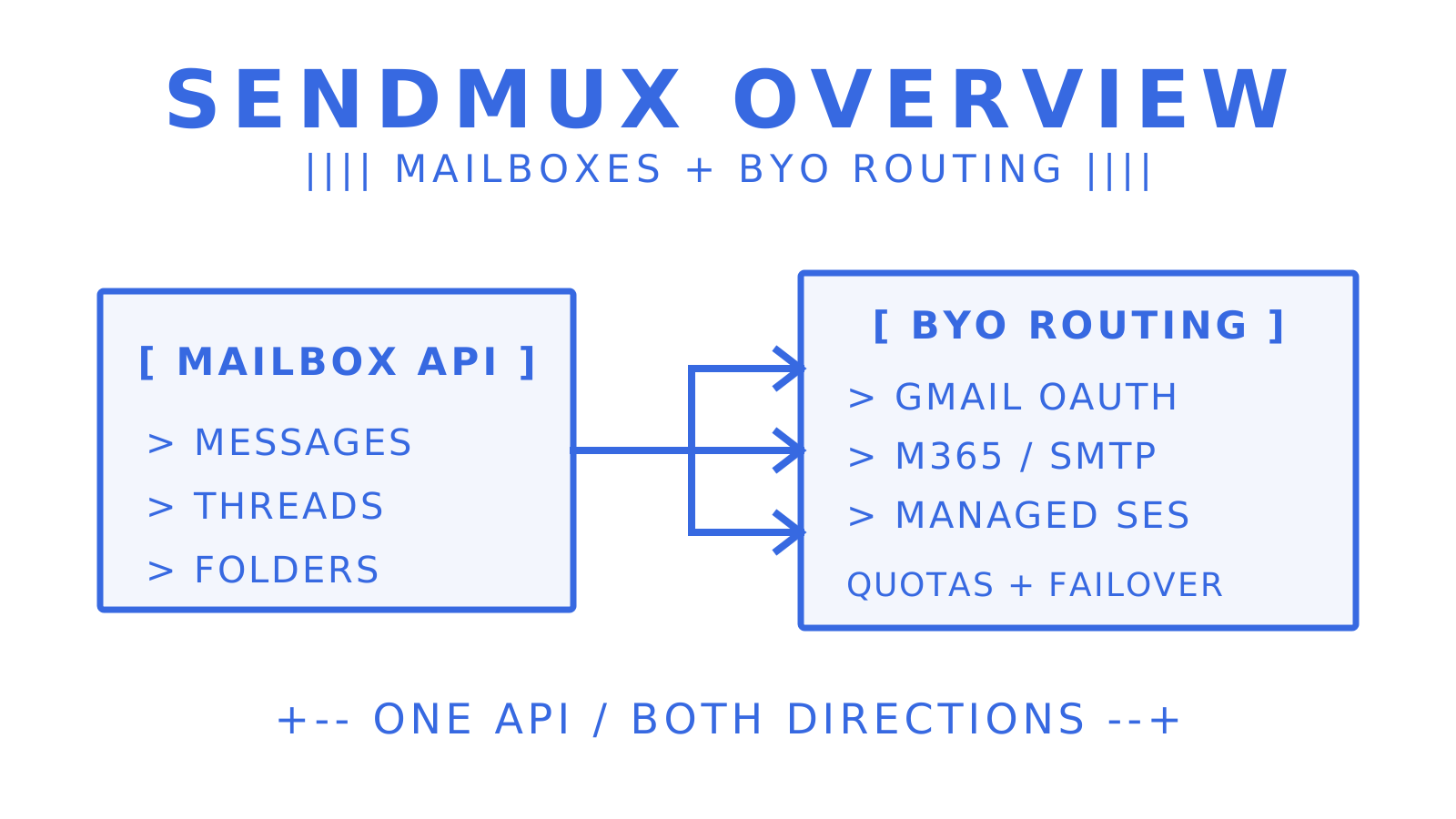
Sendmux is built differently to the rest of this list because it isn't primarily a sandbox or a sending API. It's a mailbox platform: every agent, workspace, or tenant gets a real, persistent mailbox on the included @myagent.mx domain or a verified custom domain, with a Mailbox API that handles messages, threads, folders, keywords, and attachments as durable state rather than a one-shot webhook payload.
That matters for anyone building AI agents or multi-tenant SaaS that need to send and receive mail at scale, because the alternative is usually stitching together a sending provider, a Gmail OAuth workaround, a parser, and a separate webhook relay, each with its own billing. Sendmux replaces that stack with one API surface.
- Outbound routing works across a customer's own Gmail OAuth, Outlook, Microsoft 365, or custom SMTP accounts, plus a managed Amazon SES account active by default, with per-provider quotas, health monitoring, and failover baked in.
- Inbound delivery arrives via signed webhooks or a Server-Sent Events stream, so agents don't need a public endpoint to receive mail.
- SDKs cover TypeScript, Python, Go, PHP, Ruby, and Rust, alongside a CLI generated from the public API surfaces and a hosted MCP server with 54 curated tools for agent frameworks like Claude Code and Cursor.
- Pricing is usage-based: Sendmux offers pricing across plans including free and paid tiers. Outbound through a connected provider runs $0.000500 per provider-accepted recipient; managed Amazon SES sending is $0.000750 per provider-accepted recipient; inbound delivery is $0.000500 per distinct mailbox delivery; storage is $0.02 per GB per month.
If your "Mailtrap alternative" search is really about giving software agents real inboxes rather than catching dev emails, Sendmux is the closest match on this list, and it's the only entrant here doing agent-native mailboxes and bring-your-own routing in a single product.
Mailpit: the modern self-hosted sandbox
Mailpit is the tool most local-dev teams should be reaching for by default. It ships as a single Go binary with an embedded web UI, captures everything sent to it over SMTP, and needs no external dependencies. It's MIT-licensed, so there's no licensing friction for commercial use.
The standout feature is direct MailHog compatibility. Mailpit was built as a MailHog successor, keeping the same API shape where practical so teams migrate configuration with minimal rewrite work. It adds SpamAssassin integration for spam-score checking and stays actively maintained, which is the single biggest reason to choose it over MailHog for anything new.
- What it replaces: Mailtrap's local sandbox inbox, self-hosted instead of cloud-hosted.
- Best for: Solo developers and small teams who want zero recurring cost and full control over retention.
- Pricing: Free, open source.
- CI/self-host callout: runs happily inside a Docker container in a CI pipeline; no SDK needed since it speaks plain SMTP and REST.
MailHog: legacy, stable, but stalled
MailHog earned its reputation as the default local email-capture tool for years, and if you've already got it wired into a mature pipeline, it still works. The problem is maintenance: MailHog has seen little active development in recent years, and the community guidance is now consistently pointing toward Mailpit for new setups.
Migration is straightforward precisely because Mailpit was designed to be a drop-in replacement, keeping MailHog-compatible defaults. If you're maintaining an existing MailHog deployment that isn't broken, there's no urgency. If you're starting a new project, there's no good reason to choose it over Mailpit today.
- What it replaces: Mailtrap's local sandbox, older stack.
- Best for: Teams with existing MailHog infrastructure not yet due for a refresh.
- Pricing: Free, open source.
- Migration note: swap the binary, point SMTP config at the new port, verify the web UI loads. Most teams report an afternoon's work.
Mailosaur: built for CI, not for browsing
Mailosaur takes a different approach entirely: instead of a web inbox you check manually, it gives you per-test inboxes and SDK bindings designed to be asserted against inside automated test suites. Review sources highlight its SDK support for Selenium, Cypress, and Playwright specifically, which cuts out a lot of the scaffolding teams otherwise build by hand to poll an inbox and parse a message.
For QA engineers running end-to-end suites that need to verify a password-reset email arrived, extract a magic link, and click through it programmatically, this is close to a perfect fit. It's overkill if you just want to eyeball an HTML template during development.
- What it replaces: Mailtrap's testing/assertion layer, purpose-built for CI rather than adapted to it.
- Best for: QA teams running automated E2E suites that need email content as a test assertion.
- Pricing: Free trial, then paid tiers scaled by messages and inboxes.
- CI/SDK callout: the SDK-first design is the reason teams migrate here from Mailtrap's more general-purpose API.
Postmark: deliverability first
Postmark built its entire reputation on one thing: getting transactional email into the inbox, not the spam folder. Its message streams separate transactional from broadcast traffic at the account level, which keeps a marketing send from tanking the reputation your password-reset emails depend on.
Setup is unusually fast for a DNS-dependent product, with a short path from domain verification to first send. If deliverability data (bounce rates, spam complaints, inbox placement) is what you actually need visibility into, and Mailtrap never gave you that because it's a sandbox rather than a sending service, Postmark solves a genuinely different problem than Mailtrap ever addressed.
- What it replaces: production transactional sending, not sandboxing.
- Best for: Teams where a missed password-reset email is a support ticket, not a shrug.
- Pricing: Free plan with 100 emails a month, then paid tiers scaled by email volume.
- Standout: deliverability-focused message streams.
Mailgun: API-first with reputation controls
Mailgun leans into granular control. Per-domain reputation management, detailed webhook infrastructure for tracking opens, bounces, and complaints, and an API-first design make it a natural fit for engineering teams that want to build their own delivery dashboards rather than rely on a vendor's default view.
It sits in the same transactional category as Postmark and SendGrid, and the choice between the three usually comes down to existing infrastructure. Teams already inside Sinch's broader stack tend to gravitate toward Mailgun for the operational overlap.
- What it replaces: production transactional sending with more manual control over reputation signals.
- Best for: Engineering teams that want webhook-level visibility into every delivery event.
- Pricing: Paid, per-volume, free trial available.
- Standout: per-domain reputation controls.
SendGrid: the integration generalist
SendGrid's case rests on breadth. Backed by Twilio, it has one of the largest third-party integration catalogues in transactional email, covering everything from e-commerce platforms to CRM tools out of the box. That matters if your stack already includes several Twilio products or you need a sending provider that plugs into a long tail of existing tools without custom glue code.
It's a mature, scalable option for teams sending at real volume who value integration breadth over a lean, minimal API surface.
- What it replaces: production transactional and bulk sending.
- Best for: Teams wanting a mature delivery stack with wide third-party support.
- Pricing: Paid, per-volume, free trial available.
- Standout: integration breadth and Twilio backing.
Sender: transactional and marketing under one roof
Sender's angle is consolidation: transactional SMTP and marketing automation live in the same account, which appeals to smaller teams who don't want to run two separate vendor relationships and two separate bills for what feels like one email problem. Roundups covering this space note transactional senders are grouped separately from sandbox tools precisely because they solve production delivery, not dev-time capture, and Sender leans into that by adding marketing features on top.
- What it replaces: production sending, both transactional and campaign-based.
- Best for: Small teams that want one vendor for both jobs instead of two.
- Pricing: Free tier available, paid tiers scale with contacts and volume.
- Standout: generous free tier for combined use cases.
UniOne: the budget transactional option
UniOne doesn't try to compete on features. It competes on price and simplicity of onboarding, which makes it a reasonable pick for early-stage startups sending modest transactional volume who don't yet need reputation dashboards or advanced routing.
- What it replaces: basic production transactional sending.
- Best for: Startups watching every dollar of infrastructure spend.
- Pricing: Lower per-email cost at common volumes, free trial available.
- Standout: simple setup with minimal configuration overhead.
How to choose the right Mailtrap alternative for your team
Work through this checklist before you commit to a migration, because the wrong pick here usually surfaces three months later as a rewritten CI pipeline or a support fire from mail landing in spam.
- Name the job-to-be-done explicitly. Are you catching dev emails locally, asserting on content in CI, or sending real transactional mail to real (or agent-managed) inboxes? Write it down; don't let "an alternative to Mailtrap" stay vague.
- Map your team shape to hosted vs self-hosted. A solo developer or a two-person team can run Mailpit in a container with zero fuss. A distributed QA team juggling a dozen environments usually wants a hosted tool so nobody's laptop becomes a single point of failure.
- Check CI integration requirements. Does the tool expose an SDK for your test framework (Cypress, Playwright, Selenium), or will you be writing custom polling logic against a REST API?
- Confirm mailbox persistence needs. Sandboxes like Mailpit clear on restart unless configured otherwise. If you need threaded conversation history, folders, or long-term retention (common for agent workflows), that's a mailbox platform's job, not a sandbox's.
- Test attachment and threading handling. Some tools flatten multipart messages or strip headers you need for reply threading. Verify this before you're debugging it in production.
- Weigh deliverability requirements. If inbox placement is business-critical, prioritise tools that expose bounce, complaint, and reputation data, not just capture, as Google's email sender guidelines make plain when they tell senders to keep Postmaster Tools spam rates in check.
- Model pricing predictability. Per-message fees are easy to forecast at known volume; per-seat SaaS pricing can blow out fast as a team grows.
Run a real proof-of-concept before signing anything. A solid POC checks capture reliability under load, SDK ergonomics against your actual test framework, time-to-first-message from signup to a working send, and how long the retention window actually holds messages before they vanish. Ask vendors directly about quota structures, whether there are hidden per-mailbox or per-seat fees layered on top of the advertised price, and whether SDKs exist for your language or you're stuck hand-rolling REST calls. Vague answers to any of those three are a red flag worth taking seriously.
Pro Tip: Run a 48 to 72 hour CI job hammering the alternative's API at your expected message rate before migrating anything production-facing. Flakiness and undocumented rate limits almost never show up in a five-minute demo, but they show up reliably over a few days of sustained load, and that's exactly the window where you want to catch them, not after go-live.
How this comparison was tested
Evaluating email tools fairly means testing the same things across every candidate, not taking vendor marketing pages at face value. The metrics that matter for this category are capture reliability (does every test message actually arrive, every time), API ergonomics (how many lines of code to send and verify a message), SDK binding quality where offered, inbox or mailbox persistence across restarts, attachment handling fidelity, delivery log detail, and provider health signalling under failure conditions.
The practical test harness for a comparison like this typically runs a Node.js script hitting each tool's API against a shared test domain, sending smoke-test volumes of messages per minute and checking retention windows by querying for messages hours or days after the initial send. Self-hosted tools get spun up in disposable containers to check restart persistence; hosted tools get evaluated against their published free-tier or trial limits to confirm claimed quotas hold up in practice.
- Capture reliability: message-loss rate under sustained sending load.
- API ergonomics: lines of code and setup steps to send and verify a test message.
- SDK bindings: coverage and quality for common test frameworks.
- Inbox/mailbox persistence: whether state survives a restart or container rebuild.
- Attachment handling: fidelity of multipart and binary attachment delivery.
- Delivery logs: level of detail exposed for debugging failed sends.
- Provider health: behaviour when a sending provider degrades or rate-limits.
The obvious limitation: this kind of comparison runs over parallel testing windows spanning several weeks at modest sample volumes, which is enough to catch reliability and ergonomics differences but not enough to fully characterise long-run deliverability reputation, which typically needs months of real production sending volume to assess properly. Treat deliverability claims here as directional, and validate them against your own domain's sending history before betting a launch on any single provider.
Why Sendmux fits when Mailtrap is really an agent mailbox problem
Most of the tools on this list assume a human is either checking a sandbox inbox or receiving a transactional email. Sendmux starts from a different premise: increasingly, the recipient (and often the sender) is an AI agent that needs a real, persistent, addressable mailbox, not a webhook that fires once and forgets everything about the conversation it was part of.
That distinction shows up directly in how the Mailbox API is built. Messages, threads, folders, and keywords persist as queryable state rather than transient payloads, and agents read cleaned message text with quoted history already stripped out, so they act on a new reply without re-parsing an entire MIME thread every time. Retrieval-precision endpoints exist specifically to keep payloads small: filtering by folder, sender, date range, or attachment presence, plus a dedicated count endpoint that answers "how many messages" without pulling every row.
The buyer job this replaces is concrete. Without a platform like this, a team building agent workflows typically stitches together a sending provider for outbound, a Gmail OAuth hack to receive replies, a parser to extract clean text from raw MIME, and a webhook relay to get events into their application, each billed separately and each a separate point of failure. Sendmux collapses that into one API surface with several capabilities working together:
- Persistent mailboxes on @myagent.mx or a verified custom domain, addressable by any agent, workspace, or tenant.
- A Mailbox API covering threading, folders, scoped credentials, and batch operations for messages at scale.
- Multi-provider outbound routing across Gmail OAuth, Outlook, Microsoft 365, or custom SMTP accounts, with per-provider quotas and automatic health monitoring that skips failing accounts.
- Event-driven inbound delivery through signed webhooks or a Server-Sent Events stream, so agents don't need a publicly reachable endpoint to receive mail.
- SDKs across six languages plus a CLI and MCP server, so agent frameworks can connect without hand-rolled HTTP clients.
Pricing runs on a usage-based model across three plans. The pricing includes Free, Pro, and Enterprise plans with varying features and usage limits.
Outbound capacity is governed by per-provider rate caps covering per-second, minute, hour and day windows, and over-cap sends wait rather than fail, so a burst doesn't turn into a support incident.
Candour matters here too. Sendmux doesn't include a warmup service, a campaign builder, or SOC 2 certification today, and Bring Your Own Inbox (sending from a customer's existing Gmail account rather than a connected provider) isn't built yet. If your POC depends on any of those, check the roadmap before you commit rather than after.
Keep, migrate, or run both: an editorial view
Mailtrap earns its place when a cross-functional team, not just engineers, needs a polished inbox UI, built-in spam analysis, and easy collaboration on what an email actually looks like before it ships. That's a real value proposition, and it's worth the recurring SaaS line item if your team genuinely uses those collaboration features weekly, not just during onboarding.
Where teams overpay is treating Mailtrap as a permanent CI dependency when a self-hosted sandbox would do the same job for nothing. If your actual use is "catch outbound SMTP in dev, glance at it occasionally," running Mailpit in a container costs you an afternoon of setup and removes a recurring bill entirely.
The migration case gets stronger the moment your job-to-be-done shifts away from human inspection. CI-first testing wants SDK bindings and per-test inboxes, which Mailtrap was never purpose-built for. And if your product increasingly involves agents that need to hold a real conversation over email, not just fire and forget a single transactional message, that's a fundamentally different infrastructure problem than anything a sandbox tool solves. Match the tool to the job, not the other way round.
Try Sendmux: a quick proof-of-concept worth running
If your Mailtrap replacement search is really about agent mailboxes or multi-provider outbound routing, rather than local sandboxing, Sendmux is the alternative built specifically for that job: one API replacing the sending-provider-plus-parser-plus-webhook-relay stack most teams currently maintain by hand, priced on usage instead of per mailbox.
A proof-of-concept takes an afternoon. Create a mailbox on the free @myagent.mx domain, send a test message through the Mailbox API, verify a webhook or SSE event fires on inbound delivery, and connect a second sending provider to confirm failover actually kicks in when the first one degrades. The Free plan costs nothing to start and includes enough starting credit to validate the whole loop before you touch a card.
If you're building with agent frameworks directly, the MCP integration connects tools like Claude Code or Cursor straight to mailbox operations. For teams past the validation stage and scaling toward production traffic, Pro and Enterprise plans are available with pricing and features outlined on the Sendmux website. Start the free tier today and see whether the mailbox model fits your architecture before you write another line of glue code.
Sources
For readers who want to check the comparison guidance behind this shortlist, these are the primary references. The Subrupt email-testing comparison carries the capture, rendering and deliverability split quoted above, and the Mailpit README documents the MailHog maintenance status and migration notes.
- Mailpit - modern local SMTP capture (official project site)
- 8 Best Mailtrap Alternatives: Testing & Sending (2026) (roundup splitting alternatives by job-to-be-done)
- Best Email Testings of 2026 - Subrupt (comparison separating capture, rendering, and deliverability testing)
- Mailisk: End-to-End Email and SMS Testing Made Easy (hybrid email and SMS testing platform for QA teams)
- SendGrid by Twilio (reference for SendGrid's integration breadth)
- Google email sender guidelines (spam-rate and reputation monitoring baseline)
Frequently Asked Questions
Which email API is the best for free?
For local development, Mailpit is free, open source, and requires no account at all since it runs entirely on your own infrastructure. For hosted mailbox infrastructure with a genuine free tier, Sendmux's Free plan costs $0 per month per team and includes starting credit to test real sends and receives before you need a paid plan.
What's the best mail tester to use for CI pipelines?
Mailosaur is generally the strongest pick for CI-first testing because it ships SDK bindings for Selenium, Cypress, and Playwright alongside per-test inboxes, cutting out the custom polling logic teams otherwise build by hand. If you're testing local SMTP capture rather than asserting on live sends, Mailpit's REST API works fine inside a containerised CI job too.
What is the best free email newsletter platform?
Among the tools in this comparison, Sender offers a free tier that combines transactional sending with marketing automation in one account, which suits small teams running both newsletters and transactional mail. It sits in a different category to sandbox tools like Mailpit, which never send to real inboxes at all.
How much does Mailtrap cost, and what do alternatives cost by comparison?
Mailtrap's current pricing is published on its own site rather than fixed here, since providers change tiers regularly. By comparison, Sendmux runs a usage-based model with a Free plan at $0 per month per team and a Pro plan at $7 per month per team plus metered usage on outbound sending, inbound delivery, and storage, so cost tracks actual message volume rather than a flat seat fee.
