Resend alternatives for persistent AI agent mailboxes

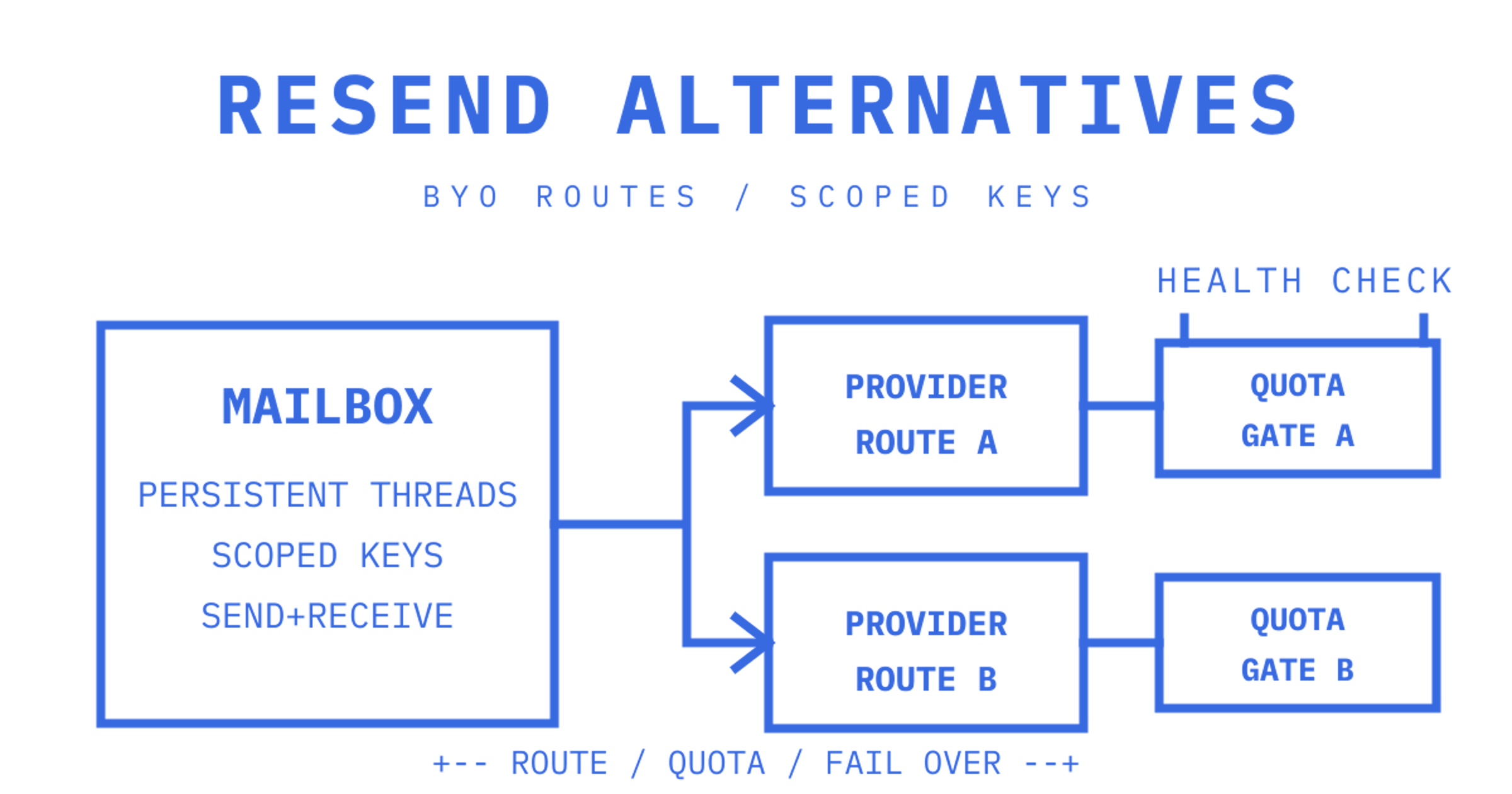
For developer-first transactional email with agent mailboxes, try Sendmux. For deliverability at enterprise scale, choose a transactional specialist like Postmark or SendGrid. For multi-channel orchestration across email, push, SMS and in-app, pick Courier or Knock. If raw cost per email matters more than tooling, Amazon SES wins on price. Compare the table below, then trial two picks in parallel before you commit.
Resend alternatives compared: features, pricing and fit
Picking a Resend alternative starts with what you're actually building. Some teams need a transactional specialist with a decade of ISP relationships behind it. Others are building agent products that need persistent mailboxes beyond a bare send endpoint. The table below sorts fifteen options against the criteria that matter to engineering teams: who it's for, what channels it covers, how pricing is shaped, deliverability posture, developer experience and where it falls short.
| Provider | Best for | Channels | Pricing shape | Deliverability strengths | Developer experience | Notable limits |
|---|---|---|---|---|---|---|
| Sendmux | Agent-native mailboxes and multi-provider routing | Email (transactional and inbound), with mailbox threading | Free at $0, Pro at $7/month plus usage, Enterprise on contract | Bring-your-own provider routing with health checks and failover | REST, SDKs in six languages, MCP and CLI, scoped mailbox keys | No email warm-up service |
| Postmark | Critical transactional email where inbox placement is paramount | Transactional email only | Volume-based transactional pricing | Transactional-only sending pool, no marketing contamination | Templates, bounce/complaint webhooks | No native multi-channel or push support |
| SendGrid | Marketing plus transactional in one platform | Email (marketing and transactional) | Tiered plans by volume | 15+ years of deliverability data and ISP relationships | Broad SDK coverage, dynamic templates | Feature sprawl can slow simple transactional integrations |
| Mailgun | API-first control with validation tooling | Transactional email | Pay-as-you-go and tiered plans | Compares directly against Resend on validation and routing control | Email validation API, strong logs | Dashboard UX trails newer entrants |
| Amazon SES | Lowest cost at scale, self-managed tooling | Transactional and bulk email | Per-message pricing, cheapest at volume | Reputation depends entirely on your own configuration | SDKs via AWS, but no built-in analytics layer | Requires engineering work for bounce handling and dashboards |
| Brevo | Contact-based campaigns plus transactional | Email, SMS, chat | Contact-tier pricing | Shared IP pools by default | Drag-and-drop plus API | Contact pricing penalises large lists |
| Knock | Orchestrated notifications across channels | Email, push, in-app, SMS | Usage-based | Depends on connected providers | Workflow builder, strong docs | Adds an orchestration layer on top of your existing sender |
| Courier | Single API for multi-channel notifications | Email, SMS, push, in-app, Slack | Usage-based | Depends on connected providers | Channel-agnostic API, template designer | Not a deliverability specialist itself |
| OneSignal | Mobile-first push with supplemental email | Push, in-app, email | Free tier, paid tiers by volume | Built for push, email is secondary | Simple push SDKs | Email feature set is thinner than dedicated providers |
| Novu | Self-hostable, open-source orchestration | Email, SMS, push, in-app | Open-source, cloud tiers | Depends on connected providers | Full source access, strong extensibility | Self-hosting adds ops overhead |
| Zoho ZeptoMail | Teams already using Zoho apps | Transactional email | Low-cost tiered pricing | Solid for low to mid-volume | Simple API, template support | Fewer advanced routing features |
| Netcore Cloud | Enterprise customer engagement suites | Email, SMS, push | Enterprise contracts | Strong for large regional senders | Broad but enterprise-oriented tooling | Overkill for small transactional-only needs |
| Mailchimp Transactional | Teams already using Mailchimp for marketing | Transactional email | Separate transactional plans with paid sends | Reasonable for moderate volume | Familiar Mailchimp-style API | Tied to the broader Mailchimp platform |
| Loops | Product-led SaaS lifecycle email | Email (product and lifecycle) | Tiered by contacts | Built for product email sends | Simple, product-marketing-friendly API | Less suited to pure transactional or agent workloads |
| Customer.io | Multi-channel lifecycle and behavioural messaging | Email, push, SMS, in-app | Tiered by contacts and volume | Strong when paired with customer data | Automation workflows, data-driven segments | Heavier setup than a pure transactional API |
A few things worth calling out from that table. Free tiers and sandbox conditions vary enormously. Sendmux's Free plan provides limited starting credit, mailboxes, and a capped number of provider-accepted recipients per UTC day, aimed at proving the mailbox model before you scale. Postmark and SendGrid offer trial sending caps built around volume rather than mailbox count. Sandbox and trial features show up repeatedly in comparison roundups because they're how teams de-risk a switch before touching production traffic.
- Postmark and Zoho ZeptoMail suit teams that only need to fire transactional email and never touch inbound.
- Knock, Courier and Novu suit product teams building notification preferences across multiple channels from one workflow engine.
- Amazon SES suits teams with existing infrastructure engineers who can build bounce handling and dashboards from scratch.
- Sendmux suits teams building AI agents, multi-tenant SaaS, or any product where each customer or workspace needs its own mailbox rather than a shared sending identity.
How do you choose the right Resend alternative?
Start with what you're actually replacing. A basic transactional sender and an agent-native mailbox platform solve different problems, even though both technically "send email."
- Deliverability requirements. If you're sending password resets and receipts at low volume, most providers on this list will land fine. If you're sending at enterprise scale, SendGrid's long ISP relationship history matters more than it will for a five-person startup.
- Channel breadth. Decide now whether you need push and in-app alongside email, because bolting that on later usually means a second vendor and a second billing relationship.
- Mailbox persistence. If your product needs to remember a conversation thread, folders, or per-customer inbox state, a pure send API won't cut it. That requirement is mailbox-first.
- Provider failover. Ask whether the platform can route across multiple sending providers on your own accounts, or whether you're locked into their single pipe.
- Pricing predictability. Contact-based pricing (Brevo, Loops, Customer.io) punishes list growth. Per-event pricing scales more predictably with actual usage.
- Logging retention and SLA terms. Ask exactly how long delivery logs and webhook payloads are retained, and what support response times look like on your plan tier.
Before you sign anything, run a short trial checklist: send a batch through the sandbox, verify webhook payloads match documented event types, test what happens when you retry a send with the same idempotency key, and hammer the rate limit deliberately to see how the provider responds under load.
Ask sales for their bounce and complaint thresholds in writing before you migrate. A provider that suspends accounts at a 5% bounce rate with no grace period will bite you the first time a stale list slips through.
Red flags worth walking away from: log retention under 7 days, pricing pages that hide per-recipient costs behind "contact sales," and support teams that won't answer a direct question about complaint ceilings.
Migration checklist: DNS, templates and webhook tests
With proper planning, switching providers is mostly a DNS and testing exercise, and the code changes stay small.
- Verify SPF, DKIM and DMARC records for your sending domain before cutting over, and check MAIL FROM alignment if the new provider requires it.
- Allow for DNS propagation delays. Test with a low-volume send window before pointing all production traffic at the new provider.
- If you're moving off React Email templates, check how the new provider renders dynamic variables and confirm no template partials break silently.
- Send to a small seeded recipient list first and manually inspect headers, not just inbox placement.
- Test bounce and complaint webhook payloads against your existing handler code before removing the old integration.
- Confirm idempotency behaviour on retries so a network timeout doesn't double-send a customer receipt.
What actually drives inbox placement?
Deliverability is a track record built from IP reputation, list hygiene, and how an ISP has treated a sending domain over time. Shared IP pools mean your reputation is partly inherited from other senders on the same infrastructure. Dedicated IPs remove that risk but need proper warm-up, usually over several weeks, before an ISP trusts high volume from a cold address.
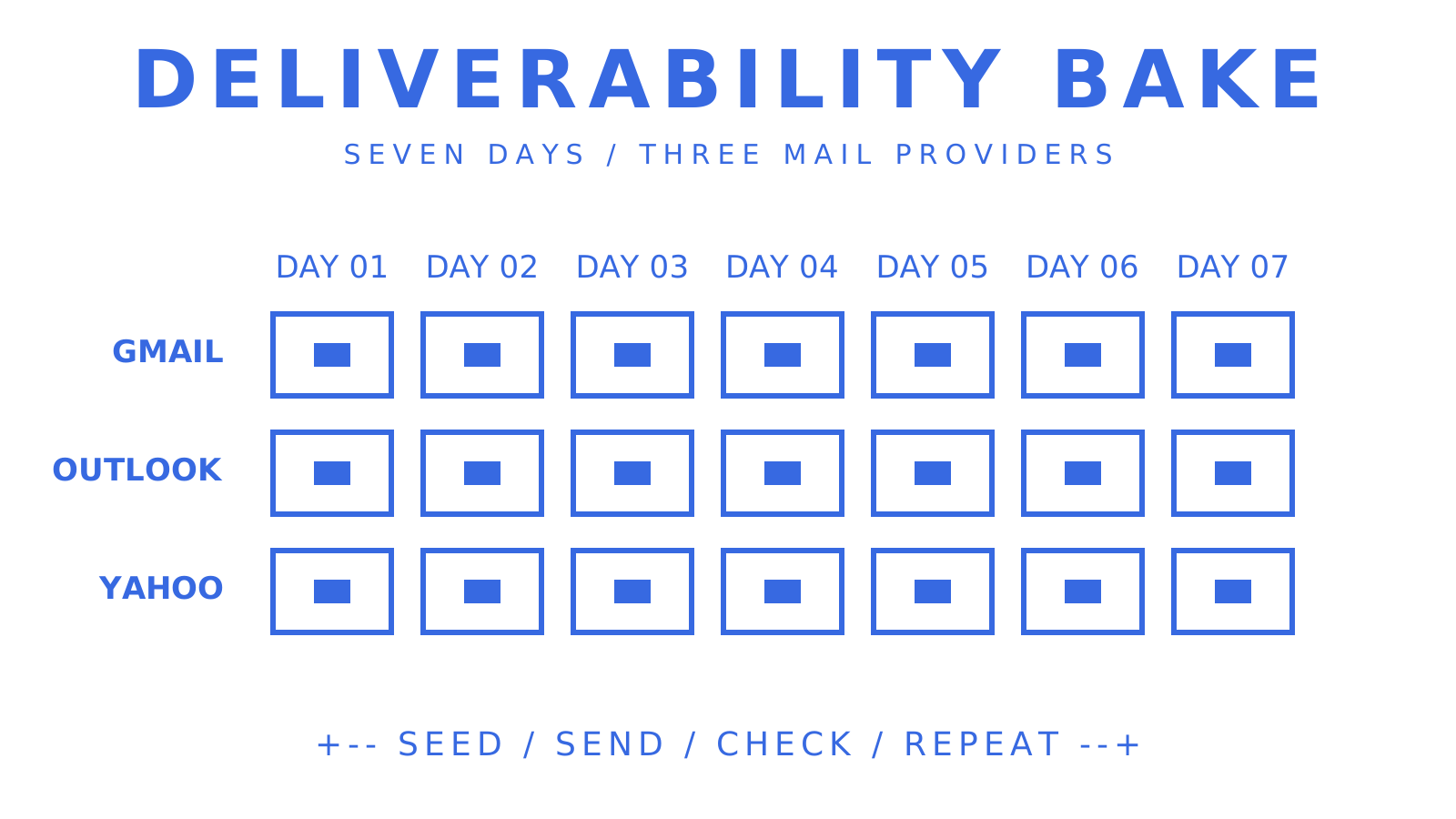
Watch bounce rate, complaint rate, and the gap between provider-accepted and actually-delivered messages. Sendmux's dashboard flags provider health issues at a 5% bounce rate and 0.1% complaint rate, thresholds worth tracking regardless of which platform you choose. Run a short deliverability bake before full migration: seed test addresses across Gmail, Outlook and Yahoo, and watch placement over a week rather than a single send.
Where Sendmux fits for mailbox-first and agent workloads
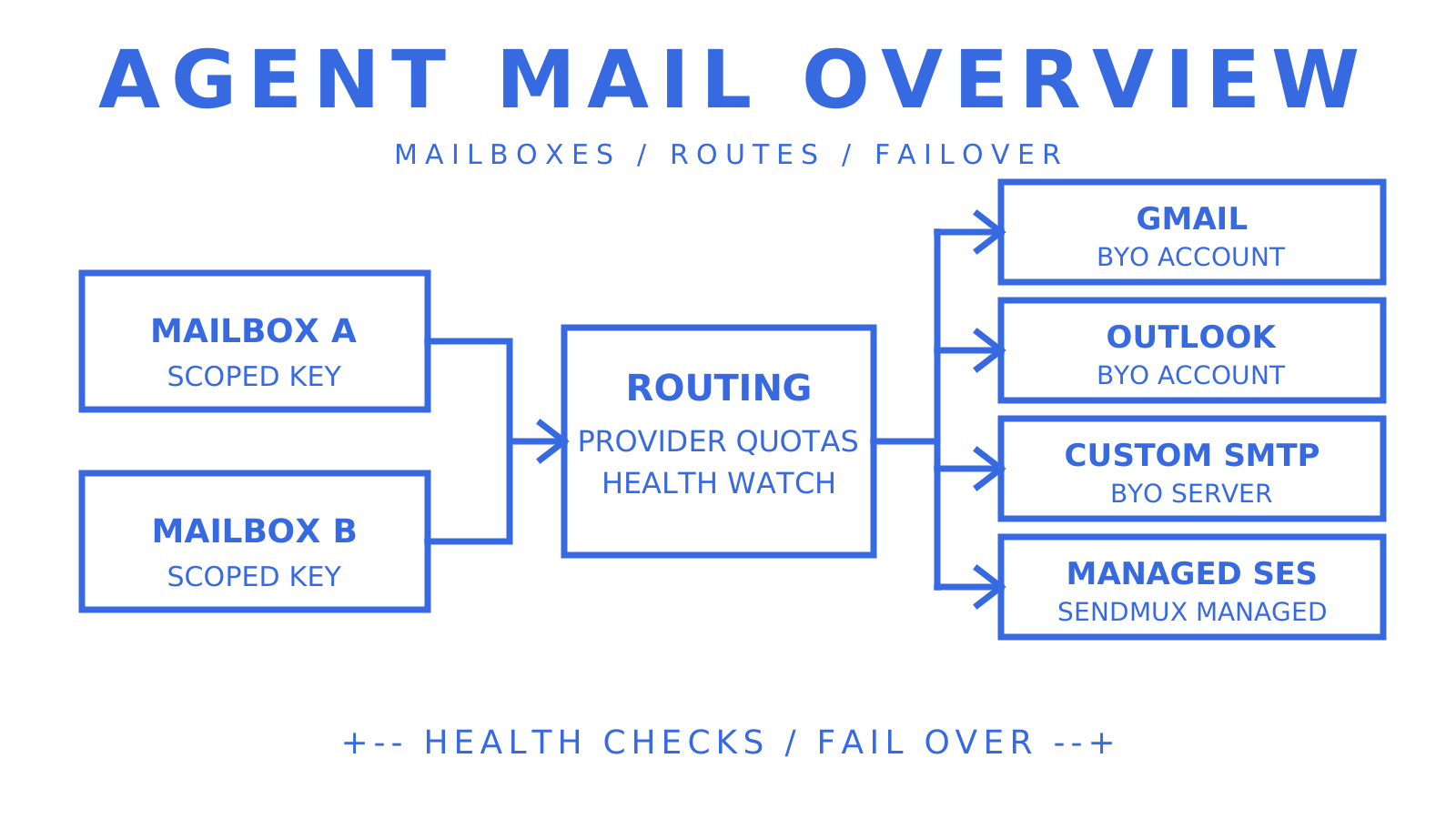
Most alternatives on this list are built to send mail. Sendmux is built to give every agent, customer, or workspace a real, persistent mailbox, then send through whichever providers you already trust.
- Mailbox API with threads, folders and cleaned message text, so an agent reads a reply without parsing raw MIME.
- Scoped mailbox keys that double as SMTP and IMAP credentials, limited to one mailbox with explicit send, receive, read and update permissions.
- Real-time events through Server-Sent Events or signed webhooks, covering delivered, bounced, complained and received messages.
- Provider failover and routing across Gmail, Outlook, custom SMTP or managed Amazon SES, with per-provider quotas and health monitoring.
- Tenant isolation across sending accounts, domains and billing, so a multi-tenant product doesn't leak one customer's mail into another's quota.
Full detail on the mailbox model sits in the Mailbox API guide, and pricing specifics are on the pricing page linked below.
Single vendor or hybrid stack?
Consolidating onto one provider simplifies auth, billing and monitoring, and it's the right call for early-stage teams without spare engineering hours. Once you're running duplicate DKIM records, two dashboards and two billing relationships just to hedge against downtime, the overhead usually outweighs the resilience gained. Enterprises with real deliverability risk still benefit from a specialist plus a fallback route. Startups and mid-stage SaaS teams are almost always better off picking the platform that matches their actual workload and consolidating around it.
Try Sendmux for agent-native mail
If your product needs persistent mailboxes beyond a bare send endpoint, Sendmux avoids stitching together a sending API, a Gmail OAuth hack, a parser and separate billing to serve agent workflows. Every agent, customer or workspace gets a real mailbox on @myagent.mx or your own domain, with provider failover across Gmail, Outlook or Amazon SES built in, and there are no per-seat or per-mailbox fees on Free or Pro. Start on the Free plan with two mailboxes and $1 of starting credit, read the sending API docs for provider failover details, or check the inbound mailbox product page if persistent threads and folders are what you're missing today.
Sources
Deliverability claims draw on SendGrid's ISP relationship data, the developer experience comparison of Resend versus SendGrid, and mid-volume pricing analysis against SendGrid. Multi-channel shortlist patterns come from Courier and Knock's own product documentation for email, push and in-app channels.
Frequently Asked Questions
What are some free alternatives to Resend?
Several providers on this list offer usable free tiers, including Sendmux's Free plan at $0 per team per month with two mailboxes and capped daily sending, plus free tiers from SendGrid and Brevo at varying volume caps. Compare the caps carefully, since some free tiers restrict recipient count per hour rather than per day.
What is another word for "resend"?
In everyday email use, "resend" is often called "redeliver," "reissue," or simply a "retry" when referring to a failed transactional message being sent again. In developer contexts, this usually maps to an idempotent retry using the same idempotency key so a customer doesn't receive a duplicate.
Is Resend better than SendGrid?
Neither is universally better. Resend offers a modern developer experience and generous free tier that suits JS-first teams moving fast, while SendGrid carries 15+ years of deliverability data and ISP relationships that matter more at enterprise sending volume. Mid-volume pricing between the two is close, so the decision usually comes down to tooling and deliverability needs rather than cost.
What is the best free email newsletter platform?
For newsletter-style sending rather than transactional email, contact-based platforms like Brevo or Loops fit better than pure transactional APIs, since they include list management and campaign tools. If your "newsletter" is really product or lifecycle email tied to individual customer mailboxes, a mailbox-first platform like Sendmux fits more naturally than a broadcast tool.
How do I test a new provider before fully migrating?
Run sends through the provider's sandbox first, verify webhook payloads match your existing event handler, and test idempotent retries under a simulated network failure. Seed a small recipient list across major ISPs and watch bounce and complaint rates for at least a week before cutting production traffic over.
