SendGrid alternatives: providers and a six-step migration


SendGrid alternatives solve different problems. Mailgun, Postmark and Amazon SES provide outbound sending services. Sendmux adds persistent agent mailboxes and routing across your own sending providers, which can include SendGrid. Start by deciding whether you need a new delivery provider, an inbox your application can read, or both.
A migration should preserve the behaviour your users depend on: authenticated messages, working templates, reliable event handling and replies that reach the right mailbox. Compare those requirements before comparing the monthly invoice.
Why are developers considering SendGrid alternatives?
Twilio began retiring SendGrid's free Email API and Marketing Campaigns plans on 27 May 2025, with a 60-day transition. Its announcement said sending would stop for accounts that did not upgrade. Accounts with more than 100 contacts would lose all their contacts after that period. That transition is historical. SendGrid now offers a time-limited 60-day Email API trial with 100 emails per day, rather than the retired ongoing free plan.
This guide compares documented capabilities and pricing structures. It does not claim hands-on performance testing or a universal deliverability ranking. Review four areas during your own trial:
- Delivery acceptance tells you whether a receiving server accepted a message. Inbox placement is a separate metric: check whether that message reaches the inbox or spam folder. A reported 99% delivery rate cannot establish where those messages appeared.
- Developer integration includes SDKs, rate limits, webhook fields and the work needed to send an authenticated message. Test those against your application rather than relying on review scores.
- Pricing includes message or recipient volume, contact limits, dedicated IPs, inbound processing and storage. Compare the same workload on each provider.
- Transactional and marketing requirements determine whether you need an API for application messages, campaign tools, or both. Keep the sending and reputation requirements of each stream explicit.
Use test inboxes at Gmail, Outlook and Yahoo to inspect placement during the trial. Send the actual templates you intend to use, with permission from the recipients.
Which SendGrid alternatives should developers evaluate?
The providers below cover different jobs. Their order is a reading guide, not a measured ranking. Sendmux is the mailbox and routing layer in this comparison; the outbound providers can also be used underneath it through supported SMTP connections.
1. Sendmux: persistent mailboxes and provider routing
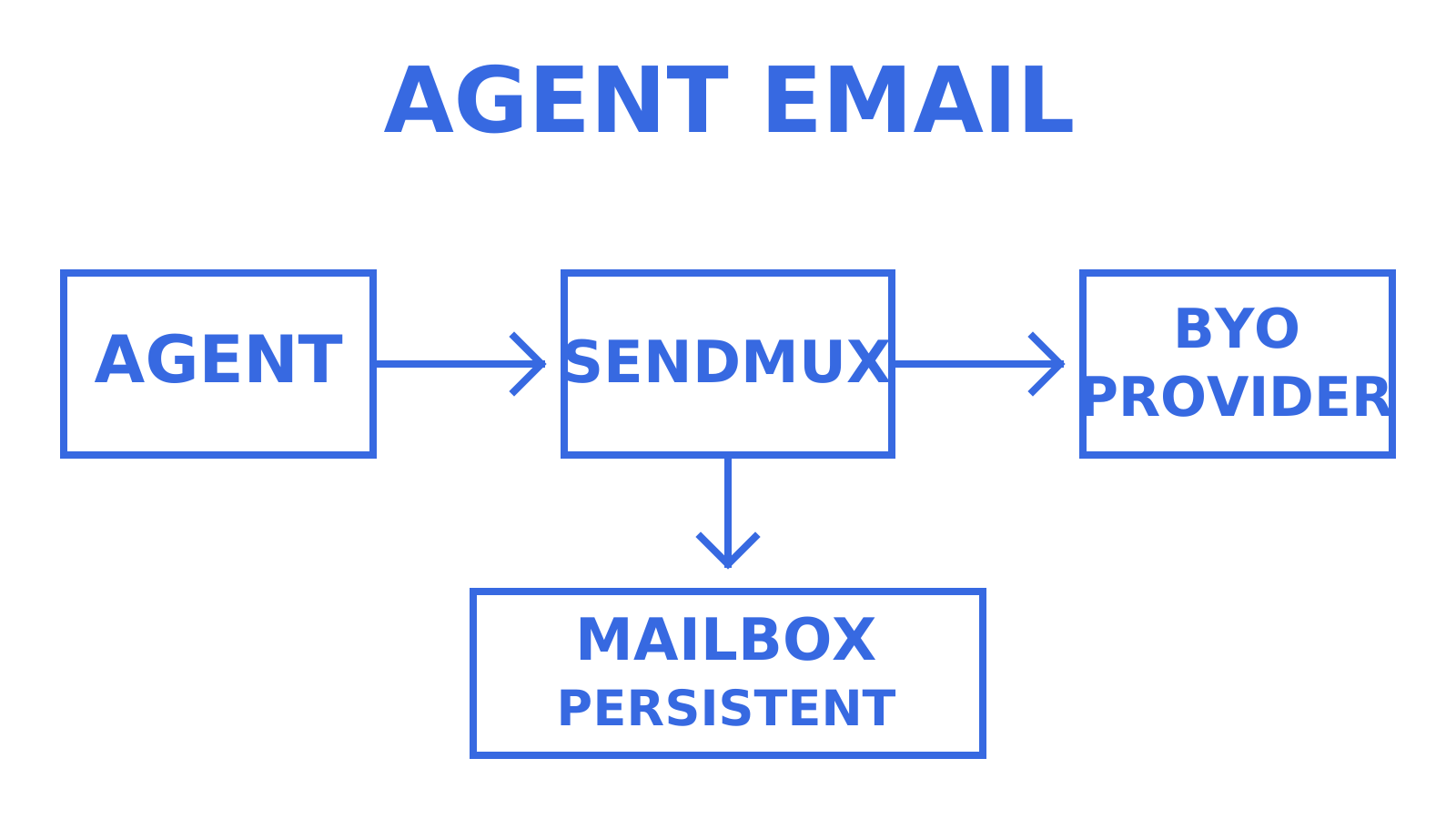
Sendmux is an email API for AI agents and SaaS platforms. It combines inbound mailboxes with outbound sending. An agent or customer workspace can have an addressable mailbox with messages, threads, folders, keywords and attachments, rather than receiving only a transient webhook payload.
The Mailbox API supports sender identities and cleaned message text, including configurable stripping of quoted reply history. It does not guarantee perfect extraction from every message. Keep your agent's parsing and trust decisions separate from the fact that a message arrived in its inbox.
For outbound sending, connect Gmail OAuth, Outlook or Microsoft 365 OAuth, or a supported SMTP account. Sendmux also offers managed Amazon SES. Weighted routing, account quotas and failover distribute traffic across eligible accounts. Delivery groups select subsets of connected accounts; the managed default account cannot join a delivery group. Monitor bounce and complaint rates and provider health signals.
Sendmux publishes REST APIs, SDKs for TypeScript, Python, Go, PHP, Ruby and Rust, plus CLI and MCP access. Choose the interface that fits your application, and verify the operations it needs.
Use scoped credentials for each job. Mailbox keys are limited to their mailbox and granted permissions; infrastructure credentials also obey their granted scopes. An agent can self-register for a constrained mailbox. Sending requires the human owner to accept the invitation and explicitly approve it. Reading mail and permission to send remain separate controls.
Sendmux fits agents that need to receive replies, retain conversation state and send through owner-approved providers. Default-domain @myagent.mx mailboxes send through managed SES; test custom-provider routing with the appropriate domain and sender identities. Sending controls do not replace provider policies or guarantee inbox placement. Sendmux does not provide a campaign builder, sequencing or email warmup. A marketing tool or agent can own that workflow and send through an appropriate customer-connected provider. Managed sending is for triggered or transactional traffic.
2. Mailgun: sending APIs and deliverability tools
Mailgun offers an email API, SDKs, logs and email validation. Its product range also includes inbox placement testing. Check which plan or separate product contains the diagnostics and retention period your application needs.
Mailgun has a permanent free plan allowing 100 emails per day. Compare paid tiers, overages, support and deliverability add-ons at your expected volume. Inbox placement and reputation monitoring are available through Mailgun Optimize; check those costs separately.
3. Postmark: separate transactional and broadcast streams
Postmark supports both transactional and broadcast email. Its Message Streams separate the two types of traffic, including their sending IP pools. Password resets and receipts belong in a transactional stream; newsletters and product announcements belong in a broadcast stream.
That separation is useful when one application sends both kinds of message. It does not guarantee inbox placement. For broadcasts, your application still manages the audience and sending workflow. Message Streams do not replace a full campaign builder.
4. Amazon SES: usage-based sending with configurable operations
Amazon SES provides API and SMTP sending with usage-based pricing. Include message data, dedicated IPs and optional deliverability features in a cost estimate. A low base sending price alone does not establish that SES will be the cheapest complete system for every workload.
SES has reputation dashboards and optional Virtual Deliverability Manager, so you do not need to build every monitoring surface yourself. You still need to integrate application events, suppressions and operational responses. Teams already using AWS may find its configuration sets and event destinations a useful fit.
5. Mailtrap: separate testing and production sending
Mailtrap Email Sandbox captures test messages. The service also provides separate production sending. Use the sandbox in development and staging, then verify the production integration independently.
Keep test and production credentials and destinations distinct. Evaluate production logs, webhooks and placement with your own messages. The age of a sending product is not evidence that its deliverability is better or worse.
6. Brevo: transactional sending and marketing tools
Brevo, formerly Sendinblue, combines transactional sending with marketing and customer-management tools. Its free plan allows 300 emails per day, a limit also discussed in this email marketing guide. Confirm Brevo's current free-plan terms before budgeting.
It is worth evaluating when the same team needs application email and campaigns. Check automation limits, branding, contacts and reporting at the chosen tier; an all-in-one account does not make every feature available on the free plan.
7. Mailchimp: marketing with a transactional add-on
Mailchimp Transactional, formerly Mandrill, provides API and SMTP sending alongside Mailchimp's marketing platform. It is a separate add-on with its own eligibility and sending charges.
Teams already using Mailchimp can evaluate its templates, audience tools and transactional integration together. Compare the complete plan and add-on cost: Transactional Email requires an eligible Standard, Premium or legacy Monthly plan.
8. SMTP2GO: SMTP relay and API sending
SMTP2GO offers SMTP relay and API sending, including an ongoing free plan. That makes it an option for applications whose immediate requirement is sending through a different provider.
The ongoing free plan allows 1,000 emails per month, capped at 200 per day. Check authentication setup and event support during a trial, using your own application templates and event handlers.
9. MailerSend: transactional API and templates
MailerSend offers transactional email through API and SMTP, with template tools. This historical SendGrid migration roundup includes MailerSend and SMTP2GO as options, but its quoted free allowances should not be used as current pricing.
MailerSend's approved Free plan allows 500 emails per month, capped at 100 per day. Its feature trial is separate, and the Free plan requires payment details. Test template conversion and webhook handling with your existing application.
10. Elastic Email: sending API and marketing plans
Elastic Email offers an Email API and email marketing products with different pricing structures. Its paid Email API plans use monthly subscriptions. Compare the plan intended for your workload, including allowance limits, automatic tier upgrades and any dedicated IP charges.
For a high-volume application, model the full monthly cost before choosing a provider. Check whether the plan includes the validation, tracking, reporting and support your team needs.
11. Sender: marketing-oriented evaluation
Sender offers marketing and transactional email. Its Free Forever plan allows 2,500 subscribers and 15,000 emails per month, with Sender branding.
For application email, test Sender's documented API and SMTP capabilities against your event and template requirements. For campaigns, evaluate its newsletters and automation against your audience workflow.
12. SMTP.com: relay and delivery services
SMTP.com offers SMTP relay, an email API and deliverability services. Evaluate it when you need a sending provider and operational support around delivery.
Compare event integration, authentication, reporting and support terms directly. SMTP.com's Essential plan uses a shared IP, while its higher-volume Starter plan includes a dedicated IP. Reputation Defender is an optional paid add-on.
For a wider shortlist, SmartInfra, formerly SmartServers by Smartlead, Infraforge, Primeforge, Mailreef, Inframail and Winnr cover different forms of mailbox or outreach infrastructure. Winnr also documents inbox read, send and delete operations. Litemail provides domain, workspace and mailbox APIs. UniOne supports transactional and marketing email. Compare those specific capabilities rather than treating the group as interchangeable SMTP relays.
Which option fits your use case?
Choose according to the job your application must perform. An agent that reads and replies needs persistent mailbox state. A password-reset service needs reliable outbound sending and event handling. A marketing team may also need segmentation, campaigns and automation.
| Product | Job to evaluate | Capabilities to verify in your trial | Budget check |
|---|---|---|---|
| Sendmux | Agent mailboxes and multi-provider outbound routing | Mailbox state, scoped credentials, sending-account routing | Free and Pro plan limits plus usage and upstream provider charges |
| Mailgun | API or SMTP sending | Logs, validation and placement tools available in your chosen products | Free 100 emails/day; paid tiers and add-ons |
| Postmark | Transactional and broadcast application email | Separate Message Streams, events and templates | Sending volume and additional services |
| Amazon SES | Configurable API or SMTP sending | Configuration sets, reputation dashboard and event destinations | Sending, data, IP and optional monitoring charges |
| Brevo | Transactional email and marketing | API events, campaigns and plan-specific automation | Free 300 emails/day; paid plan terms |
| Mailchimp | Marketing plus transactional sending | Transactional add-on, templates and audience workflow | Base plan eligibility and add-on sending charges |
Ask each provider what a delivery percentage measures, how the bill changes at higher volume, and which support channel your plan includes. Test the answers. Check authentication documentation, account-review requirements and dedicated IP charges before starting a production cutover.
How do you migrate from SendGrid in six steps?
Migrate in stages so you can identify problems before moving all traffic. Preserve the existing suppression data and working delivery path until you have verified the replacement.
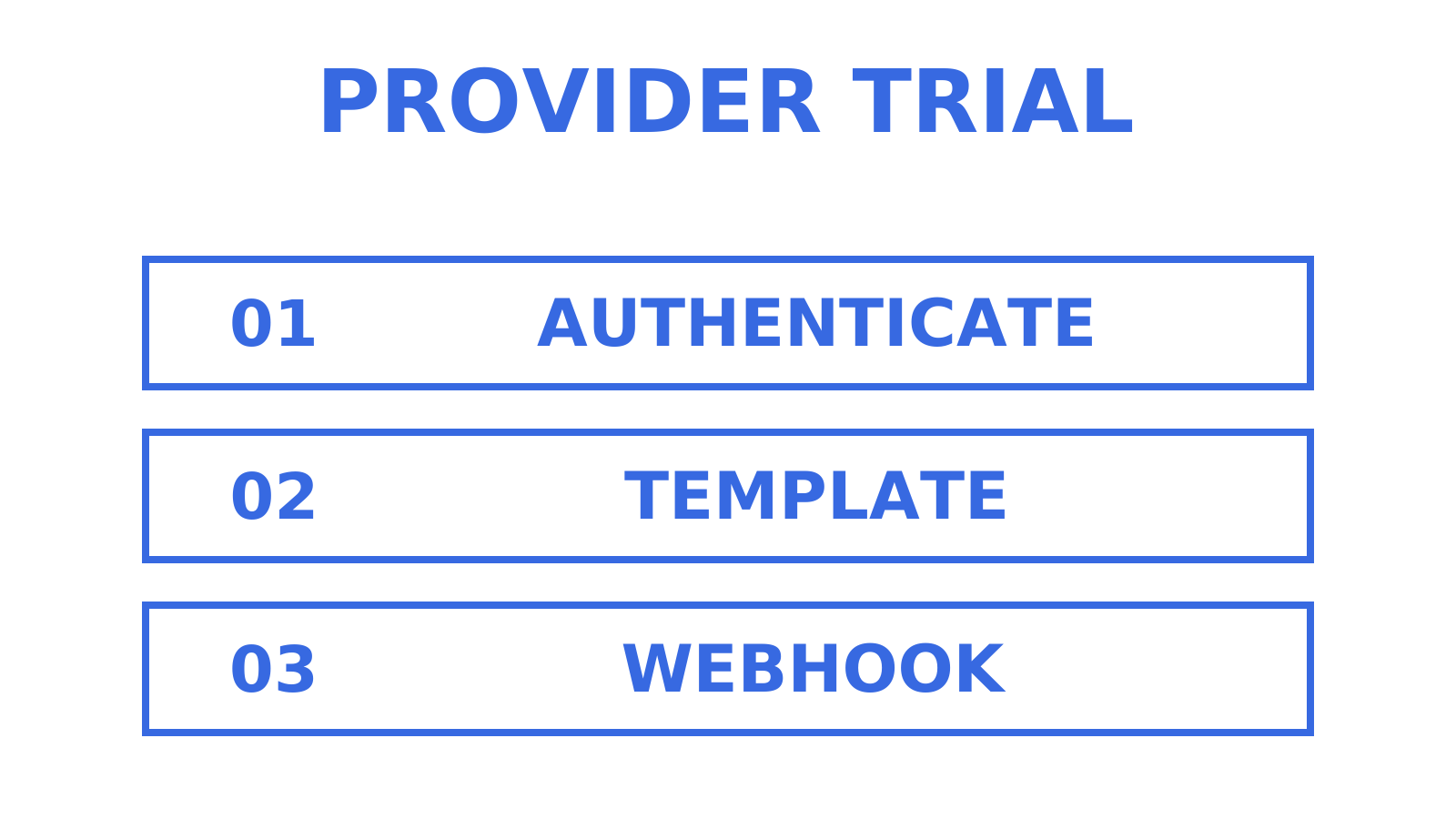
- Audit current usage. List every SendGrid endpoint, dynamic template, suppression list and webhook your application uses. Record which messages are transactional and which are marketing.
- Configure authentication. Follow the new provider's SPF and DKIM instructions and verify DMARC alignment. For a new DMARC policy, begin with monitoring at
p=noneand review legitimate senders before enforcing rejection. Do not weaken an existing enforced policy just to migrate providers. If you use a custom MAIL FROM domain with Amazon SES, add the records required for that configuration. Allow for DNS caching and record TTLs; 24 to 48 hours is a planning allowance, not a guaranteed propagation time.
- Rebuild templates and webhooks. Recreate templates in the new format and test rendering with real application data. Verify webhook authenticity using the provider's documented mechanism before trusting an event.
- Ramp sending gradually. Begin with engaged, consenting recipients and follow the new provider's warmup guidance. One to two weeks is not a universal schedule for a new domain or dedicated IP.
- Move a small share of production traffic. Compare bounces, complaints and inbox placement before increasing that share. Keep the rollback path usable.
- Monitor after the cutover. Review events and placement closely during the first two weeks and continue beyond that if the results require it. Treat open rates as a limited signal, not proof of inbox placement or a human reader.
Keep the previous sending account available while validating the migration. A read-only account cannot send fallback traffic. Confirm that its credentials, authentication and plan remain usable before relying on it for rollback.
What changed when SendGrid retired its free plans?
The 2025 retirement changed the decision for teams using those plans: upgrade, migrate or stop sending. Current free tiers and pricing still differ by provider. Compare the allowances against your actual application workload.
Brevo's 300-email daily allowance and Mailgun's 100-email daily allowance are examples of current free-plan limits. SMTP2GO and MailerSend also deserve a current plan check if a low-volume evaluation is your priority. Amazon SES uses a different usage-based model.
Sendmux's Free plan includes US$1 of starting credit and a limit of 50 provider-accepted recipients per UTC day, counted on each provider acceptance. The managed route also has a two-recipient hourly limit on Free. The starting credit is consumed by usage. Free cannot top up; more credit or capacity requires Pro. Pro costs US$7 per team per month plus usage. Inbound mail is billed per distinct mailbox delivery, and storage by decimal GB-month. Connected outbound providers can add their own charges.
Price dedicated IPs, inbound processing, attachments and retained message history where applicable. Compare your current workload with a 10x larger workload, including engineering and operational costs. A higher-volume estimate should use the same message size and retention assumptions.
Where does Sendmux fit in a SendGrid migration?
Sendmux can sit above an outbound provider while giving each agent or customer workspace its own mailbox. Moving to Sendmux therefore does not necessarily mean removing SendGrid. You can assess the mailbox and routing layer separately from the provider that delivers outbound messages.
Persistent messages and threads help an agent follow replies. Scoped credentials limit what that agent can access. Provider routing then determines which eligible sending account handles outbound traffic. Test all three boundaries with the permissions and domains you intend to use.
This fits support, scheduling and other agent workflows that must read incoming mail and reply in context. Multi-tenant applications also need to test that one workspace cannot read or send through another workspace's resources.
The existing comparison of email for AI agents and the gaps in Gmail and SendGrid workflows explains the mailbox requirement in more detail. Outbound integration targets still have a role in that design.
What should you measure before switching?
Measure authenticated sending, template output, webhook behaviour, recipient placement and total cost. Use a small consented test set before expanding traffic. A trial of 100 to 500 messages may suit some workloads, but only where account allowances and recipient permission support it. A smaller test is useful too.
For SES, aim to keep hard bounces below 5% and complaints below 0.1%, and use AWS's current reputation guidance for enforcement details. These are provider-specific thresholds, not targets to approach or a universal safe limit for every service.
Check whether your volume is consistent enough for a dedicated IP before paying for one. Follow the provider's documented warmup and volume guidance; a dedicated IP does not automatically improve placement.
What does this comparison establish?
The documented product differences give you a shortlist to test. They do not prove that one provider has the best inbox placement, fastest support or lowest total cost for your traffic.
For Sendmux, the practical distinction is the combination of mailbox state, restricted agent permissions and provider choice. Validate that combination with an incoming reply, an authorised outbound message and a permission-denied case before committing your application to it.
Try the mailbox and sending path together
Create a Sendmux team, use an included default-domain address or configure your own domain, and provision a mailbox. Test receiving and replying, then verify the outbound account and permissions you intend to use. Sendmux has no separate per-seat fee, but plan and usage charges still apply. Start at Sendmux.
Sources and further reading
Twilio's free-plan retirement announcement documents the 2025 transition. Use current provider pages for today's pricing and plan limits. This comparison describes documented capabilities; your own trial must establish how each service behaves with your traffic.
Frequently Asked Questions
Is SendGrid still free to use?
The ongoing free Email API and Marketing Campaigns plans were retired after a transition announced on 27 May 2025. SendGrid now offers a 60-day Email API trial with 100 emails per day. The old retirement notice said accounts with more than 100 contacts would lose all their contacts after the transition.
Which email API has the best free tier?
The best fit depends on the job and the limits you need. Brevo allows 300 emails per day on its free plan. Sendmux includes US$1 of starting credit for mailbox and sending usage, with a Free limit of 50 provider-accepted recipients per UTC day and an additional two-recipient hourly limit on the managed route. Starting credit is consumed by usage; Free cannot top up.
Is Mailgun better than SendGrid?
Mailgun and SendGrid offer sending APIs. Compare their current logs, event handling, validation, support and pricing for your workload. If your application also needs persistent agent mailboxes, evaluate that requirement separately; Sendmux can provide mailboxes and route outbound mail through supported connected providers.
Is SendGrid or Resend the better choice?
Resend supports sending and receiving, stored inbound messages, attachments and reply matching. Compare those documented operations with SendGrid and with the mailbox, folder, permission and protocol requirements of your application. Neither a short feature list nor this guide establishes a universal winner.
What does Sendmux cost compared to SendGrid?
Sendmux offers Free and Pro plans with usage charges. Pro costs US$7 per team per month plus usage. Sending is charged per provider-accepted recipient occurrence, inbound mail per distinct mailbox delivery, and storage by decimal GB-month; upstream provider charges can also apply. Compare those costs with the relevant SendGrid Email API or Marketing Campaigns plan, which have different billing structures.
