6,000 quota units: choose a mailbox first cold email API for developers

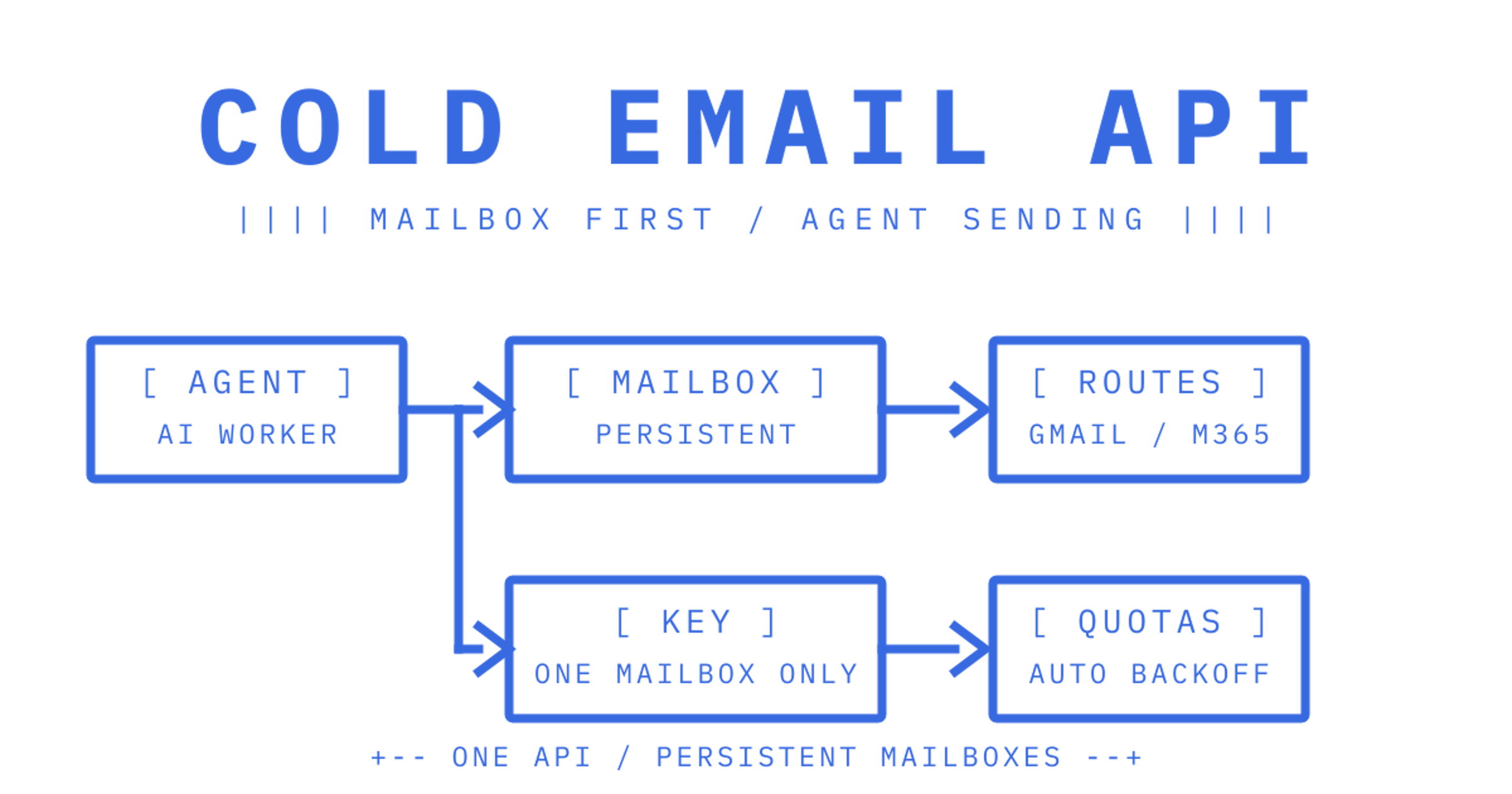
The best cold email API for AI agents is a mailbox-first platform rather than a marketing send tool bolted onto a webhook. If your agents need persistent inboxes, threading, scoped credentials and multi-provider routing, we built Sendmux for exactly that gap. The rest of this guide gives you the technical checklist and a worked integration example so you can verify that claim yourself.
TL;DR:
- A mailbox-first cold email API must support persistent inboxes, threading, scoped credentials, and multi-provider routing to meet agent needs beyond campaign tools.
- Filtering, search snippets, and sync tokens are essential for efficient retrieval, while retriable send endpoints and attachment references optimise performance and token use.
- Rate limits like Gmail's 6,000 units per minute and provider-specific throttling require built-in backoff, load distribution, and capacity planning from day one.
- Usage-based billing based on accepted recipients, inbound deliveries, and storage scales more predictably for large, low-volume agent fleets than per-mailbox fixed fees.
- Signed webhooks or SSE streams are preferred inbound delivery methods, and support levels should include published uptime, incident history, and clear SLAs before integration.
Table of Contents
What your cold email API must provide for agents
Most "cold email API" results online point to campaign tools built for marketers. If you're provisioning mailboxes for agents, customers or tenants, you need a different checklist entirely, one built around persistence and credential scope rather than sequences and open-rate tracking.
Here's what we'd check before committing engineering time to any vendor:
- Mailbox persistence and threading: messages, folders and thread state should survive across sessions, with retrieval precise enough to filter by sender, date range, keyword or attachment presence without pulling full bodies.
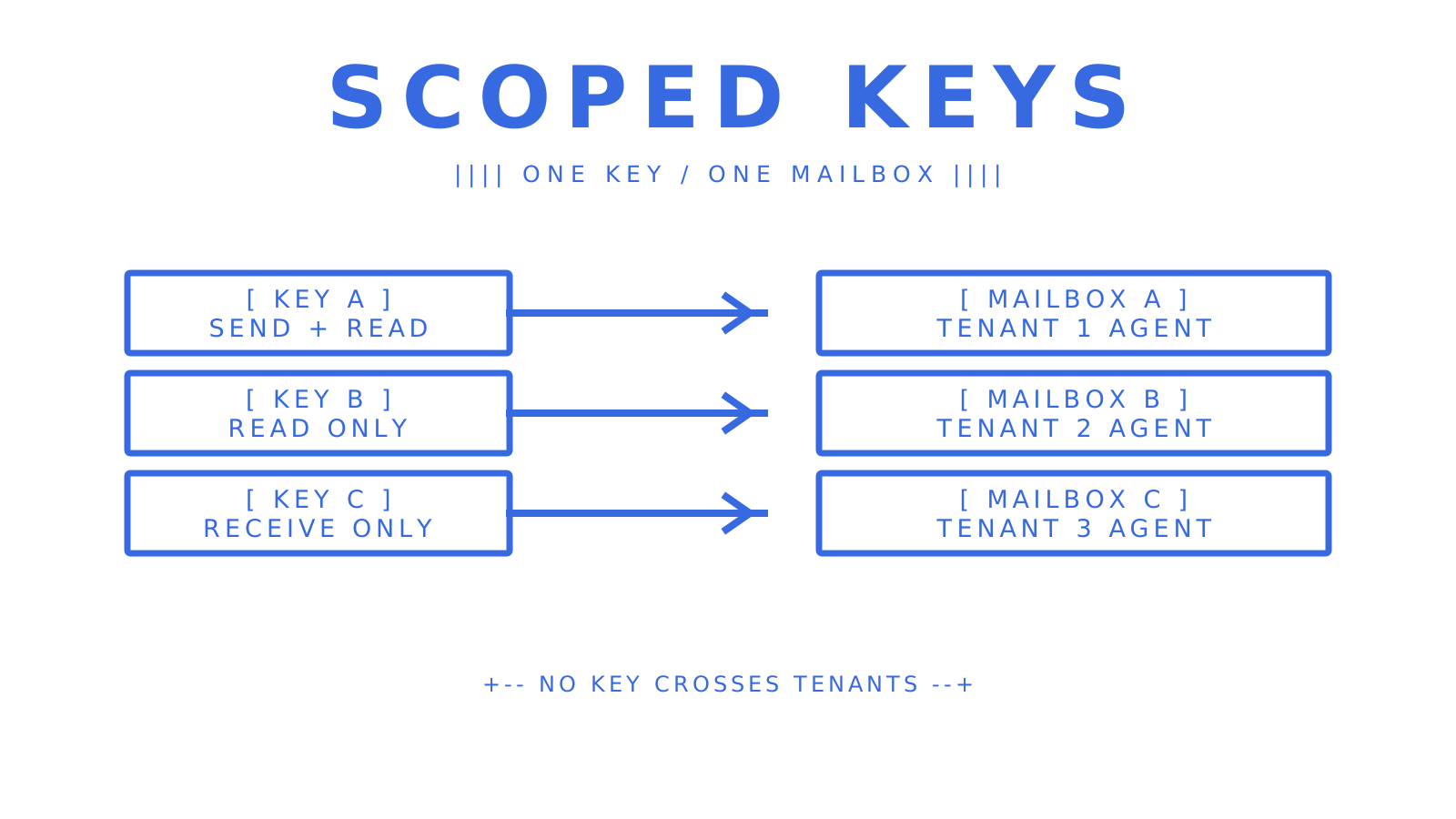
- Scoped credentials: an API key model that isolates one mailbox from another, so a compromised agent token can't read a different tenant's mail.
- Inbound event surfaces: both signed webhooks for backend processing and a Server-Sent Events stream for clients that can't host a public endpoint.
- Multi-provider routing: the ability to spread sends across Gmail OAuth, Microsoft 365 and custom SMTP accounts, with per-provider quotas and health checks that skip a failing account automatically.
- Observability: delivery logs, bounce and complaint rates, and webhook event history you can query, not just a dashboard you have to stare at.
- Developer ergonomics: a published OpenAPI spec, SDKs in the languages your stack actually uses, and a CLI for scripting mailbox and domain setup.
- Rate-limit mitigation: built-in backoff, batching and idempotent retries, because provider throttling is the single most common failure mode in agent email at scale.
If a vendor's answer to any of these is "we're building that", it's worth asking where it sits on their public roadmap rather than taking a verbal promise at face value.
Pro Tip: Reject any API that treats "inbox" as a webhook endpoint rather than a stateful resource; you'll end up rebuilding threading and folder logic yourself within a month.
Engineering patterns to expect from a mailbox-first API
Once you're past the checklist, the implementation details decide whether integration takes a day or a quarter. Here's what we'd look for in the actual API surface.
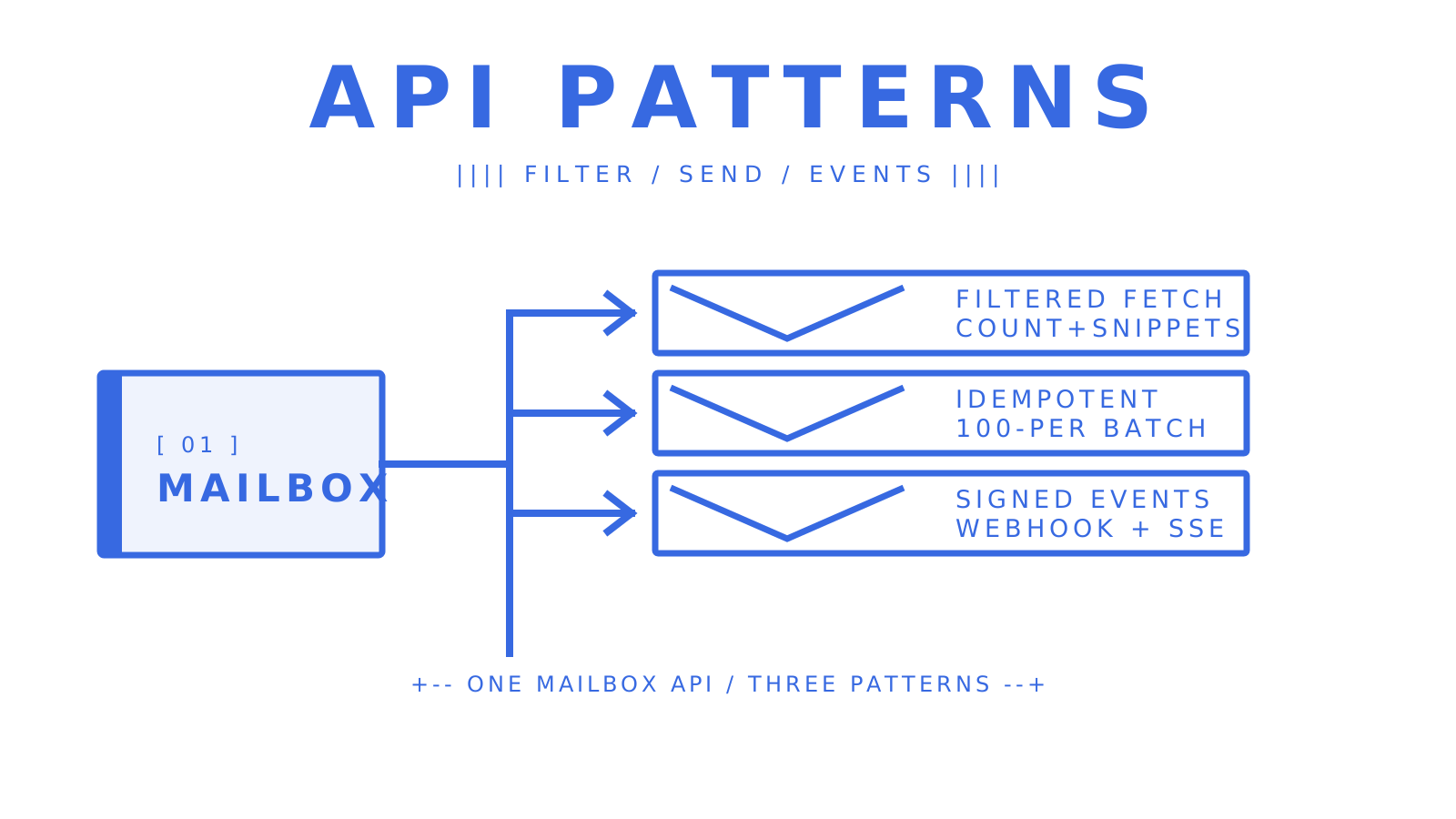
- Filtered retrieval over full dumps: a mailbox endpoint should filter on folder, thread, free-text query, sender, recipient, subject, headers, size, date range and attachment presence, plus a count-only endpoint and a search-snippets endpoint that return previews without pulling message bodies. Sync tokens let an agent poll for changes instead of re-listing an entire inbox on every check.
- Sending semantics built for retries: an
Idempotency-Keyheader so a retried HTTP request never double-sends, batch sends of up to 100 messages per call to cut request volume, and native SMTP submission when a message needs full MIME control over threading headers such asIn-Reply-ToandReferences.
- Attachment handling that protects your token budget: attachments should upload as a reference or base64 blob rather than landing in a model prompt, with inbound attachments available through short-lived download links and clear size ceilings per message and per upload.
- Storage and quota planning per mailbox: storage metered per mailbox in decimal gigabytes, with per-mailbox floors once sending is approved, keeps capacity planning arithmetic across a fleet of hundreds of inboxes.
- Provider-specific rate limit handling: Gmail's API enforces 6,000 quota units per minute per user per project and 1,200,000 per minute per project, with a single
messages.sendcall costing 100 units. Microsoft Graph applies separate service-specific throttling with tenant and per-resource ceilings, including stricter limits on repeated requests against the same message or recipient pair.
- Resilient event delivery: inbound mail should reach your backend as a signed HMAC webhook with retry and backoff, or via an SSE stream when you can't expose a public endpoint.
6,000 quota units per minute per user is the Gmail API's per-user ceiling, and a single send costs 100 units, meaning an agent sending unthrottled can exhaust a user's quota in under a minute.
Design for these limits from day one rather than discovering them in production when an agent fleet suddenly goes quiet.
A worked integration example for agent mailboxes
Here's roughly how we'd wire up an agent mailbox from scratch, mapped to the patterns above.
An agent typically self-registers without a human in the loop: it discovers the platform's auth.md, solves a proof-of-work challenge, and receives a constrained mailbox with a claim token. That pre-claim token grants read and receive permissions only; send access arrives only after a human owner approves the claim and exchanges it for a token with send scope. This two-step flow matters because it means an agent can start receiving and reading mail immediately while you decide, separately, whether it should be allowed to send.
Once approved, the mailbox key doubles as both an API credential and an SMTP/IMAP password, which is genuinely useful if part of your stack still expects IMAP polling while the rest calls REST endpoints directly.
A typical call sequence looks like this:
- Create or claim the mailbox and fetch its session details to confirm supported features and current rate limits.
- Poll
GET /mailbox/messageswith folder, sender and date filters rather than listing everything.
- Send replies through the mailbox send endpoint, switching to SMTP submission when a reply needs explicit
In-Reply-ToandReferencesheaders.
- Subscribe to signed webhooks or the SSE stream for new inbound mail instead of polling continuously.
Pro Tip: Fetch message previews through a search-snippets or count-only endpoint before pulling full bodies into a prompt; it's the cheapest way to cut both latency and token spend.
This pattern, scoped keys, filtered retrieval, idempotent sends and event-driven inbound, is what SDKs, an MCP server and a CLI are built to wrap, so you're scripting mailbox setup rather than hand-rolling HTTP calls for every environment.
Usage-based billing and how to control it at scale
Per-mailbox pricing punishes exactly the use case agent platforms have: hundreds or thousands of mailboxes, each sending relatively few messages. Usage-based billing, charged per accepted recipient, per inbound delivery and per gigabyte of storage, scales with actual activity instead.
Three numbers to watch as your fleet grows:
- Accepted recipient occurrences outbound, since each accepted To, Cc and Bcc address bills separately, while addresses rejected before provider acceptance don't.
- Inbound deliveries, where one message landing in two mailboxes counts as two deliveries.
- Storage in gigabytes, which compounds slowly but matters once mailbox counts run into the thousands.
To keep spend predictable: batch sends to cut provider round-trips, route lower-priority mail through cheaper connected providers rather than managed sending where that's an option, and monitor retry volume closely, since a misbehaving agent retrying failed sends can quietly inflate your bill faster than legitimate traffic. Free tiers typically cap daily sending and managed-provider throughput tightly; expect those caps to lift substantially, not disappear, on a paid plan.
Security and compliance for agent mailbox infrastructure
Agent email infrastructure sits on sensitive ground by default: inboxes often carry customer names, case details or financial references. At minimum, expect credentials to be hashed rather than stored in raw form, provider OAuth tokens and SMTP credentials encrypted at rest, and all connections running over TLS.
Scoped API keys matter as much as encryption here. A key limited to one mailbox, with explicit permissions for send, receive, read and update, contains the blast radius of a leaked credential to a single inbox rather than an entire tenant's mail. Hard tenant isolation across mailboxes, domains, billing and logs, enforced through role-based access such as Owner, Admin, Developer and Member tiers, is what lets you run multiple customers on one platform account without one customer's agent ever touching another's mail.
Formal certification is a separate question from architectural isolation, and it's worth checking directly with any vendor rather than assuming: ask specifically whether they hold SOC 2 or ISO 27001, and whether they offer enterprise SSO via SAML or OIDC, since these are often enterprise-tier additions rather than baseline features. If your use case involves health data specifically, confirm HIPAA-eligible handling in writing before you build on top of any platform, cold email or otherwise.
Fitting agent mailboxes into CRM and automation workflows
Agent mailboxes rarely operate in isolation. A support agent reading a customer thread usually needs to write that conversation back to a CRM record, and an outbound agent generating leads needs those replies routed into whatever pipeline tool your sales team already lives in.
The practical pattern is webhook-driven: an inbound event fires the moment a message lands, your backend parses the cleaned message text, and you push the relevant fields into your CRM or automation platform's own API. Because a mailbox-first API already strips quoted history and returns clean text rather than raw MIME, that parsing step is far lighter than building a MIME parser yourself.
Direct, native connectors into specific CRM or marketing automation products are a different matter entirely, and today they're thin across the mailbox-first category generally. If your roadmap depends on a packaged integration with a particular CRM, check a vendor's published integration list rather than assuming support exists, and build the webhook bridge yourself as a fallback. It's a few hours of work against a documented event schema, not a blocker.
What to expect from support and service levels
Engineering teams evaluating infrastructure vendors care less about marketing promises and more about two concrete things: what happens when something breaks, and whether uptime commitments are documented rather than implied.
A published status page you can check independently, separate from a vendor's own dashboard, is a reasonable baseline expectation. So is a documented incident history rather than silence after an outage. Beyond that, support tiers typically track plan level: expect community or ticket-based support on free and entry paid plans, with dedicated support, custom SLAs and often dedicated IPs reserved for enterprise contracts.
If uptime guarantees matter to your use case, specifically for agent fleets running unattended, ask for the SLA in writing rather than inferring one from a load-testing claim. A platform capable of handling millions of messages a day is a capacity signal, not a contractual uptime commitment, and the two shouldn't be confused when you're negotiating terms.
Latency and performance in practice
Latency in agent email infrastructure shows up in two separate places: how fast the API responds to a request, and how fast a message actually lands in a recipient's inbox once accepted. The first is within a vendor's control; the second depends heavily on the receiving provider and isn't something any sending platform fully owns.
For retrieval-heavy workloads, the endpoints that matter most for perceived speed are the lightweight ones: count-only queries, search snippets and sync tokens that return only what's changed since the last poll. An agent that re-lists an entire inbox on every check will feel slow regardless of how fast the underlying API responds, simply because it's moving far more data than it needs.
Published, vendor-specific latency benchmarks are genuinely rare across this category, and we'd treat any unsourced number here with scepticism. The more useful question to ask a vendor directly is what their own load-testing figures represent, and whether their architecture is built around full-payload retrieval or the lighter, filtered endpoints described above.
Why cold email campaign limits don't apply to agent mailboxes
Spam blacklist risk is almost entirely a function of sending pattern: high volume, repetitive content and poor list hygiene are what get domains flagged, and that's a marketing-campaign problem more than an agent-mailbox one. Agent mailboxes built around persistent, individual inboxes per tenant or entity look structurally different from a campaign blast, because each mailbox tends to send and receive a handful of genuine, contextual messages rather than thousands of near-identical ones.
That said, the underlying deliverability mechanics still apply. Domain verification through SPF, DKIM and DMARC remains the baseline for inbox placement regardless of use case, and a mailbox-first platform should expose bounce and complaint rates so you can catch a misbehaving agent before its sending account gets flagged by a provider. Health monitoring that automatically skips an account showing a rising bounce rate protects every other mailbox routing through the same provider pool, which matters more as agent count grows.
If your agents are sending anything resembling bulk outreach rather than one-to-one conversational mail, that's a genuinely different infrastructure problem, with its own rules, tools and audience, and outside what this guide covers.
Build vs buy for agent mailboxes: an honest take
Building your own stitching layer, OAuth plus a parser plus a webhook relay, makes sense at genuinely small scale, or where a unique compliance requirement forces custom handling no vendor offers off the shelf. Below a few mailboxes, the complexity is manageable.
Past that, the calculus flips fast. The moment you're running a multi-tenant fleet, provider throttling stops being theoretical and starts being Tuesday. Buying a mailbox-first platform isn't about avoiding effort, it's about not re-learning Gmail's quota table the hard way, twice, at 2am.
Sendmux: mapping the checklist to what we've built
Everything on the checklist above maps directly to what we offer. Persistent mailboxes with threading and filtered retrieval, scoped keys per mailbox, multi-provider routing with per-provider quotas and health checks, SDKs and an OpenAPI spec, and delivery logs with bounce and complaint tracking all ship as one API rather than several separate services you have to glue together.
Our Free plan gets you two mailboxes and one connected sending account to test the pattern end to end, capped at 50 provider-accepted recipients a day. Pro, at $7 per team per month plus usage, removes those resource caps and lifts managed sending to 1,000 accepted recipients a day.
To get started:
- Check mailbox and sending API details against your own integration checklist.
- Review multi-provider routing and failover if provider quotas are your main concern.
- See pricing and current plan limits before you provision your first mailbox.
Sources
Essential quota and error-handling docs to read next
Before you build against any provider, read the primary sources directly: Gmail's usage limits for quota unit tables, Microsoft Graph's throttling limits for tenant and per-resource ceilings, and Gmail's error-handling guide for retry and backoff recommendations.
Frequently Asked Questions
What is the best cold email API for AI agents?
A mailbox-first API that provisions persistent inboxes with scoped credentials, rather than a campaign-sending tool, is the right fit for agent workflows. We built [Sendmux](https://sendmux.ai/) specifically around persistent agent mailboxes and multi-provider routing for this reason.
How do I handle Gmail API rate limits for agent mailboxes?
Gmail enforces 6,000 quota units per minute per user per project, with a single send costing 100 units, so high-volume agents can exhaust quota quickly. Use exponential backoff on 429 errors and spread load across accounts where possible.
What's the difference between per-mailbox and usage-based pricing?
Per-mailbox pricing charges a fixed fee for every inbox regardless of activity, which penalises fleets with many low-volume mailboxes. Usage-based billing charges per accepted recipient and inbound delivery instead, which scales more cheaply when mailbox count is high relative to messages per mailbox.
Do agent mailbox APIs support multiple email providers?
A genuinely mailbox-first platform should let you route outbound mail across Gmail OAuth, Microsoft 365 and custom SMTP accounts with independent quotas and automatic health checks. We support this routing model with per-provider quotas and failover across providers you already own.
Can I use webhooks instead of polling for inbound email?
Yes, signed HMAC webhooks are the standard pattern for inbound event delivery, with a Server-Sent Events stream as a fallback when you can't host a public endpoint. Both approaches avoid the latency and cost of continuous polling.
