Send Email in Python: EmailMessage, smtplib and Email APIs

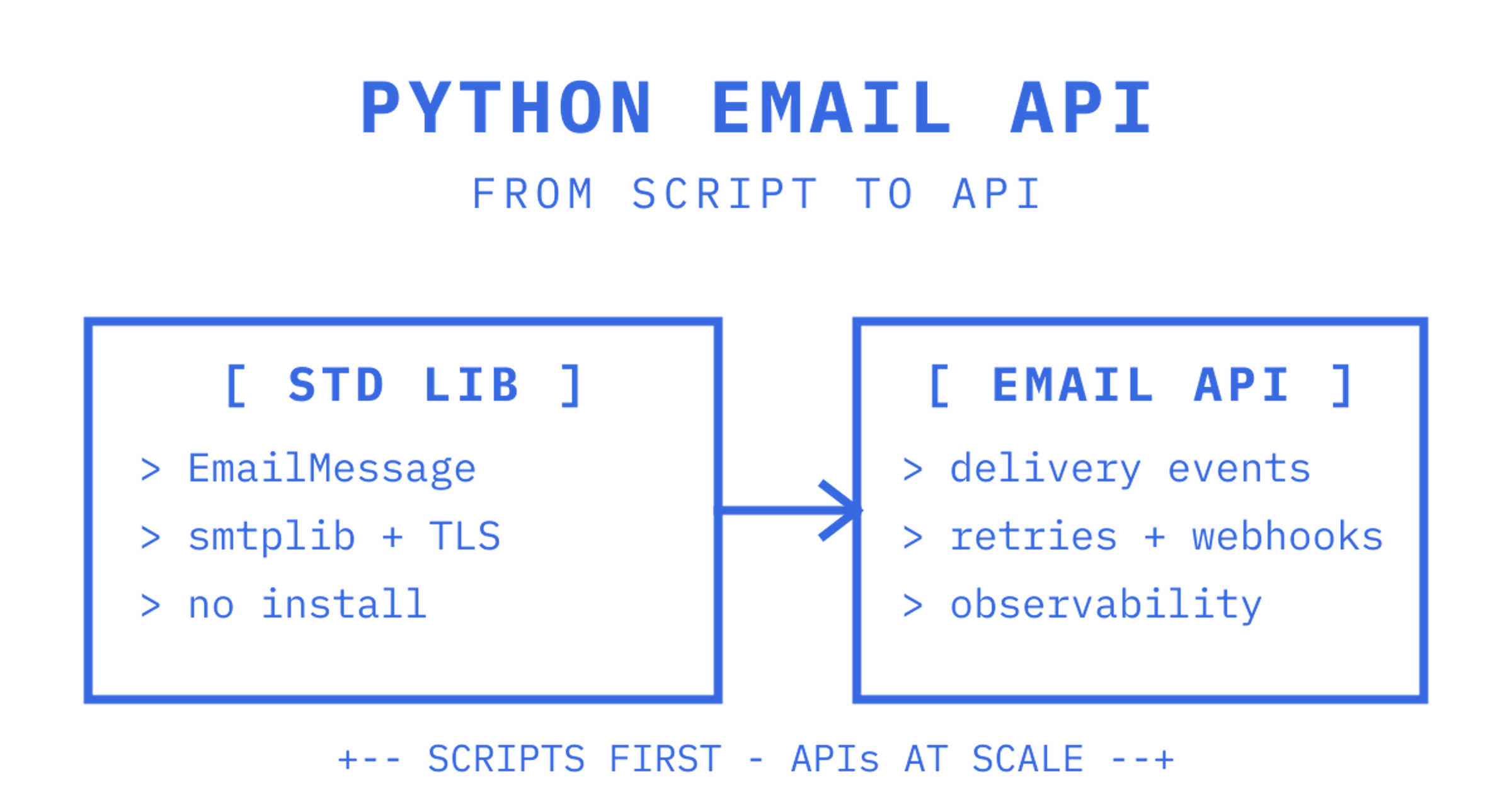
For a quick script, use Python's built-in email.message.EmailMessage with smtplib and you'll have mail moving in minutes. For anything hitting production, real users or meaningful volume, reach for a managed Email API instead: you get deliverability tracking, retries and webhooks that raw SMTP won't give you. A higher-level library trims MIME boilerplate but still sends over plain SMTP, so it adds none of that. Either way, TLS and proper credential handling aren't optional.
Quickstart: send a plain text email with EmailMessage and smtplib
The fastest path from zero to a sent email is four lines of setup and one SMTP call. Python's email package builds the message; smtplib delivers it. This is the pattern behind most "how to send email in Python" tutorials, and for good reason: it needs nothing beyond the standard library.
import smtplib
import ssl
from email.message import EmailMessage

msg = EmailMessage()
msg["Subject"] = "Order confirmation"
msg["From"] = "orders@example.com"
msg["To"] = "customer@example.com"
msg.set_content("Thanks for your order. It's on its way.")

context = ssl.create_default_context()
with smtplib.SMTP_SSL("smtp.example.com", 465, context=context) as server:
    server.login("orders@example.com", "app_password_here")
    server.send_message(msg)
EmailMessage handles header encoding and MIME structure for you, which matters because building that structure by hand is a common source of malformed mail. The official Python examples show this exact construction pattern for text messages, and send_message() is the method the smtplib documentation recommends over the older sendmail() call, since it reads headers straight off the message object rather than asking you to repeat the sender and recipients separately.
Three gotchas catch developers on their first attempt:
- Missing or malformed From and To headers. Some SMTP servers reject a message outright if these aren't set on the
EmailMessageobject before sending, so set them before callingset_content().
- Newline handling inside the body. Use
\ninsideset_content()and let the library manage line endings and encoding rather than pasting in raw CRLF sequences.
- Plaintext credentials in source code. Store SMTP credentials in environment variables (
SMTP_USER,SMTP_PASS) and read them withos.environ.get()rather than hard-coding them, even in a throwaway script.
Before running anything, confirm you have an SMTP host, port and login that actually accept outbound mail, whether that's a personal account with an app password or a sandboxed test server. Set your credentials as environment variables, then run the script and check the recipient inbox and any bounce notice that comes back. This pattern is fine for a cron job that emails you a daily report or a script that pings a teammate. It's not what you want once "the script" becomes "the product."
Constructing production messages: HTML alternatives and attachments
A plain-text email is easy. A production email, one with a styled HTML body, a plain-text fallback for clients that can't render HTML, and maybe a PDF invoice attached, needs a bit more structure. EmailMessage handles all of it without you touching MIME boundaries directly.
- Call
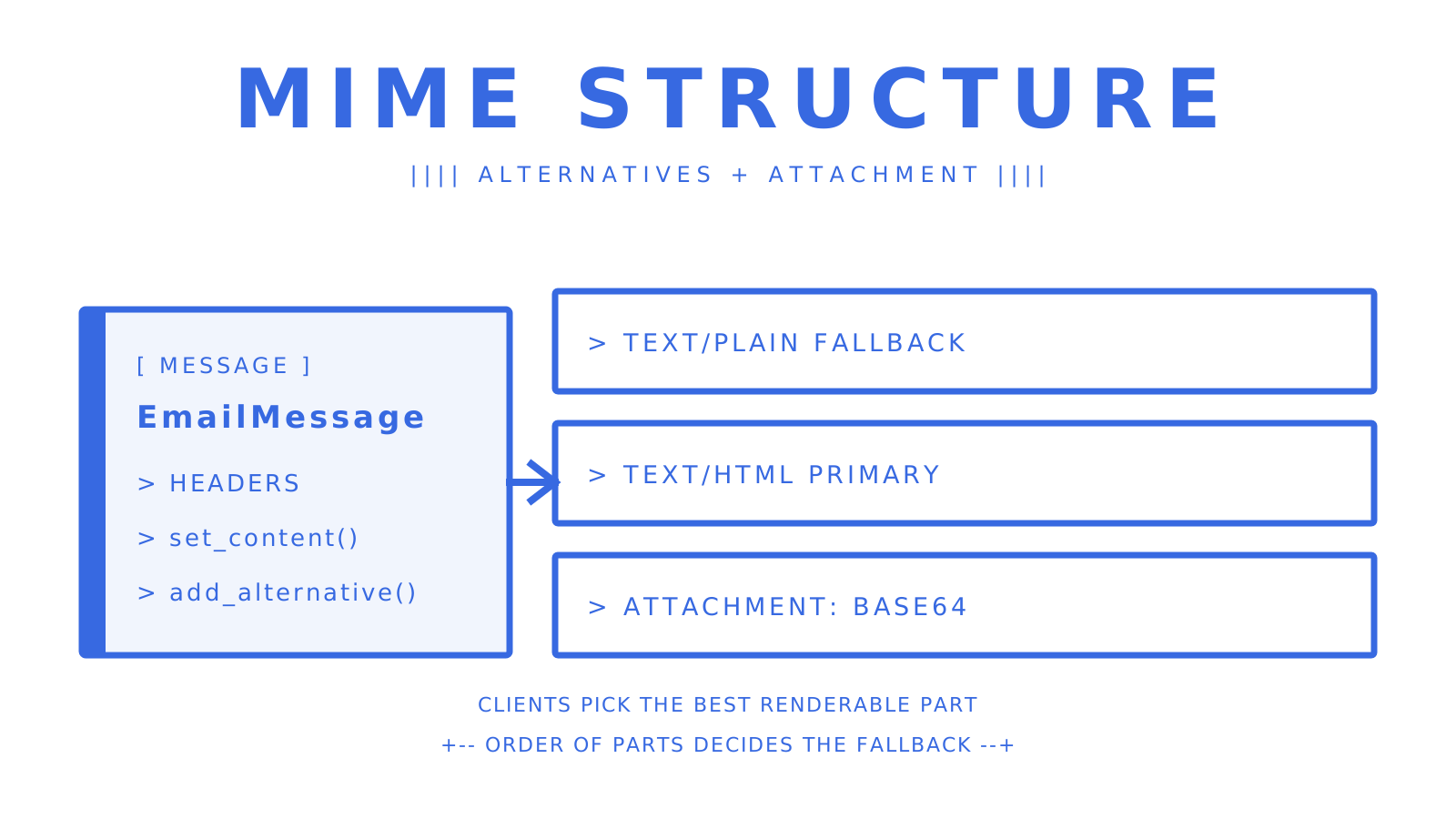
set_content()with your plain-text body first, thenadd_alternative()withsubtype="html"to attach the HTML version. This produces amultipart/alternativestructure automatically, and mail clients pick whichever version they can render, falling back to plain text when HTML isn't supported.
- Keep the plain-text version genuinely readable on its own, not just a stripped copy of the HTML, since some recipients and spam filters weight it in deliverability decisions.
- Use
add_attachment()for binary files: pass the file bytes, amaintype, asubtypeand afilename, and the library handles base64 encoding and the correct MIME headers for you.
- For addressing, the
email.headerregistry.Addresshelper builds correctly formatted display names and addresses, which avoids manual string concatenation errors like unescaped commas in a "Display Name <email>" header.
- Set a
Message-IDheader explicitly when your application needs to track a specific send, since some SMTP relays generate their own and others don't.
msg = EmailMessage()
msg["Subject"] = "Your invoice is ready"
msg["From"] = "billing@example.com"
msg["To"] = "customer@example.com"
msg.set_content("Your invoice is attached. Thanks for your business.")
msg.add_alternative(
    "<p>Your invoice is attached. <strong>Thanks for your business.</strong></p>",
    subtype="html",
)

with open("invoice.pdf", "rb") as f:
    msg.add_attachment(
        f.read(), maintype="application", subtype="pdf", filename="invoice.pdf"
    )
The Python documentation's email examples walk through this exact combination of alternatives and attachments, and it's worth reading them once even if you copy the pattern above, because the order of set_content() and add_alternative() calls determines which part becomes the fallback. Get that order wrong and some clients render the plain text as the primary body instead of the HTML.
Attachments are also where a lot of MIME-related bugs live: wrong content types, missing filenames, or attachments that arrive corrupted because they were read in text mode instead of binary. If attachments are a core part of what you're building, rather than an occasional invoice, it's worth reading a deeper comparison of attachment handling approaches before you commit to a pattern that doesn't scale past a few megabytes.
Connecting and sending securely: SMTP, STARTTLS and SMTP_SSL
There are two accepted ways to open a secure SMTP connection in Python, and both are documented directly in smtplib. Which one you use depends on the port your provider expects.
SMTP_SSLon port 465 wraps the entire connection in TLS from the first byte. Usesmtplib.SMTP_SSL(host, 465, context=ssl.create_default_context())and you get an encrypted channel before any command is sent.
- SMTP plus STARTTLS on port 587 opens a plaintext connection, then upgrades it. Call
smtplib.SMTP(host, 587), thenserver.starttls(context=ssl.create_default_context()), and only sendlogin()or message data after that call succeeds.
- Always pass an explicit
SSLContextfromssl.create_default_context()rather than relying on defaults, since it enables certificate verification and modern cipher preferences out of the box.
- Call
server.login(user, password)before sending, catchsmtplib.SMTPAuthenticationErrorandsmtplib.SMTPExceptionseparately, and always close the connection withserver.quit()or use the connection as a context manager so it closes automatically on error.
- Set a
timeoutargument on theSMTPorSMTP_SSLconstructor, a few seconds is enough for most providers, so a hung connection doesn't stall your whole process.
For development, server.set_debuglevel(1) prints the raw SMTP conversation, every command and response, to your console, which is the fastest way to see why a server rejected a message. The smtplib documentation covers all of these methods along with the source_address and local_hostname parameters, which matter if you're sending from a machine with multiple network interfaces or need to bind to a specific outbound IP.
Skipping TLS entirely, sending credentials and message bodies in plaintext, is not a shortcut worth taking even for internal scripts, since credentials leaked over an unencrypted connection are just as usable by an attacker as ones leaked any other way.
Templating and bulk sending: using libraries to reduce boilerplate
Once you're sending more than the occasional notification, writing raw EmailMessage code for every template gets repetitive fast. This is where a higher-level python email sending library earns its place.
- Red Mail wraps SMTP setup, HTML templating with Jinja and attachment handling behind a single
EmailSenderobject, so a send call looks like configuration rather than MIME construction, and it installs with a standard pip command as shown in the Red Mail documentation.
- python-emails offers a similarly concise API for HTML and plain-text messages, attachment handling and multiple backends including SMTP and async delivery via
aiosmtplib, according to the project's GitHub page.
- yagmail trades flexibility for brevity, aimed specifically at Gmail-based sending with minimal configuration.
from redmail import EmailSender

email = EmailSender(host="smtp.example.com", port=587, username="user", password="pass")
email.send(
    subject="Weekly digest",
    receivers=["customer@example.com"],
    html="<h1>Hi {{ name }}</h1><p>Here's your digest.</p>",
    body_params={"name": "Alex"},
)
Both Red Mail and python-emails add Jinja-style templating and CSS inlining on top of what EmailMessage gives you natively, which matters once your HTML emails start carrying real styling rather than a single paragraph.
For bulk sending, three patterns cover most cases. Batching through a provider's bulk endpoint, where the send API itself accepts multiple recipients per call, keeps connection overhead low. Queue workers, a task queue like Celery or RQ pulling send jobs off a queue, isolate slow or failing sends from your main application thread. Async job runners handle the same idea inside a single process using asyncio, useful when you don't want the operational weight of a separate queue.
When bulk sending from a script rather than a queue, add a short sleep between batches, most providers rate-limit aggressively, and hitting that limit mid-run is harder to recover from than sending slightly slower.
Using an email provider HTTP API from Python: a practical pattern
Raw SMTP gets a message to a server. It tells you nothing about what happened after that: whether the message bounced, landed in spam, or was opened. That gap is why most production systems eventually move to a provider's HTTP API instead of, or alongside, SMTP.
Provider APIs typically return delivery status, expose analytics dashboards and push events (delivered, bounced, complained) to a webhook endpoint you control. The tradeoff is cost per message and being tied to that provider's API surface and rate limits rather than the portable SMTP protocol.
- Call the provider's REST endpoint with
requests.post(), sending your API key in anAuthorizationheader and the message payload as JSON.
- Check the response status code explicitly: a
200or202means accepted, a4xxusually means a payload or authentication problem worth logging and fixing, and a5xxis the provider's problem, worth a retry with backoff.
- Validate the response body against the fields the provider documents, don't assume a 200 status alone means the message will actually be delivered, since acceptance and delivery are different events.
import requests

response = requests.post(
    "https://api.provider.example/v1/send",
    headers={"Authorization": "Bearer YOUR_API_KEY"},
    json={
        "from": "app@example.com",
        "to": ["customer@example.com"],
        "subject": "Welcome aboard",
        "html": "<p>Thanks for signing up.</p>",
    },
    timeout=10,
)
response.raise_for_status()
Webhook handling is the other half of this pattern. Providers push delivery, bounce and complaint events to an endpoint you host, and your handler needs to verify the signature, deduplicate by event ID (providers do retry webhook delivery, so the same event can arrive twice), and update your own records accordingly. A developer-focused breakdown of SMTP versus API sending walks through the operational tradeoffs in more depth, including where each approach tends to break down at scale. The Real Python guide to sending email covers the same choice in depth.
The migration point from SMTP to an API usually arrives earlier than developers expect: the moment you need to know whether a message actually delivered, not just whether your script exited without an exception. A practical migration checklist: confirm domain authentication is already correct, move credentials to a scoped API key rather than an SMTP password, replace direct send_message() calls with an API client, and wire up webhook handling before switching production traffic over, not after.
Gmail API and OAuth quickstart notes
The Gmail API solves a different problem to SMTP or a transactional Email API: it's for reading and sending mail as a specific Gmail user, which is why it requires OAuth consent rather than a username and password.
- Use the Gmail API when your application needs to act on behalf of an individual user's Gmail mailbox, reading their inbox, sending as them, rather than sending from a service account your application owns outright.
- The quickstart requires enabling the Gmail API in Google Cloud Console, creating an OAuth client ID, installing
google-api-python-clientandgoogle-auth-oauthlib, and requesting the specific scopes your application needs (send-only scopes are narrower and safer than full mailbox access).
- Store the resulting OAuth refresh token securely, since it's a long-lived credential that grants ongoing access until revoked, and treat it with the same care as a password.
The Gmail API Python quickstart walks through the Google Cloud setup and the first authenticated call in full.
Compared to SMTP, the OAuth consent flow adds real setup overhead: a consent screen, scope approval and token refresh logic that a plain SMTP login doesn't need. Compared to a provider API, it's the right tool specifically when you need per-user mailbox access rather than a single sending identity your application controls, and it's the wrong tool when what you actually want is high-volume transactional sending, where the consent flow and per-user quotas just get in the way. Teams that hit OAuth token expiry or scope mismatch errors mid-integration aren't alone: it's common enough that a dedicated troubleshooting guide for Gmail OAuth sending exists just to cover the recurring failure modes.
Deliverability, authentication and security checklist
Getting a message accepted by an SMTP server isn't the same as getting it into an inbox. Deliverability rests on domain authentication that has to be configured before you send your first production message, not after complaints start arriving.
- Publish an SPF record listing which servers are allowed to send on your domain's behalf, so receiving servers can check the sending IP against it.
- Sign outgoing mail with DKIM, which lets receivers verify the message wasn't altered in transit and confirms it genuinely came from your domain.
- Publish a DMARC policy that tells receivers what to do when neither aligned SPF nor aligned DKIM passes, quarantine, reject, or just report, and where to send those reports.
- Verify all three with DNS lookup tools once configured, since a typo in a TXT record silently defeats the whole setup.
- Store API keys and SMTP credentials as encrypted secrets or environment variables, never committed to source control, and scope API keys to the minimum permission the integration actually needs.
- Verify webhook payloads with HMAC signature checks where the provider supports them, rather than trusting that a POST to your endpoint is genuine just because it arrived on the expected URL.
Providers commonly flag accounts once bounce rates climb past a defined threshold and complaint rates cross a separate, much lower one, which is why dashboards built for this track both figures continuously rather than as an afterthought. Watching those two numbers, and alerting on them before they become a suspended sending account, is cheaper than rebuilding domain reputation after the fact. A collection of deliverability-focused guides covers SPF, DKIM and DMARC configuration in more detail for teams setting this up for the first time.
None of this is optional once you're sending on behalf of a business domain. A misconfigured or absent SPF record is one of the more common reasons a technically correct email lands in spam.
Testing, debugging and retries: tactics for reliable programs
Sending email in a test suite without actually hitting a real mail server is worth setting up early, since it's the difference between a test that runs in milliseconds and one that depends on network conditions and a provider's willingness to accept test traffic.
- Run a local debug SMTP server during development and unit tests, so messages print to console instead of leaving your machine. Python's old
smtpdmodule served this role, but it was removed in Python 3.12; the standard library's own removal note names the third-partyaiosmtpdlibrary as the replacement.
- Load credentials from environment variables rather than config files checked into source control, and use a separate
.envfor test versus production settings.
- Set
server.set_debuglevel(1)during development to see the full SMTP command and response sequence, which is usually the fastest way to diagnose an authentication or formatting failure.
- Log every send attempt with a unique ID tied to the business event that triggered it (an order ID, a signup ID), so a failed send can be traced back to what caused it.
- Retry transient failures (timeouts, SMTP
4xxreplies, HTTP5xxresponses from a provider API) with exponential backoff rather than an immediate retry loop, and cap the number of attempts; an SMTP5xxreply is a permanent failure, so fix the cause instead of retrying.
- Use an idempotency key, an application-generated ID passed with the send request, so a retried call doesn't result in the recipient getting the same email twice.
The retry and idempotency pattern matters more than it looks. A network blip halfway through a send can leave you unsure whether the message went out, and retrying blindly risks a duplicate; retrying with an idempotency key or checking your own send log first avoids that entirely.
Advanced patterns: async sending, inbound processing and event-driven mail
Once sending becomes a meaningful part of your application's request path, blocking SMTP calls inside a web request handler start to hurt. Async libraries solve that specific problem.
- aiosmtplib provides an async-native SMTP client with the same conceptual API as
smtplib, letting you send email without blocking the event loop in anasyncio-based application.
- aiosmtpd goes the other direction, letting you run your own async SMTP server, useful for local testing or for building inbound processing pipelines you control end to end, and it's documented on PyPI.
- For inbound mail, three architectures cover most needs: webhook-based event delivery from a provider, polling a mailbox API for new messages, or connecting via IMAP or POP3, which is the most operationally heavy of the three and worth avoiding unless you specifically need to work with an existing mailbox you don't otherwise control.
- Design inbound consumers around named event types (delivered, bounced, complained, received) rather than a single generic "email event" handler, since each type usually needs different downstream logic.
If your application already reacts to events elsewhere (order placed, payment failed), treat inbound and delivery email events the same way: as messages on a queue your existing event consumers can subscribe to, rather than a special case bolted onto the side.
A guide to mailbox API design for high-volume, multi-tenant email covers this event-driven inbound pattern in more depth, including where a persistent mailbox model beats a webhook-only approach for applications that need to maintain conversation threads over time rather than just react to single messages.
Sendmux: a developer option for mailbox APIs, multi-provider sending and event streams
If your project has outgrown a script that logs into one SMTP account, Sendmux gives you a mailbox API and multi-provider outbound routing behind a single set of credentials, rather than stitching together a sending provider, a Gmail OAuth workaround, a separate parser and a webhook relay with its own billing.
- Every agent, customer or tenant gets a persistent mailbox with a real address, on the included
@myagent.mxdomain or a verified custom domain, with messages, threads and attachments accessible through a REST API.
- Outbound sending routes through your own connected providers, Gmail OAuth, Microsoft 365, custom SMTP, or a managed Amazon SES account active by default, with per-provider quotas and health checks that skip an account that's failing.
- Inbound events (delivered, bounced, received, spam-flagged) arrive as signed webhooks or through a Server-Sent Events stream, so you're not polling IMAP for new mail.
- SDKs cover Python, TypeScript, Go, PHP, Ruby and Rust, and an MCP server exposes the same mailbox, sending and management tools to AI agent frameworks directly.
This fits teams building multi-tenant products where every customer or workspace needs its own mailbox, and teams building agent-facing email where inbound processing and thread persistence matter more than a single outbound send call. Pricing runs on usage rather than per-inbox fees: Free, Pro and Enterprise plans start at $0 and $7 per team per month respectively, with usage billed per accepted recipient rather than a flat per-mailbox charge. Worth a look if raw SMTP scripts have started to feel like the wrong layer for what you're actually building: check the sending API with provider failover or the inbound mailbox product page for the details relevant to your stack.
Sources
Frequently Asked Questions
What's the simplest way to send email in Python?
Use the standard library's EmailMessage class to build the message and smtplib.SMTP_SSL to send it over a TLS connection. This needs no extra installation since both modules ship with Python, and the official examples cover the exact construction pattern.
When should I use an Email API instead of SMTP?
Reach for a provider API once you need delivery tracking, bounce and complaint webhooks, or analytics that raw SMTP simply doesn't report back to you. The Real Python sending guide frames this as a scale and reliability decision: SMTP suits simple, low-volume automation, while an API earns its cost once deliverability and observability actually matter to the business.
Which Python email library reduces the most boilerplate?
Red Mail and python-emails both wrap SMTP setup, HTML templating and attachment handling behind a simpler API than raw EmailMessage code. Check the Red Mail documentation or the python-emails project page to compare their templating and backend options against what your project actually needs.
How do I handle inbound email programmatically in Python?
Inbound processing typically works through provider webhooks, a mailbox API you poll or subscribe to, or a direct IMAP or POP3 connection to an existing mailbox. Webhooks and mailbox APIs are generally easier to maintain than IMAP polling once volume grows, since they push structured events rather than requiring you to parse raw messages yourself.
Does Sendmux replace SMTP for sending Python email?
Sendmux sits on top of SMTP rather than replacing the protocol: it routes outbound sends through providers you connect (Gmail OAuth, Microsoft 365, custom SMTP or a managed Amazon SES account) while giving you one API, one set of credentials and persistent mailboxes for inbound mail. Pricing details are on the Sendmux pricing page.
