Email Webhooks Built for Developers: Signing, Idempotency and Replay

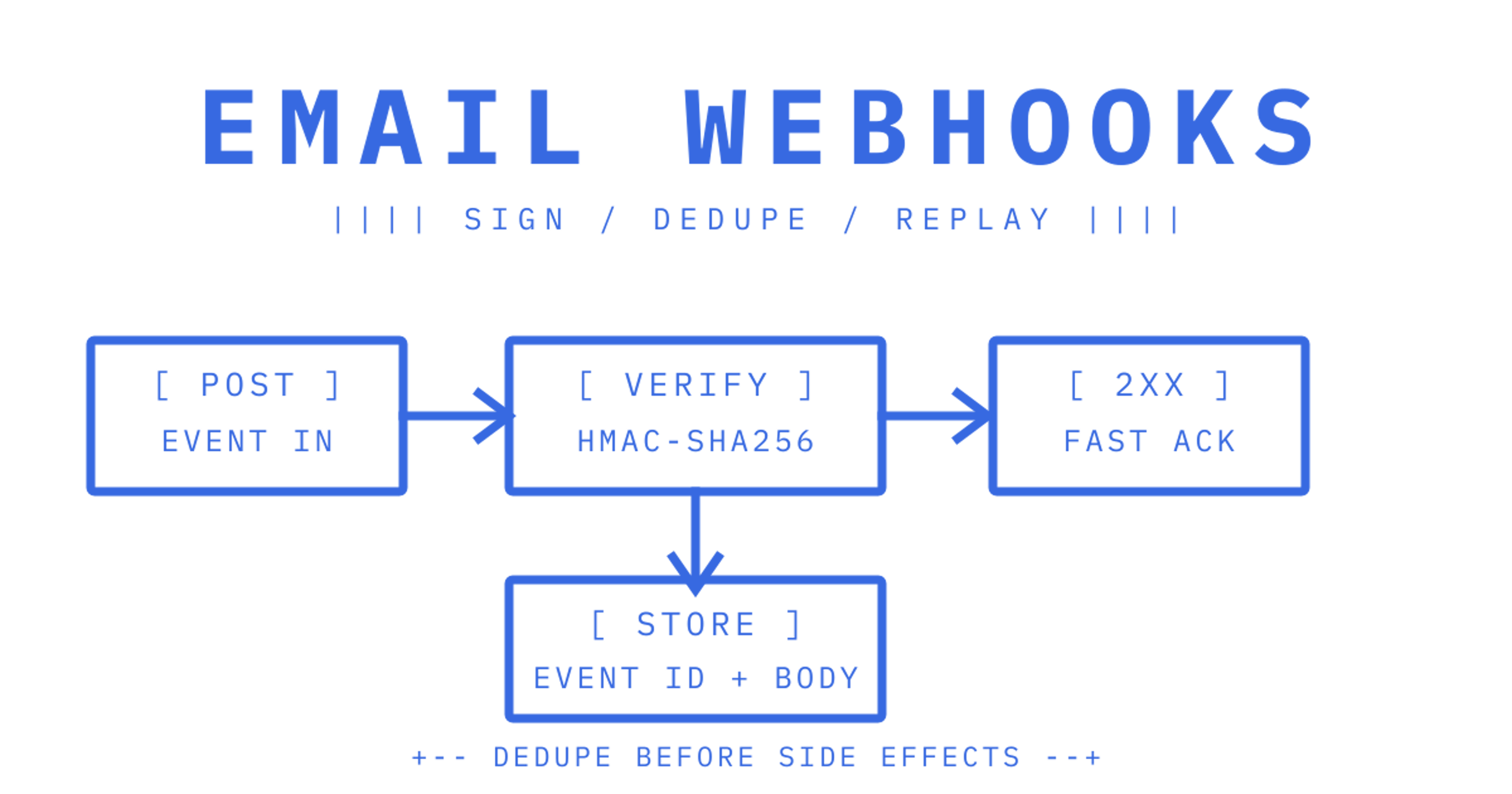
For most agent and automation builds, mailbox-first inbound handling beats a bare webhook, because agents need threaded, parsed content rather than a metadata ping. For delivery analytics and lifecycle tracking, outbound event webhooks remain the right tool. Sendmux covers both: persistent mailbox state with parsed payloads, plus signed webhooks for delivery, bounce and complaint events. The sections below cover payload shape, signing, retries and a checklist you can apply to any provider.
TL;DR:
- Outbound webhooks are suitable for tracking message status and delivery outcomes, while inbound webhooks are essential for reading and responding to incoming messages.
- Payloads should include stable event IDs, full message content or fetch pointers, authentication results, and conversation identifiers to ensure proper processing and deduplication.
- Signature verification via HMAC-SHA256 is critical for security, and secret rotation requires accepting both old and new secrets during an overlap period.
- Webhook endpoints must respond within a few seconds over HTTPS, with retry handling, backpressure management, and detailed logging to ensure reliable delivery.
- Using a mailbox-first approach like Sendmux simplifies integration by providing persistent message state, signed webhooks and tooling that covers the pipeline, reducing operational complexity.
Table of Contents
Inbound vs outbound webhooks: choose by workflow shape
The first decision in any email integration isn't which provider to pick. It's which direction of data actually solves your problem, and the two directions behave nothing alike.
Outbound event webhooks tell you what happened to a message you sent: delivered, bounced, opened, clicked, complained. These are small, structured notifications fired after a send event, and they're what you want for deliverability monitoring, suppression list management, or feeding a sales engagement tool. The payload is lightweight because the content already exists on your side. You sent the email, you know the body, you just need the outcome.
Inbound webhooks (or mailbox-first flows) go the other direction: a message arrives at an address you control, and your system needs to act on it. This is the shape almost every AI agent, support bot or automated reply workflow actually needs. The agent isn't tracking a send it made, it's reacting to something a human or another system sent it, and it needs the full message: subject, body, attachments, thread context.
The practical difference shows up fast once you start building:
- Outbound webhooks are typically small JSON blobs (a few hundred bytes) describing an event, not a message.
- Inbound flows often require either the full message body in the payload or a fetch-by-id step to retrieve it, which changes your auth model and latency budget.
- Mailbox-first platforms persist state (threads, folders, read status) so an agent can query history later, something a one-shot webhook can't do on its own.
- Change-notification patterns, as used by Microsoft Graph's webhook delivery model, often send only metadata and require a follow-up GET to retrieve the actual message, plus subscription renewal to avoid silent drops.
That last point matters more than it looks. A change-notification webhook is a doorbell, not a parcel. If your agent architecture assumes the webhook body contains the email, and your provider only sends a pointer, you'll build half an integration before noticing messages are missing content. Change notifications also need lifecycle management: subscriptions expire, and resource-data inclusion (sending the actual content) is optional and typically requires encryption certificates.
For AI-agent products specifically, the hard part usually isn't receiving a POST request at all. It's mailbox identity, OAuth lifecycle management and reliable message retrieval once that POST arrives. An agent that needs to reply in a thread, check prior messages, or hold state across a conversation needs something closer to a mailbox than a webhook.
So the decision rule is simple: if you're tracking what happened to mail you sent, outbound event webhooks are sufficient and simpler. If you're building something that reads, understands and responds to mail, you want mailbox-first inbound, with webhooks layered on top for the events that matter (new message arrived, delivery confirmed). Most serious automation builds end up needing both, just for different halves of the workflow.
What a good webhook payload contains
Before you write a single line of handler code, pull a real sample payload from the provider's docs and check it against this list. Missing fields here cause the kind of bugs that only show up in production, three weeks after launch, when a message with an unusual encoding breaks your parser.
Envelope fields. Every solid payload has an event id, an event type, a timestamp and a schema version. Provider examples typically show an event envelope with a stable id and schema_version, and this matters because duplicates are normal in webhook delivery, not an edge case. Without a stable id to dedupe against, you'll process the same bounce or the same inbound message twice, which in an agent workflow can mean two replies sent for one email.
Message content. For inbound flows you need subject, sender, recipient list, a text body, an HTML body, and attachment handling, either inline (base64) or as a fetch pointer. Inbound email-to-HTTP integrations generally require parsing sender, recipients, subject, body, headers and attachments before anything structured can be posted to your application. Check whether attachments arrive as bytes in the payload or as a link you call back for, because that decision affects your payload size limits and your latency.
Security and reconciliation metadata. Good payloads include the raw headers, SPF/DKIM/DMARC authentication results, and identifiers for the mailbox and thread the message belongs to. These aren't decorative. SPF and DKIM results let you flag spoofed senders before an agent acts on a forged instruction, and thread identifiers let you reconstruct a conversation without rebuilding it from subject-line guessing.
A few fields worth checking specifically:
- Does the payload include a thread or conversation id, or will you need to infer threading from subject lines and
In-Reply-Toheaders?
- Are attachment metadata (filename, size, content type) included even when the file itself is fetched separately?
- Does the provider expose raw headers, or only a parsed summary?
- Is there a distinct field for the event's schema version, so a provider update doesn't silently break your parser?
Pro tip: check whether the provider sends the full message in the webhook or only a change notification requiring a follow-up fetch, because that single design choice decides your entire integration's latency and failure modes.
The trade-off that matters most is full delivery versus change-notify-and-fetch. Full delivery is simpler to build against but makes payloads larger and ties your throughput to webhook delivery speed. Change-notify-and-fetch is lighter per event but adds a round trip, API rate limit exposure, and a second failure point if the fetch call errors after the notification succeeded. There's no universally right answer, it depends on message volume and how time-sensitive your agent's response needs to be.
Duplicate events are a certainty, not a possibility, in any webhook system built on at-least-once delivery semantics, which is why dedup-by-id belongs in your handler from day one rather than as a later fix.
Security and authenticity: signature verification and secret rotation
Every webhook endpoint you expose is a public URL that accepts POST requests. Without signature verification, anyone who finds it can post fake delivery events, fake inbound messages, or fake bounce notifications, and your system will act on them as if they were real.
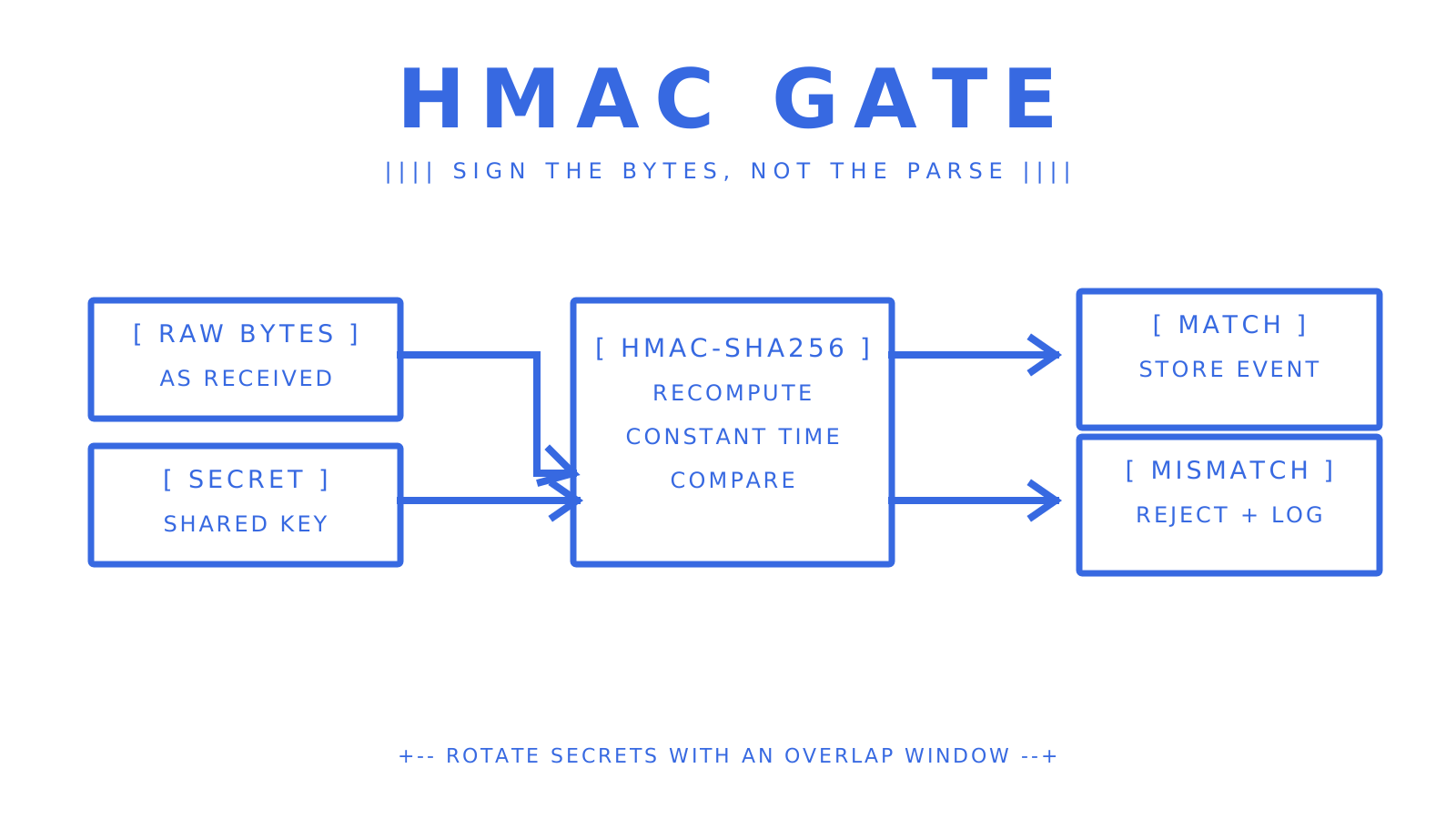
The standard pattern is HMAC-SHA256 signing, where the provider computes a signature over the raw request body using a shared secret, and sends it in a header such as X-Signature or a provider-specific equivalent. Your job is to recompute that signature on your end and compare it, and the details matter more than they look:
- Read the raw request bytes before any JSON parsing or middleware touches them, since re-serialised JSON rarely matches the original byte-for-byte.
- Compute HMAC-SHA256 over those raw bytes using your stored secret, and compare it to the header value using a constant-time comparison function, never a plain string equality check.
- Reject the request immediately on mismatch, before any business logic runs, and log the rejection for monitoring.
- During secret rotation, accept signatures from both the old and new secret for a short overlap window, because in-flight retries from the provider may still be signed with the old one.
- Persist the raw payload and delivery metadata (headers, timestamp, attempt count) alongside the verified event, so you can replay or audit it later without re-requesting it from the provider.
That rotation step is the one most teams get wrong on the first attempt. If you rotate a secret and immediately reject the old one, any request already in flight when you rotated will fail, and providers that retry with backoff may keep retrying against a secret you've already killed. Keep both valid until you're confident no in-flight requests remain, typically a window measured in minutes, not seconds.
Pro tip: store the raw payload exactly as received, before verification and before parsing, because replaying an event later only works cleanly if you can re-sign the original bytes rather than a reconstructed approximation.
Common pitfalls worth naming directly: verifying against a parsed object instead of raw bytes, using a timing-unsafe string comparison, forgetting to handle the rotation overlap window, and failing to log rejected signatures (which means you won't notice an attack attempt until something downstream breaks).
Retries, ordering, idempotency and replay strategies
Webhook delivery is at-least-once, not exactly-once, and that single fact should shape every handler you write. Providers retry failed deliveries with backoff, which means your endpoint will, sooner or later, receive the same event twice. If your handler sends a reply, charges a credit, or updates a record every time it fires, duplicates will cause real damage, not just log noise.
The fix is dedup on a stable key, not a timestamp or a guess. Use the event id the provider assigns, or an X-Idempotency-Key header where one's offered, and check it against a store (even a simple database unique constraint) before running side effects.
- Treat every handler as idempotent: check the event id against processed records before acting, not after.
- Design for out-of-order arrival, since retries and network conditions mean event 2 can arrive before event 1.
- When order matters (a bounce arriving before the delivery confirmation it relates to), reconcile by fetching the related record rather than trusting arrival sequence.
- Store every verified event, even ones you've already processed, so a dead queue or failed job can be replayed without contacting the provider again.
Replay deserves its own attention because it's the feature most teams forget to plan for until they need it during an outage. If your processing pipeline goes down for twenty minutes, what happens to the forty events the provider sent during that window? Good replay design rebuilds the request from stored canonical event data and re-signs it, so a replayed event looks identical to the original to your verification logic, and metadata about pipeline configuration at the time helps you confirm a replay reflects current behaviour rather than a stale rule set.
Retention matters here too. Keep attempts, status, latency and payloads for long enough to debug a slow-discovered bug, a week at minimum, longer if your compliance posture requires an audit trail.
On monitoring, three signals tell you whether your webhook pipeline is healthy: the size of your dead-letter queue (anything growing steadily means a handler bug, not transient load), the average attempt count per event (climbing attempt counts mean your endpoint is failing before success), and your replay rate (a high replay rate against a particular time window usually points at a downstream outage, not a webhook problem). Alert on all three rather than waiting for a support ticket to tell you something's wrong.
Webhook endpoint requirements and operational best practice
Providers don't wait forever for your endpoint to respond, and the single most common cause of "missing" webhook events is a slow handler, not a provider outage.
- Serve your endpoint over HTTPS only. Plaintext HTTP webhook endpoints are a non-starter for anything carrying real message content or authentication headers.
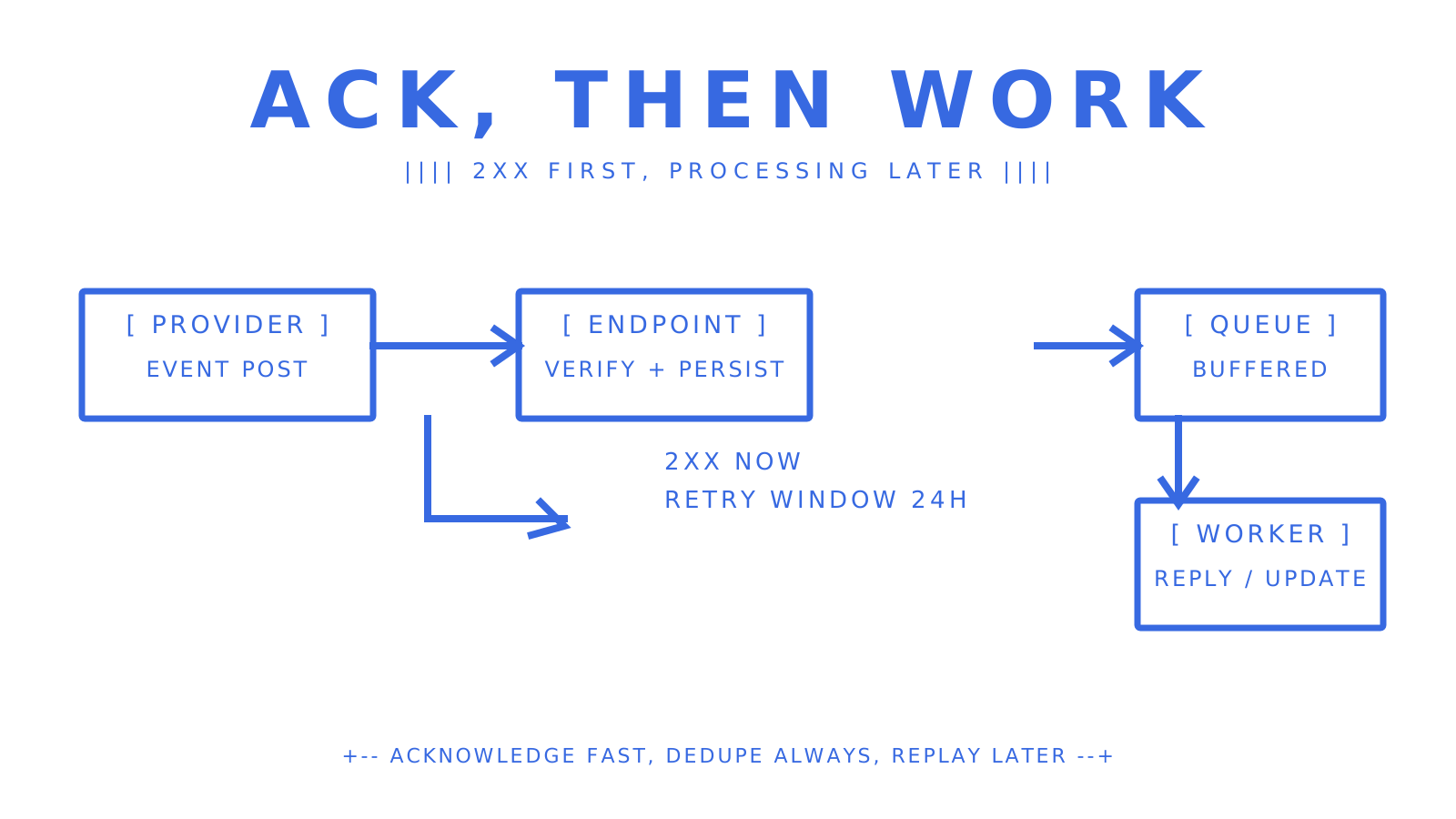
- Respond fast. Microsoft Graph's webhook delivery enforces a timeout of a few seconds, and most providers sit somewhere in the 3 to 5 second range. Persist the event and return a 2xx (or 202 Accepted) immediately, then process the actual work asynchronously in a queue.
- Know which status codes trigger a retry. A 5xx or a timeout usually means the provider retries with backoff. A 4xx typically means the provider treats delivery as a terminal failure and stops trying, so returning the wrong status code on a transient error can permanently lose an event.
- Build backpressure handling. If your downstream queue fills up during a traffic spike, your endpoint should still accept and buffer the event rather than timing out and forcing a retry storm.
- Log everything: the raw event, the number of attempts, latency per attempt, and the last error if one occurred. This is what lets you answer "did we actually receive this?" six weeks later when a customer asks why an email seemingly vanished.
Rate limiting cuts both ways here. Your endpoint needs to handle bursts without falling over, and you also need to respect any rate limits the provider itself imposes on retries or on your outbound API calls if you're doing a fetch-by-id pattern. A queue in front of your processing logic, something as simple as a managed message queue or even a database-backed job table, smooths out both problems at once.
The pattern that trips teams up most often: treating "return 200" and "finish processing" as the same step. They're not. Acknowledge receipt fast, do the real work in the background, and your webhook pipeline will survive provider timeouts, traffic spikes and the occasional slow downstream API without silently dropping events.
Developer buying checklist: what to require from a provider
Picking an email webhook provider on the strength of a demo is how teams end up rebuilding the integration six months later. Here's what to check before you commit:
- Documented event schemas with sample payloads. You should be able to see a real example of every event type before you write a line of code, not just a field list in prose.
- Clear inbound vs outbound scope. Confirm whether the provider sends full message content or only change notifications requiring a fetch, and whether attachments arrive inline or via a link.
- Signature verification and secret rotation support. A provider without documented HMAC signing and an overlap window for rotation is asking you to trust an unauthenticated endpoint.
- Replay and retention windows. Ask how long delivery attempts, payloads and statuses are retained, and whether you can manually trigger a replay after an outage.
- Stable event IDs and idempotency support. This is non-negotiable for any handler that performs a side effect, which is almost all of them.
- Delivery logs and debugging tools. You want a dashboard where you can see attempt history, latency and failure reasons without digging through your own logs first.
- SDKs, an OpenAPI spec, and a CLI. These aren't nice-to-haves, they're the difference between a half-day integration and a week spent reading undocumented behaviour.
- A cost model that matches your shape. Per-message pricing suits high-volume single mailbox senders; per-mailbox pricing suits platforms with many tenants and lower volume per tenant. Check which one matches your actual ratio before signing up.
This checklist echoes what operationally mature webhook documentation emphasises directly: schema clarity, scope, signing, retry and replay, stable IDs, and a cost model that doesn't punish the shape of your workload. Operational completeness, not feature count, is what separates a webhook system you can trust from one you'll be firefighting in production.
Pro tip: before committing, send yourself a test event for every event type you plan to handle, including a deliberately malformed one, and confirm your handler behaves correctly on all of them, not just the happy path.
If you're serving many tenants or many agents, pay particular attention to whether pricing is per mailbox or per message. A platform charging a flat fee per mailbox gets expensive fast once you're provisioning hundreds of them for individual customers or agent instances, regardless of how little mail each one sends.
Implementation patterns and quick recipes
Once you've chosen a direction and picked a provider, these are the patterns that get a working integration into production fastest without cutting corners that cause pain later.
Inbound mailbox flow vs change-notify-and-fetch. If your provider hands you the full parsed message in the webhook body, your handler is straightforward: verify, persist, act. If it only sends a change notification, you need a second step: call back to fetch the actual message by id, and treat that fetch as a potential failure point with its own retry logic. Use the direct-delivery pattern whenever it's available, it removes an entire category of bugs.
Webhook gateway buffering. When you're receiving from multiple providers, or need to transform payloads into a common internal shape, a gateway layer in front of your application logic can buffer bursts, normalise formats and give you a single place to inspect delivery health. A webhook gateway earns its place when you need buffering, transformation or fan-out, not as a substitute for mailbox parsing or OAuth-based sync, which still has to happen somewhere upstream.
Minimal handler recipe. This is the shape every inbound or outbound handler should follow, regardless of provider:
- Verify the signature against the raw request bytes before touching the parsed body.
- Persist the event id and payload to your store, checking for a duplicate before any side effect runs.
- Enqueue the actual processing (sending a reply, updating a record, triggering an agent action) as a background job.
- Return a 2xx response immediately once the event is durably stored, not after processing finishes.
Testing recipes. Most providers support sending a test event to your endpoint before you go live, use it for every event type, not just the one you're actively building against. Stand up a staging endpoint behind a tunnel or a dedicated test URL so you can iterate without touching production data. And once you have delivery logs with stored raw payloads, build a small internal tool to replay any historical event against your staging handler, it turns "a customer says this didn't work three weeks ago" into a five-minute diagnosis instead of a guessing game.
Pro tip: keep a running library of real captured payloads, including edge cases like empty bodies, oversized attachments and malformed headers, and run your handler against the whole library whenever you change the parsing logic.
For teams building AI agents specifically, Sendmux's Mailbox API guide covers the filtering and sync endpoints that reduce the need for a separate fetch step, since retrieval-precision filters mean you can query exactly the messages you need rather than pulling an entire inbox and filtering client-side.
How Sendmux maps to the checklist and reduces integration work
Run Sendmux against the checklist above and most of the assembly work disappears into the platform rather than your codebase.
Mailbox-first, not webhook-only. Every agent, customer or tenant gets a persistent mailbox, with messages, threads, folders and attachments available through the Mailbox API rather than reconstructed from a stream of notifications. Agents read cleaned message text and HTML with quoted history already stripped, so they act on a new reply without parsing a raw MIME thread, while raw body endpoints stay available when the original is needed. That solves the full-delivery-versus-fetch trade-off from the earlier section by default: the mailbox holds state, so a fetch is a query, not an emergency recovery step.
Signed webhooks as an operational primitive, not an afterthought. Sendmux webhooks are signed HMAC-SHA256 in an X-Sendmux-Signature header, filterable by mailbox and event type, with non-2xx responses and timeouts retried across a 24-hour window, covering delivered, bounced, complained, rejected, delayed, received and spam-received events. Delivery attempts, status, latency and payloads are retained for seven days, which covers the replay and debugging checklist item directly rather than leaving it to a third-party gateway.
Scoped credentials instead of one shared secret. Mailbox keys are scoped to a single mailbox with explicit send, receive, read and update permissions, which limits the blast radius of a leaked key to one mailbox rather than an entire team's mail.
Bring-your-own outbound, centralised inbound events. Sendmux routes outbound mail through a customer's own Gmail OAuth, Outlook, custom SMTP or managed Amazon SES account, preserving sending reputation on infrastructure the customer already owns, while inbound events and delivery logs stay centralised in one API regardless of which provider sent the mail. That's the routing gap most mailbox-first competitors leave open.
Tooling that matches the checklist's last line. OpenAPI 3.1 specs, SDKs across TypeScript, Python, Go, PHP, Ruby and Rust, a CLI, and dashboard webhook inspection mean a team can verify schemas and test delivery without reading undocumented behaviour from scratch, closing the "SDKs, OpenAPI, CLI" line of the checklist by design rather than by assembly.
Opinion: pick the simplest reliable architecture for your use case
The temptation on every integration is to build for the architecture you'll supposedly need at scale. Resist it. Start with the simplest reliable path: if you only need delivery telemetry, a bare outbound webhook with proper signing and idempotency is enough, don't bolt on a mailbox you don't need. If you're building an agent that reads and replies to mail, go mailbox-first from day one rather than retrofitting state management onto a webhook that was never meant to carry it.
Run your first pilot on a single mailbox or a single sending domain, and watch three things closely: your dead-letter queue size, your attempt counts per event, and whether duplicate side effects show up in your own logs. If any of those three climb during a modest pilot, they'll climb faster at scale, and it's far cheaper to fix idempotency logic against ten test events than against ten thousand production ones.
The most common pitfall isn't a provider failing you, it's a team skipping signature verification "for now" and never circling back, or assuming at-least-once delivery was a theoretical risk rather than a Tuesday-afternoon certainty. Build for duplicates and outages from the first commit, not after the first incident.
Try Sendmux: quick next steps and links to product pages
If the checklist above left you counting how many separate services you'd need to stitch together, that's the exact problem Sendmux is built to remove. Mailbox provisioning, parsed message content, signed webhooks and delivery logs sit in one API instead of a sending provider, a Gmail OAuth hack, a parser and a webhook relay billed separately.
A practical pilot looks like this:
- Create a mailbox on the included @myagent.mx domain, or verify a custom domain if you need your own.
- Configure a webhook filtered to the event types you actually need (received, delivered, bounced) rather than subscribing to everything.
- Run a small pilot sending through your own connected provider or the managed Amazon SES account, and watch the delivery logs for attempt counts and latency.
The Free plan costs $0 per month and includes one webhook, two mailboxes and $1 of starting credit, enough to validate signing and event handling before committing to anything. The Pro plan runs $7 per month per team plus usage once you're past evaluation and need more mailboxes or sending volume. For teams specifically wiring up AI agents, the MCP integration exposes mailbox, management and sending tools directly to agent runtimes. Start at Sendmux to pick the path that matches your workload.
Sources
Frequently Asked Questions
Can I send an email using a webhook?
Not directly: a webhook is a notification mechanism that tells your system an event happened, not a sending mechanism. To send email you use a sending API or SMTP, and you can trigger that send from logic inside a webhook handler once an event arrives.
What replaced webhooks?
Nothing has broadly replaced webhooks for event notification, though some providers use change-notification patterns (a lightweight ping requiring a follow-up fetch) rather than full-payload delivery. Microsoft Graph's model is a common example, sending metadata and leaving the actual content retrieval to a separate API call.
Does Gmail have webhooks?
Gmail doesn't expose traditional webhooks in the way a transactional email API does, it uses push notifications tied to Google Cloud Pub/Sub for inbox change events, which still requires OAuth setup and a follow-up API call to fetch message content. This OAuth-and-fetch pattern is part of why mailbox identity and retrieval are considered the harder problem for agent builders, rather than simply receiving a notification.
What are the top email automation tools for developers?
The right tool depends on whether you need outbound delivery analytics, inbound mailbox-first automation, or both: sending-first APIs handle outbound events well, mailbox-first platforms like Sendmux handle persistent inbound state and signed webhooks together, and dedicated webhook gateways like Webhook Relay add buffering and transformation on top of either. Compare providers on event schema documentation, signature verification, replay support and cost model rather than feature count alone.
How do I handle duplicate webhook events?
Deduplicate using the event's stable id or an idempotency key header, checked against a store before any side effect runs, since webhook delivery is at-least-once by design and duplicates are expected, not exceptional. Persisting the event before processing it, and checking for a prior record first, prevents a retried delivery from triggering a second reply, charge or update.
