Best Email API for Developers: Mailboxes and Failover

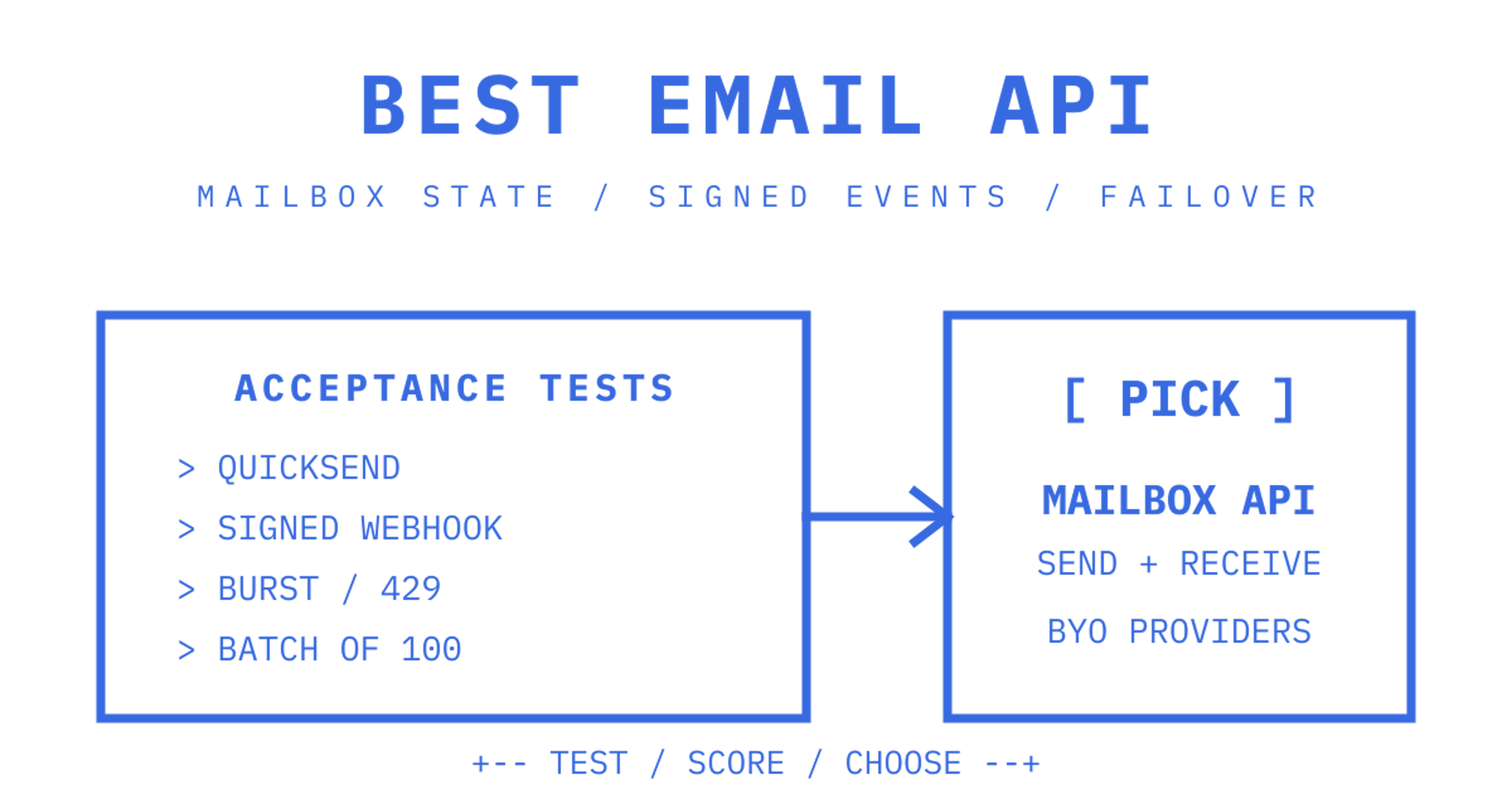
For developer teams and AI-agent platforms that need persistent inboxes rather than an outbound pipe, Sendmux is the best email API pick: it pairs a mailbox API with multi-provider sending, failover and quotas. If your workload is pure high-volume marketing blast or cost-per-thousand bulk mail, a dedicated sending-only platform will usually beat it on raw price.
What is the best email API for developers right now?
Most "best email API" roundups compare outbound sending speed and deliverability scores, and stop there. That misses half the job modern applications actually need done: receiving mail, threading it, and giving an agent or a support workflow somewhere persistent to read from. The market has split into distinct categories, and picking the wrong one costs weeks of integration work you'll redo later.
Sendmux sits in a category of its own: agent-native mailboxes with bring-your-own multi-provider outbound routing. Every mailbox gets a real address on a shared domain or a verified custom domain, and sends and receives through one API rather than a sending SDK bolted onto a Gmail OAuth hack. It's the right call when your product provisions an inbox per customer, tenant, or AI agent, and needs that inbox to persist state (threads, folders, quota) rather than disappear after a webhook fires.
If your use case is different, here's where to look instead:
- Managed bulk SMTP cost optimisers (large transactional volume, price-per-thousand is the deciding factor): providers like Amazon SES, SMTP2GO, SMTP.com and Elastic Email compete hardest here, often undercutting mailbox-first platforms on raw sending cost at scale.
- Marketing-first multi-channel suites (newsletters, drip campaigns, SMS plus email): Brevo, SendPulse and Mailjet lean into campaign builders, list segmentation and analytics dashboards that a pure transactional API doesn't bother with.
- Inbound-only webhook parsers (you just need to catch replies and forward them somewhere): Mailgun and Postmark both offer solid inbound parsing as an add-on to their sending infrastructure, without the full mailbox semantics of threads and folders.
- Developer-experience-first transactional senders (clean docs, fast integration, no mailbox needed): Resend, MailerSend and Zepto by Zoho are built for teams who just want to fire a templated email and move on.
The single test to run before committing: try to model your actual data shape. If your application needs to ask "what did this specific customer's mailbox receive last week, and what thread does this reply belong to?", you need mailbox state. If it only needs to ask "did this email get delivered?", you need a sending API and nothing more. Everything else in this comparison follows from that one distinction.
How this comparison weighs email API providers
The comparison below leans on criteria that matter to engineers shipping production systems, not marketing checklists. Each criterion maps to a real failure mode teams hit after picking the wrong provider.
- SDK and documentation quality: does the provider ship maintained SDKs in your language, or will you be hand-rolling HTTP calls against sparse docs?
- Webhook architecture: signed payloads, retry semantics, and event-type coverage, versus IMAP polling that falls over under load.
- Deliverability infrastructure: domain verification support (SPF, DKIM, DMARC), dedicated IP options, and reputation monitoring.
- Pricing model shape: per-message, per-mailbox, or hybrid, and whether it matches your actual traffic pattern.
- Ease of integration: time from signup to first successful send and first received webhook.
The test sequence itself is straightforward: run the documented quickstart, confirm a message sends and lands, register a webhook endpoint and confirm signed delivery on an inbound test message, then push a short burst of requests to see how the provider communicates rate limits (clean 429 responses with retry-after headers, or silent drops).
Weighting differs by audience. An engineering team building agent infrastructure should weight mailbox semantics and webhook reliability heavily and treat campaign analytics as irrelevant. A marketing-ops team evaluating the same providers should flip that weighting entirely. This article weights for the former, because that's who's asking "what's the best email API" in a developer context.
Developer experience: SDKs, sandboxes and daily workflow
The difference between a good and mediocre developer experience rarely shows up in the pitch deck. It shows up three weeks into integration when you're debugging a retry storm at 11pm.
SDK coverage varies more than vendor pages suggest. Brevo publishes a free email API for developers with RESTful JSON endpoints and sandbox modes designed to shorten the path from signup to first send. Sendmux ships maintained SDKs in TypeScript, Python, Go, PHP, Ruby and Rust, plus a CLI covering its API surfaces for sending, mailbox, and management, with extensive command coverage to support diverse engineering teams. That parity matters for polyglot engineering orgs, where the sending service might get called from a Python worker and a TypeScript frontend on the same day.
Sample apps and sandbox modes save real hours. A provider without a sandbox forces you to test against production, which means real emails hitting real inboxes during development, real reputation risk, and a much slower iteration loop.
Idempotency and retry semantics separate providers built for reliability from providers built for demos. An Idempotency-Key header on the send endpoint means a network timeout followed by a client retry doesn't double-send a transactional email, which is exactly the kind of bug that only shows up in production under load. Watch for:
- Documented error codes with specific meanings, not a generic 400 for every validation failure.
- Retry-after guidance on rate-limit responses, so your client backs off correctly instead of hammering the endpoint.
- Structured logs that expose attempt counts per message, not just a final pass/fail status.
Local development workflow is where day-to-day friction lives. A CLI with local profiles for scoped keys, key-prefix preflight checks, and a --json flag on every command lets you script integration tests without writing a wrapper library first. Sandbox domains that don't touch production sending reputation let you throw genuinely broken payloads at the API without consequence.
The gap between a provider with strong developer tooling and one without shows up fastest in error handling. If your team spends more time reading forum posts than API docs to figure out what a 422 response actually means, that's a signal worth weighting heavily against the provider, regardless of its sending price.
Why webhook-first inbound processing beats polling
IMAP polling is the architecture every team eventually regrets. Polling means your application asks "is there new mail?" on a timer, for example, every 30 to 60 seconds, whether or not anything has actually arrived. At low volume that's wasteful but tolerable. At any real scale it becomes a genuine liability: connection pool exhaustion against the IMAP server, race conditions when two workers poll the same mailbox simultaneously, and a hard ceiling on how fast your application can react to an inbound message.
Webhook-based inbound flips that model. Mail-to-webhook services commonly normalise raw MIME messages into structured JSON and push a signed event to your application the moment mail arrives, rather than waiting for you to ask. Hosted webhook gateways add retry semantics and payload mapping on top, so a temporarily-down endpoint doesn't silently lose messages.
The pattern that matters: a production-grade inbound pipeline delivers a signed, deduplicated JSON payload with quoted-history already stripped, rather than handing your application a raw MIME blob to parse from scratch.
What separates a webhook implementation you can build on from one that will bite you in six months:
- HMAC-signed payloads: without a signature header your application can't verify the webhook actually came from the provider, which is a real security gap for anything handling customer data.
- Idempotency keys on inbound events: a provider that retries a failed webhook delivery without a stable event ID will duplicate that message in your database on every retry.
- Stable JSON schema: a provider that changes field names or nesting between API versions breaks your parser without warning.
- MIME-to-JSON parsing done server-side: you shouldn't be writing a MIME parser in your application layer in 2026.
- Attachment handling that doesn't inline file bytes into the payload: large attachments belong behind a short-lived download link, not base64-encoded into a webhook body that chokes your request parser.
- Event and log retention for replay and inspection: when a webhook silently fails, you need to see the attempt history, not just accept the message is gone.
Sendmux's mailbox API returns cleaned message text and HTML with quoted history already stripped, so an agent reading a reply acts on the new content directly instead of re-parsing a multi-message thread on every read. Raw body endpoints still exist for the rare case where you need the exact original. It also offers a Server-Sent Events stream for clients that can't host a public webhook endpoint, alongside signed webhooks for those that can, which covers both deployment shapes without forcing a choice.
Microsoft's guidance for high-volume senders sets out SPF, DKIM and DMARC requirements for domains sending more than 5,000 emails per day. The announcement applies to Outlook.com consumer addresses.
Deliverability and infrastructure: what actually protects your sender reputation
Deliverability is not a single feature you turn on. It's the compound result of domain verification, warmup discipline, monitoring, and routing policy, and Microsoft's tightened requirements for high-volume senders apply to Outlook.com consumer addresses, including Hotmail and Live.
Start with the basics that are genuinely non-negotiable: SPF, DKIM and DMARC records verified on your sending domain, plus the required MX and SPF records if you configure a custom MAIL FROM domain in Amazon SES. A provider's dashboard should tell you plainly whether your domain is verified and sending-eligible, rather than leaving you to guess from bounce rates days later.
Dedicated IPs versus shared pools is a genuine tradeoff, not a strict upgrade. A dedicated IP means your sending reputation is entirely your own, good or bad, and it needs proper warmup, gradually ramping volume over days or weeks so mailbox providers learn to trust it. A shared IP pool means you inherit the reputation of everyone else on that pool, which is usually fine at low-to-moderate volume and risky if a poorly-behaved sender shares your pool.
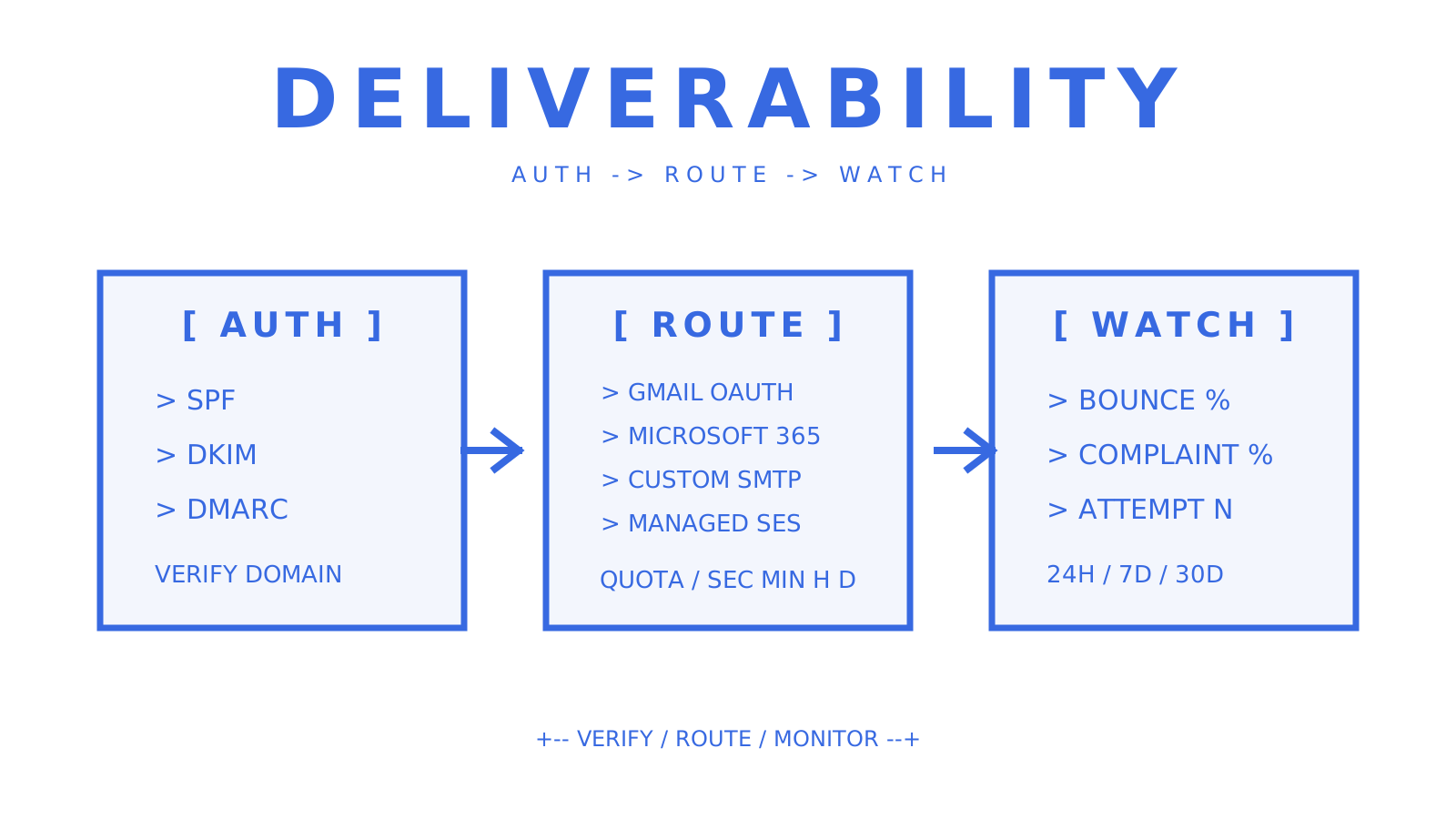
Provider routing and failover is the piece pure sending APIs don't offer, because they are the single provider. Sendmux structures delivery as delivery groups across connected accounts, including Gmail OAuth, Microsoft 365, custom SMTP or managed Amazon SES accounts, with health monitoring that skips failing accounts. That's inbox rotation as a primitive on infrastructure you own, rather than a shared pool you're renting blind.
What your delivery logs need to expose, at minimum:
- Per-message status (pending, sent, failed, rejected) with sender, recipient, provider and attempt count.
- Bounce and complaint rates as distinct metrics, not folded into a single "failure" bucket.
- Aggregate counts over rolling windows (24 hours, 7 days, 30 days) so you can spot a reputation trend before it becomes a crisis.
Set your alert thresholds early and don't wait for a spike to define them. Crossing either without an alert firing means you find out about a reputation problem from a mailbox provider's blocklist, not from your own monitoring.
Scalability, rate limits and throughput: reading past the marketing number
The rate limit printed on a pricing page rarely tells you what you actually need to know: what happens at the edge of that limit. Does the API return a clean 429 with a Retry-After header, or does it silently drop or queue your request with no signal? That distinction determines whether your application degrades gracefully under load or fails invisibly during a traffic spike.
Documented limits are usually expressed per minute or per API key, and batching changes the math significantly. A provider that lets you send up to 100 messages in a single batched request, counted as one request against your rate limit, gives you dramatically more effective throughput than one that only accepts single-message calls. Sendmux documents a cap of 1,800 sending API requests per 60 seconds, with a batch send counting as one request regardless of how many messages it contains.
To actually test for burst behaviour rather than trust the documentation:
- Send a deliberate burst well past the documented per-minute limit and record the exact response codes and headers you get back.
- Check whether the provider's SDK implements automatic backoff on
429responses, or whether you have to write that logic yourself.
- Confirm batch endpoints exist for your primary send pattern, and measure real throughput using batches rather than looping single sends.
- Test with realistic payload sizes, including attachments, since documented rate limits often assume small text-only messages.
For workloads that genuinely span multiple providers, look for provider multiplexing built into the platform rather than something you hand-roll: quotas per provider per second, minute, hour and day, with automatic failover when one account starts erroring. Building that yourself across three separate provider SDKs, each with different error formats and rate-limit conventions, is a multi-week project most teams underestimate badly.
Security, tenancy and compliance for multi-tenant systems
If your application serves multiple customers, workspaces, or AI agents through a shared email infrastructure, tenant isolation is not optional. A single leaked API key should never expose another tenant's mail.
Scoped API keys are the baseline control. A key scoped to one mailbox, with explicit permissions for send, receive, read and update, limits the blast radius of a credential leak to that single mailbox rather than your entire account. Role-based access at the team level, typically Owner, Admin, Developer and Member tiers, further separates who can view billing and provision domains from who can send mail through a specific integration.
Watch for these tenancy patterns specifically:
- Per-mailbox credentials that double as both API keys and SMTP or IMAP passwords, so you're not managing two separate credential systems for the same mailbox.
- Hard tenant isolation across sending accounts, mailboxes, domains, billing and logs, not just a shared database with a
tenant_idcolumn and hope.
- Sender allowlists and denylists configurable at both domain and mailbox level, with clear precedence rules when both exist.
- The ability to suspend a single mailbox instantly across inbound, outbound, API, SMTP and IMAP in one action, for the moment a tenant needs to be cut off immediately.
Domain verification needs to be self-service and clearly surfaced. Your dashboard or management API should expose verification state, sending eligibility and the exact DNS records needed, rather than making you dig through support documentation to figure out why a domain won't verify.
On encryption: confirm API keys are hashed (SHA-256 is a reasonable baseline) rather than stored in plaintext, that provider credentials and OAuth tokens are encrypted at rest, and that connections use TLS throughout. For compliance attestations specifically, ask directly rather than assuming: SOC 2, ISO 27001, HIPAA and GDPR support vary enormously between providers, and a provider without a specific certification isn't automatically disqualified, but you need that answer in writing before you build a regulated workload on top of it.
Pricing shapes and cost modelling for email APIs
Email API pricing generally takes one of three shapes, and picking the wrong shape for your workload is the most common way teams overspend without realising it.
- Per-message (per-thousand or per-event) pricing. You pay for volume sent and received, with no fixed cost tied to mailbox count. This suits workloads with a small number of mailboxes sending high volume, like a transactional notification system serving thousands of end users from one sending identity.
- Per-mailbox (per-seat) pricing. You pay a fixed fee for each provisioned inbox, regardless of how much mail moves through it. This suits workloads with heavy mailbox counts and light traffic per mailbox, but becomes expensive fast once you're provisioning inboxes for thousands of tenants or agents.
- Hybrid usage pricing. A small platform fee covers infrastructure access, with usage billed per event (per accepted recipient, per inbound delivery) rather than per mailbox. This tends to scale better for platforms provisioning many mailboxes at low individual volume, since you're not paying a seat fee for a mailbox that receives ten messages a month.
Storage and attachments add a quieter cost layer that's easy to miss in a pricing comparison. A platform charging per gigabyte of mailbox storage matters a lot if your workload involves large attachments (PDFs, images, reports) accumulating in inboxes over months, and barely matters if your traffic is short-lived transactional text.
Worked comparison: imagine two workloads. Workload A is 5,000 mailboxes (one per customer) each receiving roughly 20 messages a month, for 100,000 total inbound deliveries. Workload B is 10 mailboxes sending 500,000 outbound transactional messages a month. On a per-mailbox pricing model, Workload A pays for 5,000 seats regardless of low traffic per seat, which gets expensive fast. On Sendmux's usage-based model, at $0.000500 per distinct mailbox delivery, that same inbound volume costs roughly $50 in inbound fees, with no per-mailbox charge at all on the Free or Pro plans. Workload B, being outbound-heavy through connected providers, pays per accepted recipient occurrence rather than per mailbox, which suits its shape far better than a seat-based model would.
How to choose an email API: a one-page acceptance checklist
Run this as an actual trial before signing a contract, not as a documentation read-through. Documentation tells you what a provider claims; a trial tells you what it does.
- Quicksend test: send a single transactional message through the REST API and confirm delivery time and correct headers, ideally against a real inbox you control at Gmail and Outlook both.
- Webhook receipt test: register a webhook endpoint, send yourself a test message, and confirm you receive a signed, correctly-formatted payload within seconds, not minutes.
- Deliverability spot-check: send test messages to a handful of different mailbox providers and check spam placement, not just successful API acceptance.
- Rate-limit stress test: deliberately exceed the documented per-minute limit and confirm the response is a clean, documented error rather than a silent drop.
- Security review: confirm scoped API keys exist, confirm credential storage practices, and confirm you can instantly revoke or suspend access to a single mailbox or key.
- Batch and idempotency test: send a batch request and a duplicate single request with the same idempotency key, and confirm no double-send occurs.
Minimum SLA and support expectations for anything touching production transactional email: a documented status page with real incident history, support response times stated in writing rather than implied, and a clear escalation path for deliverability emergencies (a domain suddenly landing in spam is not a "file a ticket and wait" situation).
Red flags worth walking away from: no documented rate limits at all, no visible status page or incident history, webhook payloads with no signature verification, and pricing pages that require a sales call just to see per-unit rates for a self-serve tier.
Testing notes: how to reproduce these checks yourself
None of the acceptance tests above require special access. Here's the minimal reproducible sequence.
- Set up identical test conditions. Use the same sending domain, the same test payloads, and the same recipient mailboxes across every provider you're evaluating, so you're comparing infrastructure, not payload differences.
- Run the quickstart exactly as documented. Time how long it takes from signup to a successfully delivered first message. This alone reveals a lot about documentation quality.
- Register a webhook and trigger an inbound test message. Record time-to-delivery of the webhook event, whether the payload is signed, and whether the JSON schema matches the documented format.
- Push a burst of requests past the documented rate limit. Record the exact HTTP status code, whether a
Retry-Afterheader is present, and whether the SDK (if you're using one) handles backoff automatically or leaves it to you.
- Check inbox placement, not just API acceptance. A
200 OKfrom the sending API tells you nothing about whether the message landed in an inbox or a spam folder; you need to actually check the destination mailbox.
Record concrete metrics for each provider: time-to-first-send, webhook latency in seconds, rate-limit response format, and spam-placement rate across the mailbox providers you tested against. Comparing those four measures side by side gives you a far more honest picture than any vendor's own benchmark claims. Fairness matters here: never compare one provider's clean sandbox environment against another's production account, and never test with wildly different payload sizes across providers, since attachment-heavy payloads behave differently under rate limits than plain text.
Why mailbox-first email APIs are winning the agent era
The shift from "send an email" to "give an agent a real inbox" is an architecture change, and most teams underestimate how much that difference costs them later.
An outbound-only API answers one question: did the message get delivered? A mailbox-first API answers a much more useful one for anything agent-driven: what does this specific counterparty's conversation history look like, and what's the next appropriate reply? Building the second capability on top of the first means stitching a sending SDK to a Gmail OAuth integration to a MIME parser to a webhook relay to a separate billing system, and hoping none of the seams leak.
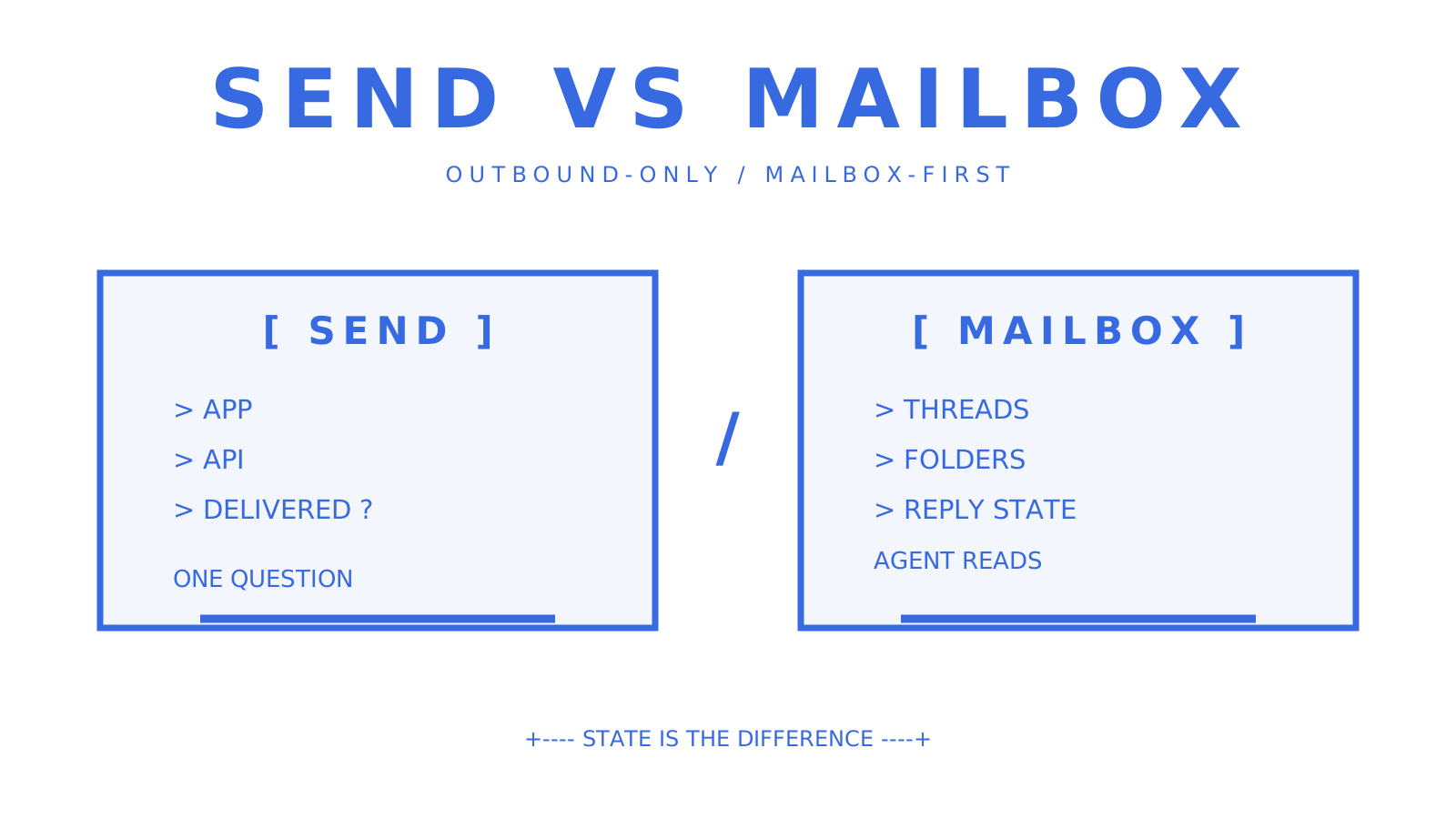
That's the real trade-off worth naming honestly: mailbox state is more infrastructure to reason about than a stateless send call. If your product genuinely never needs to read a reply, that added state buys you nothing and a simpler outbound-only API is the right call. But the moment your product involves an agent, a support workflow, or a multi-tenant platform that needs to track a conversation over time, treating email as fire-and-forget becomes the more expensive choice, not the simpler one, because you end up rebuilding mailbox semantics badly inside your own application layer anyway.
The mailbox API guide goes deeper into how thread and folder semantics work in practice for agent-scale systems, and it's worth reading before you commit to an architecture either way.
Get Sendmux running against this checklist today
Sendmux offers an integrated API that covers mailbox provisioning, multi-provider outbound sending with failover, and inbound webhooks together, without per-mailbox fees on the Free and Pro plans. Every checklist item above maps directly onto a real feature: scoped mailbox keys for the security review, signed webhooks with retained delivery attempts for the webhook receipt test, delivery logs with bounce and complaint tracking for the deliverability spot-check, and provider health monitoring across connected accounts for the rate-limit stress test.
The fastest way to validate fit is to run the acceptance tests yourself: create a mailbox, send a test message through the sending API, register a webhook and confirm signed delivery on an inbound test, then check the delivery logs. The Free plan starts with $1 of credit and two mailboxes, enough to run the full checklist without a card on file. When you're ready to model real volume, the pricing page breaks down the Pro plan at $7 per team per month plus usage, alongside the exact per-recipient, inbound-delivery and storage rates covered above.
Sources
For readers ready to go deeper on any single piece of this comparison, these are the resources worth opening next. Sendmux's own developer guide to sending email via API walks through sample payloads and integration patterns referenced in the developer experience section above. The email webhooks guide expands on signed delivery and retry semantics for teams building inbound pipelines. For deliverability specifically, Sendmux's deliverability category page collects deeper technical breakdowns beyond what fits in a single comparison article. Node.js developers building SDK integrations should keep the official Node.js documentation bookmarked as the canonical reference for runtime behaviour underlying most JavaScript-based email SDKs. And for a broader view of email as an acquisition channel rather than a transactional pipe, this guide to cost-effective email marketing is a useful contrast for teams deciding whether they need a developer API or a campaign platform at all.
Frequently Asked Questions
What is the best email API for developers?
For teams needing persistent inboxes, provider failover and webhook-based inbound processing, Sendmux is the strongest fit because it combines mailbox state with multi-provider outbound routing in one API. For pure high-volume transactional sending with no inbound requirement, a sending-only API like Amazon SES or Postmark may suit better on raw cost.
What's the difference between a transactional email API and a mailbox API?
A transactional email API focuses on sending messages and reporting delivery status. Some also offer inbound processing. A mailbox API, like the one Sendmux provides, gives each customer, tenant or agent a real inbox that receives, threads and stores mail, so applications can read conversation history, not just confirm a send.
Why are webhooks better than IMAP polling for inbound email?
Inbound email webhooks push events when mail arrives, while IMAP polling checks on a fixed timer regardless of whether anything's actually arrived, which wastes resources and adds latency. Services such as Mailgun and Postmark normalise raw MIME into structured JSON. Check that your chosen provider signs its webhook payloads.
What does Sendmux cost?
Sendmux offers a Free plan at $0 per month per team with two mailboxes and $1 of starting credit, and a Pro plan at $7 per month per team plus usage based on provider-accepted recipients, inbound mailbox deliveries and mailbox storage. Enterprise pricing is available on request for teams needing dedicated infrastructure and custom SLAs.
How do I test an email API's deliverability before committing?
Send test messages to real inboxes across multiple mailbox providers (not just to your own test account) and check spam placement, not just API acceptance codes. Also confirm the provider supports SPF, DKIM and DMARC verification on your sending domain, since Microsoft's tightened sender requirements now weigh sender hygiene heavily in inbox placement decisions.
