Best Email Provider Routing for AI Agents: Mailbox First Deliverability

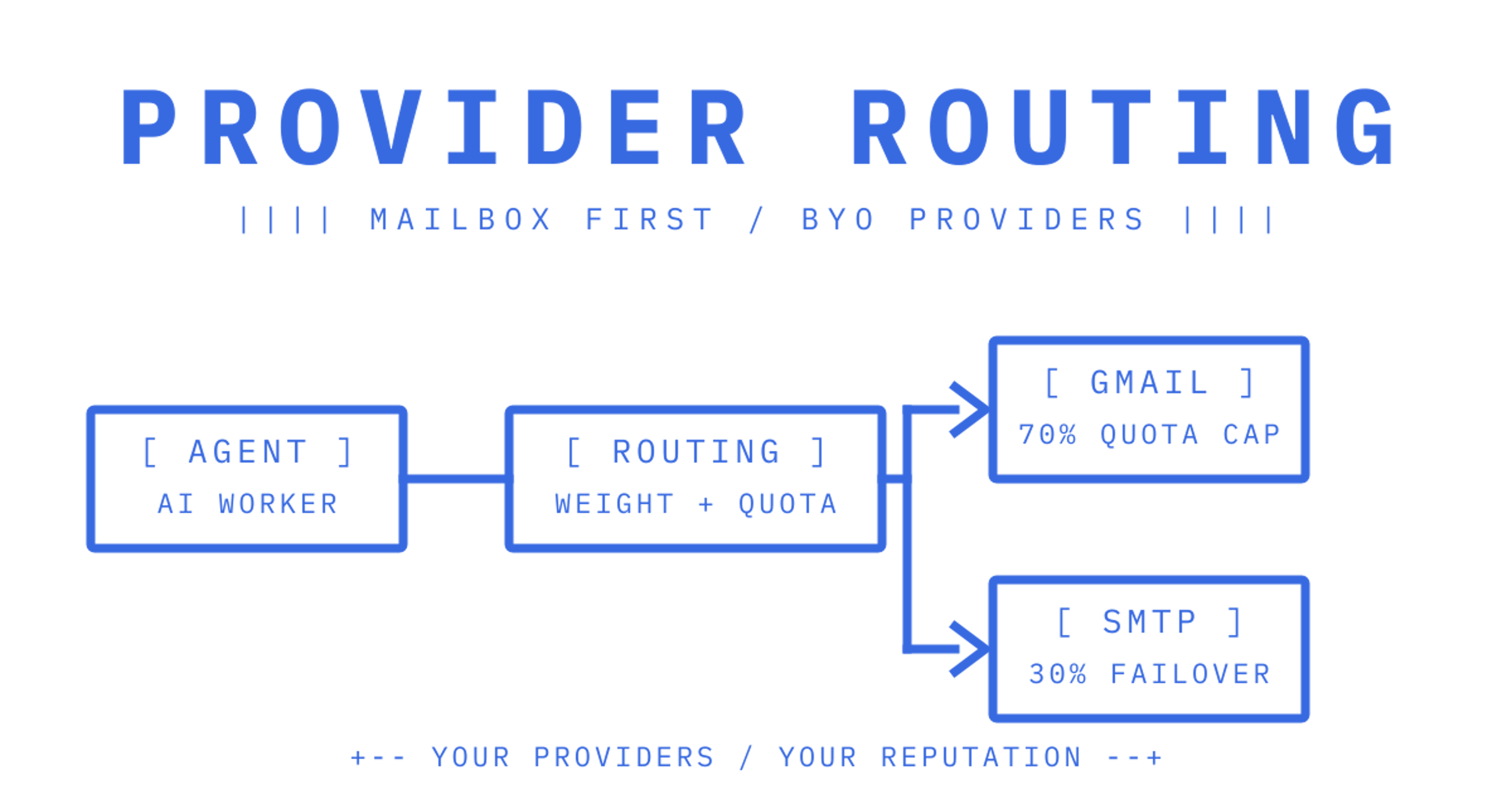
The best architecture for routing outbound mail from AI agent mailboxes is mailbox-first: persistent mailboxes paired with bring-your-own sending providers, controlled through delivery groups, quotas, weighting and health checks. This pattern keeps sending reputation with the provider accounts the customer already owns, while giving each agent precise, auditable scope. The sections below walk through the architecture, the controls that make it safe, and a checklist to get it running.
TL;DR:
- Using delivery groups with weighted routing and dedicated provider accounts ensures traffic is spread evenly and avoids reputation damage from any single provider failure.
- Implementing sync tokens and batch sending with idempotency keys reduces API load, minimises duplicate messages, and improves overall throughput.
- Monitoring failure rates, applying health checks, and respecting provider-specific quotas prevent service interruptions and mitigate 429 or rate-limit errors.
- Routing through user-owned accounts maintains reputation control, whereas shared pools risk degradation from other tenants' bad behaviour.
- Starting with a single provider connection, creating a mailbox, and testing load capacity can establish a functional mailbox-first routing system within a week.
Table of Contents
Map the architecture: mailbox layer, routing layer and provider connectors
A working system for agent mail splits cleanly into three layers, and conflating them is where most homegrown setups go wrong.
The mailbox layer owns persistent state: threads, folders, keywords and the retrieval-precision endpoints that let an agent ask "how many unread in this thread" without pulling every message body. This is what keeps an agent's context window small and its reasoning grounded in the current reply rather than a re-parsed MIME dump.
The routing layer decides which provider account carries a given send. It owns delivery groups, percentage weighting across accounts, per-provider quotas and health checks that pull a failing account out of rotation automatically.
The provider connector layer handles the mechanics of each account: OAuth token refresh for Gmail or Microsoft 365, SMTP authentication for a custom relay, and translating that provider's own rate-limit signals back to the routing layer.
- Mailbox layer: threading, folders, search, sync tokens for incremental polling.
- Routing layer: delivery groups, weighting, quotas, failover and draining.
- Connector layer: authentication, per-provider rate-limit handling, credential refresh.
Because the customer's own accounts send the mail, reputation accrues to accounts they control, not to a shared pool they are renting space in.
Concrete API patterns to look for or implement
A handful of API patterns separate a routing layer that scales from one that falls over under agent-driven volume.
- Delivery groups bound to tenants. Each group maps to a set of provider accounts, and the binding to a key or mailbox (not a global default) stops one tenant's traffic from bleeding into another's reputation.
- Per-mailbox routing keys. A key scoped to a single mailbox, with explicit send, receive, read and update permissions, limits the blast radius if a credential leaks.
- Batch semantics with server-side idempotency. Sending up to 100 messages in one call, with the batch protected by an
Idempotency-Keyheader, makes retries safe rather than risky.
- Sync tokens for incremental polling. An agent that polls for changes since its last token avoids re-listing an entire mailbox, which keeps both API load and prompt size down.
- Attachment handling via reference, not inline bytes. Uploading a file and passing a short-lived download link keeps raw file content out of a model's prompt entirely.
Pro Tip: Treat sync tokens as the default polling mechanism, not a fallback. Full re-list calls should be rare enough that you can alert on them.
How to distribute traffic and handle provider failures
Weighting and quotas work together, not as separate dials. A delivery group might split 70% of sends to a primary Amazon SES configuration and 30% to a secondary SMTP relay, while each account also carries its own per-second, per-minute, per-hour and per-day cap, so a burst never exceeds what either provider will tolerate.
- Set percentage-based routing across accounts in a delivery group, then layer provider-specific quotas on top so weighting never overrides a hard limit.
- Use health checks to skip accounts that are failing, draining them out of rotation automatically rather than continuing to throw traffic at a degraded sender.
- Reintroduce a drained account once it passes a health check again, rather than requiring a manual flip.
- On failure, retry immediately to the next healthy provider in the group, fall back to exponential backoff for retries on the same provider, and dead-letter anything that exhausts its attempts.
The Amazon SES reputation dashboard documentation is explicit that mailbox providers flag problematic sending patterns, and the fix is almost always to change sending behaviour, not to retry harder. A routing layer that monitors failure rate and drains accordingly is the practical answer to that guidance.
Connector types and common provider limits to expect
Gmail OAuth, Microsoft 365 OAuth and generic SMTP each impose quotas that a routing layer has to respect rather than discover in production.
- Gmail enforces per-user daily sending limits and concurrent connection caps, and its sender guidelines recommend SPF, DKIM and DMARC authentication along with the observation that shared IP reputation affects delivery for every sender on that IP.
- Amazon SES applies quotas by recipient count and sending rate, with some limits adjustable on request and others fixed, plus separate API throttles on many SES operations.
- The Gmail API returns 429 errors on quota or concurrency breaches, and Google's error-handling guidance recommends exponential backoff combined with splitting traffic across accounts to recover faster than a single account can on its own.
- Custom SMTP relays vary by vendor but generally enforce connection and per-hour sending caps similar in shape to the above.
Imported, customer-owned provider credentials carry reputation that belongs to the customer, which is a materially different position from renting space in a shared sending pool where one bad actor can degrade delivery for everyone else on it.
Telemetry you must collect and alert on
Routing decisions are only as good as the telemetry feeding them; for practical telemetry and deliverability guidance, see our deliverability monitoring docs. At minimum, a routing layer needs per-attempt delivery logs (status, provider, recipient, attempt count and failure reason), and an event stream covering delivered, bounced, complained, rejected, delayed and spam-received outcomes.
Export delivery logs as CSV for ad hoc analysis when an incident needs a closer look than a dashboard view provides; our own delivery logs guide covers the shape of that export in more depth.
Least-privilege credentials and mailbox scoping for agents
Agent fleets need credential boundaries that a single shared API key cannot provide. The practical pattern is a small set of key families, each scoped to what it actually does.
- An infrastructure-level key manages accounts, domains and billing, but is rejected outright on mailbox-level endpoints, so a leak there cannot read agent mail.
- A mailbox key is scoped to one mailbox with explicit send, receive, read and update permissions, and can double as the SMTP or IMAP password where that protocol is needed.
- An agent token carries only the scopes granted to it, typically starting with read and receive, with send permission added only after a human owner approves it.
- Sender allowlists or denylists apply at domain and mailbox level, with mailbox rules overriding domain rules, and any mailbox can be suspended across every channel in one action if it misbehaves.
Pro Tip: Default new agent tokens to read-only. Granting send access as a deliberate, logged step is cheaper than revoking it after an incident.
Provider credentials and OAuth tokens should sit behind strong encryption at rest, with API keys stored as hashes rather than raw strings, so a database leak does not translate into a credential leak.
Step-by-step checklist to trial or evaluate routing for agents
Evaluating a mailbox-first routing setup does not need more than a focused week.
- Verify SPF, DKIM and DMARC on your sending domain, then connect one provider account, whether that is Gmail OAuth, Microsoft 365 or a custom SMTP host.
- Create a mailbox and generate a scoped mailbox key, then send and receive one test message end to end.
- Run a modest load test to find each provider's real quota ceiling, exercising batch sends and confirming idempotency keys prevent duplicate delivery on retry.
- Enable webhooks or an SSE stream, turn on dashboard metrics, and set alert thresholds for bounce and complaint rate before sending anything at volume.
| Step | What you're confirming |
|---|---|
| DNS and provider connection | Domain authenticates, account sends successfully |
| Mailbox and scoped key | Inbound and outbound flow both work end to end |
| Load test | Real quota ceiling, batching and idempotency behaviour |
| Webhooks and alerts | Visibility into failures before they compound |
Our API guide to sending email walks through the batching and idempotency patterns referenced in step three in more detail.
Handling inbound email routing and integration
Outbound routing gets most of the attention, but an agent mailbox is only half-built if inbound mail is not handled with the same discipline. Inbound routing for agent mailboxes means getting a received message from the wire into a form an agent can act on, reliably and without the agent re-parsing raw MIME every time.
The two practical delivery mechanisms are a Server-Sent Events stream, useful for clients that cannot host a public webhook endpoint, and signed webhooks for backend services that can. Webhooks should be signed (HMAC-SHA256 is a common and sufficient scheme) so a receiving service can verify the payload actually came from the mailbox provider rather than a spoofed request, and retried across a 24-hour window so a brief outage on the receiving end does not drop mail silently.
Event types worth ingesting separately are delivered, bounced, complained, rejected, delayed, received and spam-received, because each maps to a different response: a bounce might suspend a sending address, a complaint might trigger a review, and a received event is what actually triggers an agent's reply logic.
Cleaned message text, with quoted history already stripped, is what an agent should read by default. Raw body access remains useful for edge cases, such as a signature block an agent needs to verify, but defaulting to the cleaned version keeps prompts smaller and keeps an agent focused on the new content rather than a growing thread history it has already seen.
Pricing and usage considerations for multi-provider routing
Multi-provider routing changes the shape of your email bill because you are paying for orchestration and delivery events, not seats. Usage-based billing, priced per accepted recipient rather than per inbox, tends to be the better fit when mailbox count runs high relative to the number of messages each mailbox sends, which is exactly the pattern in agent fleets where one mailbox might exist per customer, case or workflow.
On our own pricing, outbound sent through a connected provider you already own is $0.000500 USD per provider-accepted recipient occurrence, while sending through our managed Amazon SES account is $0.000750 USD per accepted recipient. Inbound delivery is $0.000500 USD per distinct mailbox delivery, and storage runs $0.02 USD per GB per month. Each accepted To, Cc and Bcc counts as a separate occurrence, and anything rejected before a provider accepts it is not charged at all.
Plans themselves are separate from usage: Free costs $0 USD per month, Pro is $7 USD per month per team plus usage, and Enterprise is priced on contract with no published list rate. Billing runs on prepaid credit with auto top-up, which matters for routing design: a delivery group that fails open to a provider with higher per-recipient costs during an outage should be a deliberate choice, not a surprise on the invoice.
Criteria for selecting the best email providers for routing
Three criteria matter more than any feature checklist when choosing which providers to connect into a routing layer: deliverability track record, geographic coverage and spam compliance posture.
Deliverability is the hardest to assess in the abstract because it depends on how the account has been used, not just which company operates it. A fresh SMTP account with no sending history behaves differently to a Gmail account with years of legitimate traffic behind it, which is one reason health checks and gradual ramp matter more than picking a single "best" provider.
Geographic coverage affects latency and, in some jurisdictions, data residency expectations for where mail is processed. A provider connector that supports multiple regions gives you room to route around a regional outage without losing control over where customer data is handled.
Spam compliance is governed by the receiving mailbox providers, not the sending API, and Gmail's own sender guidelines are a useful baseline: authenticate with SPF, DKIM and DMARC, and expect that a shared IP's reputation affects every sender using it. That last point is the practical argument for bring-your-own provider accounts over a shared sending pool: an account you control and warm up yourself is not exposed to another tenant's bad behaviour on the same IP range.
Comparison of popular email providers' routing features and performance
Provider categories differ enough in what they expose that comparing them on a single axis misses the point. Sending-focused APIs are built to get mail out fast and offer strong deliverability tooling, but receiving, when it exists at all, tends to arrive as a metadata webhook with content fetched separately, without native threads, folders or persistent mailbox state.
Human-first providers such as Gmail and Microsoft 365 are built for people reading mail in a client, not for provisioning hundreds or thousands of mailboxes programmatically; OAuth flows and per-user quotas assume one person per inbox, which becomes a scaling constraint once an agent fleet needs a mailbox per customer or case.
Amazon SES sits in between: strong raw sending infrastructure with well-documented recipient and rate quotas, but no mailbox layer of its own, so anything built on SES alone needs a separate system for threading, storage and inbound handling.
What differs most in practice is what sits on top of the provider: whether delivery groups can span multiple provider types in one routing decision, whether quotas and weighting are configurable without redeploying code, and whether health monitoring reacts automatically or requires a human to notice a spike in bounces first. Those orchestration features, not the raw sending throughput of any single provider, are usually what decide whether a routing layer holds up under real agent traffic.
Security considerations beyond authentication
Authentication (SPF, DKIM, DMARC, OAuth) answers who is allowed to send. It does not answer what happens to the data in transit and at rest, which is a separate set of decisions.
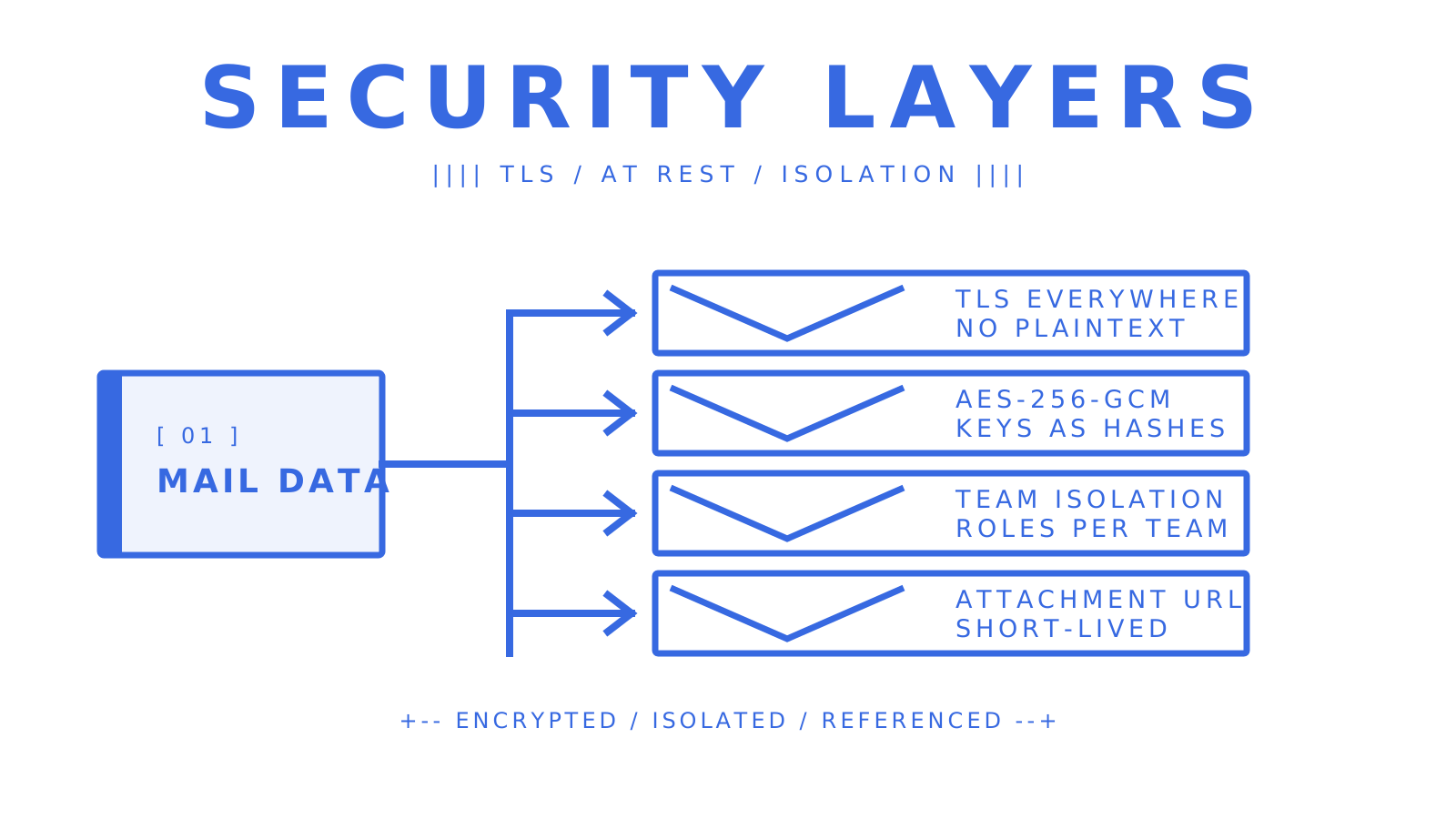
Connections between your systems and any provider or routing API should run over TLS, with no plaintext fallback. Provider credentials and OAuth tokens stored by a routing layer should be encrypted at rest, with a strong symmetric cipher such as AES-256-GCM a reasonable baseline, and API keys should be stored as hashes rather than retrievable plaintext, so a database compromise does not hand over working credentials.
Tenant isolation matters as much as encryption for anyone running a multi-tenant agent platform. Sending accounts, delivery groups, mailboxes, domains, billing and keys should be partitioned per team, with role-based access (commonly something like Owner, Admin, Developer and Member) controlling who can see or change what. Data privacy in agent mail also means thinking about where message content is stored and for how long, particularly for attachments: the SMTP standard itself governs relaying and retry behaviour, but says nothing about storage retention, so that policy sits with whatever platform holds the mailbox.
Attachments deserve a specific mention: delivering them via short-lived download links rather than embedding raw bytes in an API response keeps file content out of logs and out of model prompts, which is a meaningful privacy boundary when an agent is summarising or acting on an inbound message.
Impact of routing on email latency and throughput
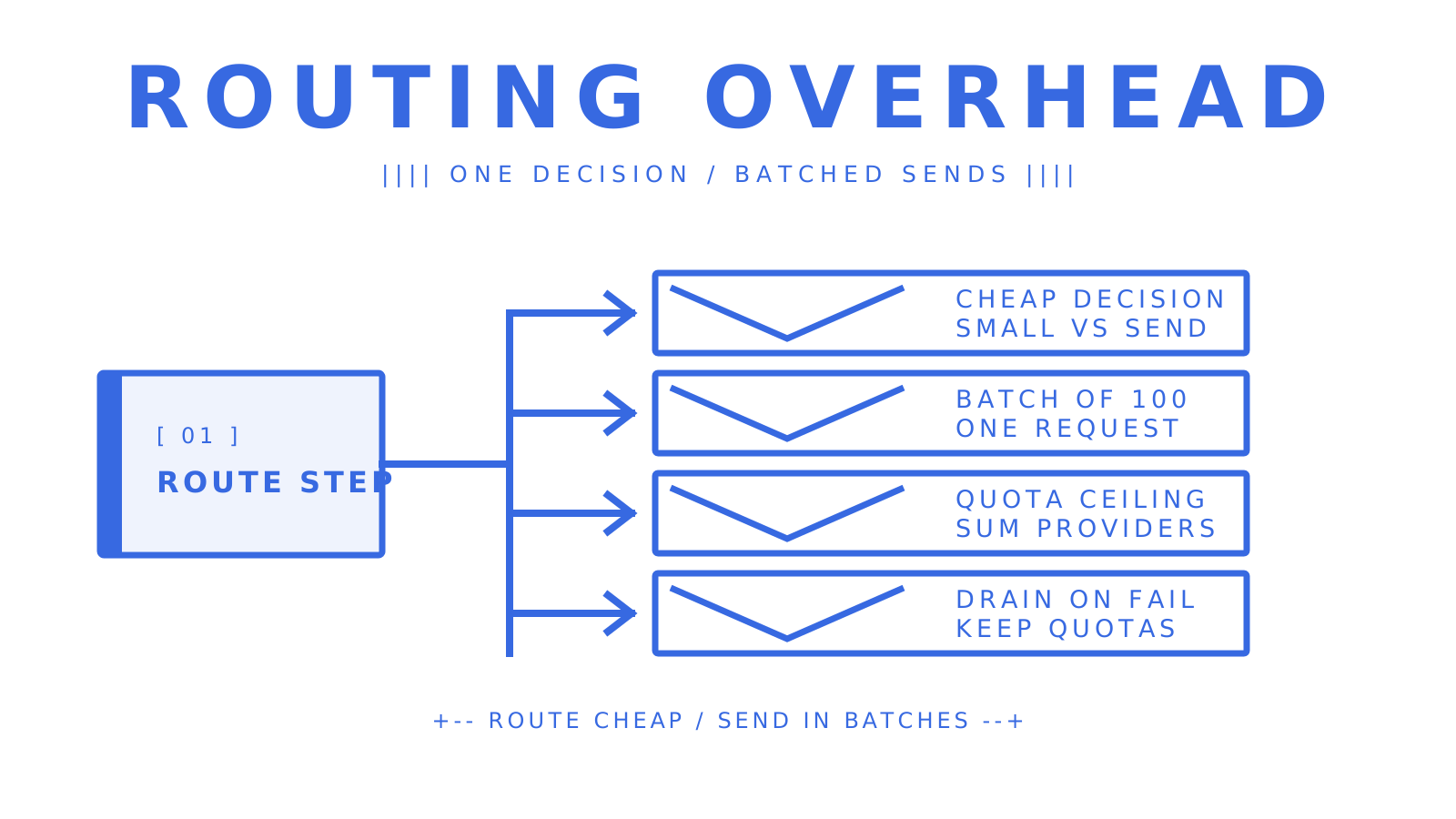
Routing adds a decision step before a message reaches a provider, and that step should be fast enough to be invisible against the latency of the provider's own sending pipeline. The practical throughput ceiling in a multi-provider setup is rarely the routing logic itself. It is the sum of each connected provider's quota.
Batching is where throughput gains are real: sending up to 100 messages in a single call moves far more volume per request than sending one message per call. Idempotency keys make it safe to retry a batch that times out partway through, without the risk of duplicate sends inflating both your bill and your recipient's inbox.
Health checks introduce a small trade-off: draining a failing account out of rotation protects deliverability but briefly concentrates traffic on the remaining healthy accounts, which is exactly why quotas per second, minute, hour and day need to be respected even during failover, not just during steady-state sending. The Gmail API's own quota guidance recommends exponential backoff and splitting traffic across accounts precisely because retrying too aggressively against a throttled endpoint makes throughput worse, not better.
For inbound, latency is mostly a function of delivery mechanism: a signed webhook typically reaches a backend faster than polling, while an SSE stream suits clients that cannot expose a public endpoint but need near-real-time delivery. Either way, incremental sync tokens keep polling-based consumers from re-fetching an entire mailbox just to find one new message.
Trade-offs and common pitfalls for agent builders
Mailbox-first routing is the right default for agent fleets, and the reason is less about any single feature and more about where the parsing burden sits. A persistent mailbox that hands an agent cleaned text and a thread ID does far less damage to a context window than an agent re-parsing raw MIME on every poll, and that difference compounds across thousands of mailboxes.
The trade-off worth naming honestly: owning your provider reputation means owning the operational work of protecting it. That is not free, but it is mitigated by decent health monitoring, rather than avoided by handing reputation to a shared pool you do not control.
The pitfalls that show up repeatedly are small and avoidable: skipping signed webhook verification because it is extra setup, granting agent tokens broad send scope on day one instead of starting read-only, and building routing logic without first reading a provider's documented quotas, which guarantees a surprise 429 in production rather than in a load test.
Where to start with Sendmux
We built Sendmux around exactly the architecture this article describes, because we kept seeing teams stitch together a sending API, a Gmail OAuth hack, a separate parser and a webhook relay just to give agents something resembling a real inbox. We give every agent, workspace or tenant a persistent mailbox on the included @myagent.mx domain or your own verified domain, with a Mailbox API for threads, search and sync tokens, and a sending path that routes across providers you already connect, whether that is Gmail OAuth, Microsoft 365, custom SMTP or our managed Amazon SES account.
- Delivery groups, weighting, per-provider quotas and health monitoring sit on top of accounts you own, so reputation stays with you.
- Signed webhooks and an SSE stream cover inbound events, and scoped mailbox keys double as SMTP or IMAP passwords where needed.
- Billing is usage-based without a per-seat or per-mailbox fee on some plans.
Start on the Free plan, connect one provider account, create a mailbox and generate a scoped key, and you can have inbound and outbound both working before you need to touch a credit card.
Sources
Frequently Asked Questions
What is multi-provider outbound routing for agent mailboxes?
It is an architecture where an API selects, weights, quotas and fails over between a customer's own sending providers, such as Gmail, Microsoft 365 or SMTP accounts, for mail sent from agent mailboxes. It differs from a single fixed sending account because traffic can shift automatically when one provider degrades or hits a quota.
How do delivery groups differ from a single sending account?
A delivery group binds multiple provider accounts together under shared routing rules, like percentage weighting and per-provider quotas, rather than relying on one account for everything. This lets a routing layer spread load, isolate traffic per tenant, and drain a failing account without manual intervention.
What quota limits should I expect from Gmail and Amazon SES?
Gmail enforces per-user daily sending limits and concurrent connection caps, and the Gmail API returns 429 errors with exponential backoff recommended on breach. Amazon SES applies quotas based on recipient count and sending rate, with some limits adjustable and others fixed.
How much does multi-provider routing cost on Sendmux?
On our pricing page, outbound through your own connected provider costs $0.000500 USD per provider-accepted recipient occurrence, and managed Amazon SES sending costs $0.000750 USD per accepted recipient. The Pro plan itself is $7 USD per month per team on top of usage, while Free runs at $0 USD per month with capped volume.
Why does bring-your-own provider routing protect sending reputation better than a shared pool?
Reputation accrues to the account that actually sends the mail, and Gmail's own sender guidelines note that shared IP reputation affects every sender using that IP. Routing through accounts you own and warm up yourself keeps your deliverability isolated from another tenant's bad sending behaviour on a shared pool.
